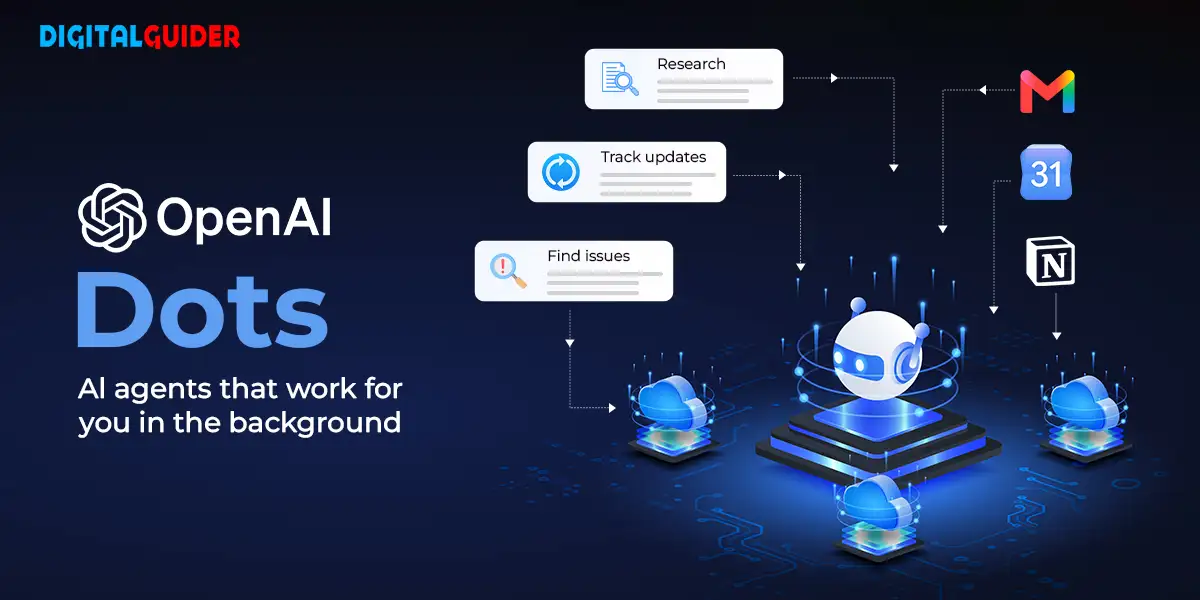
OpenAI introduced Dots on September 29, 2026, as always-on AI agents designed to manage ongoing tasks across connected applications. Powered by GPT-6 Astra, each Dot operates on its own cloud computer, allowing it to work toward user-defined goals between conversations. OpenAI is gradually rolling out Dots to eligible ChatGPT Pro and Business Premium users.
Pro availability excludes the European Economic Area (EEA), Switzerland, and the United Kingdom, while Business Premium access extends across supported ChatGPT regions. The first Dot is included at no additional cost. Dots can research topics, investigate issues, and prepare findings for review, while actions requiring approval remain subject to permission controls.
What is the OpenAI Platform in ChatGPT?
The OpenAI platform includes ChatGPT and other tools that let users work with OpenAI’s AI models. OpenAI Dots extend this experience by maintaining context and continuing assigned work beyond individual conversations.
Users can provide goals, connect relevant applications, and give feedback as tasks progress. Dots can also communicate through ChatGPT, Slack, and Microsoft Teams, helping users continue work across different channels without repeatedly explaining the same project.
OpenAI Dots Turn Background Research Into Ongoing Work
Powered by GPT-6 Astra, OpenAI Dots operate on dedicated cloud computers and can work on multiple projects simultaneously. OpenAI says its plugin ecosystem connects Dots to more than 4,000 applications.
The company describes practical examples of this approach. When a software bug appears in Slack, a Dot can investigate it. When a new design arrives, it can be turned into a working app while the team focuses on customer feedback. During a planning cycle, it can help keep projects moving toward deadlines.
OpenAI shared an example from an early tester whose Dot identified a forgotten invoice, prepared it for sending, and sent it after the tester approved the action.
This illustrates how an agent can identify unfinished work and prepare an outcome without requiring instructions for every intermediate step.
How OpenAI Dots Keep Proactive Research ‘Read-Only’
A central safeguard is the distinction between gathering information and taking action. During proactive research, OpenAI Dots use read-only tools to access permitted connected applications. These tools cannot send messages, modify application content through plugins, or control the user’s browser or computer.
For example, a Dot reviewing vendor discussions could identify a potential billing discrepancy and prepare private research notes. It cannot resolve the discrepancy by changing a vendor record through its read-only research tools.
This restriction applies specifically to proactive research, not every agent task. Other actions follow separate permissions, Custom Rules, and safety checks.
How Human Approval Controls OpenAI Dots’ Actions
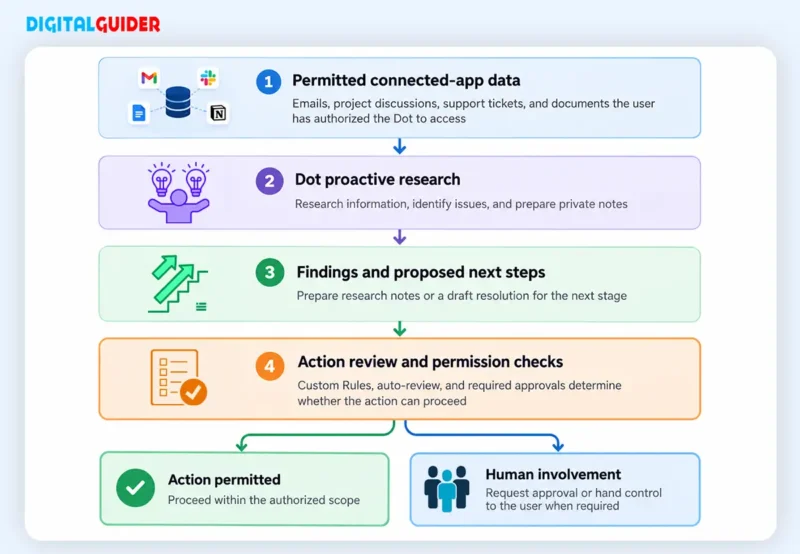
OpenAI Dots use built-in rules and an automated action-review system to determine which actions can proceed independently, which require approval, and which must remain with the user. Custom Rules let users permit supported actions, require approval, or block actions entirely. Activity View also lets users inspect progress and redirect an agent when necessary.
The process can be represented as follows:
| Note: Illustrative workflow based on OpenAI’s published safeguards. Not every task follows the same approval sequence. |
For instance, if a Dot identifies a software bug, it can investigate the issue and prepare a proposed fix. Whether it can implement that fix depends on the available tools, permissions, and applicable safety rules. When approval is required, the user must provide it before the action proceeds.
OpenAI Dots Pricing and Availability
OpenAI has not disclosed separate prices for additional Dots or higher usage limits. Eligible subscribers receive an initial Dot as part of their existing plan, but the amount of work it can perform depends on applicable usage limits.
Enterprise, Edu, and Healthcare customers can access the beta through their workspace administrator. OpenAI has yet to confirm when the beta will end or announce a broader pricing structure.
What OpenAI’s Always-On Agents Mean for ChatGPT Users
OpenAI Dots signal a shift from reactive chatbots toward AI agents that manage ongoing responsibilities. Their ability to investigate problems, maintain project context, and prepare work could reduce repetitive information gathering. However, their usefulness depends on reliable results, appropriate permissions, and human oversight.
The central development is that ChatGPT can support work between conversations while keeping users involved in consequential decisions.
Share This Article
About the Author: Akiko Sato

Related Articles
 October 15th, 2026 | 2 minutes read
Google has completed its September 2026 spam update. The update took nearly two weeks to complete and became the longest
- October 8th, 2026 | 2 minutes read
Google Search Console has introduced a new Multimodal filter that gives website owners more insight into how their content performs
 September 24th, 2026 | 2 minutes read
Google is expanding its AI-powered Search into travel, providing users with new methods to check airline fares, compare points and
- September 17th, 2026 | 3 minutes read
Google is changing its AI Mode search to help publishers. They added link carousels for changing news topics. This means