Synopsis Your old blogs once brought traffic, but are they still performing? Find out why content loses rankings, how to fix content decay, and what you can do to keep your pages relevant.
You publish a blog post, it starts ranking on Google, brings in consistent traffic, and becomes one of your website’s top-performing pages. Everything looks great until the numbers start falling. Clicks drop, rankings slip, and your competitors begin outranking you.
Sound familiar?
This gradual loss of organic visibility is often a sign of content decay. And the tricky part? It doesn’t always happen because your content is bad. This actually happens due to changes in search intent, competitors adding unique/updated information to their content, and your information becoming outdated after it once ranked.
But should you rewrite the entire page, update a few sections, or take a completely different approach? Let’s understand what’s causing the decline and how you can bring life to your content.
What Is Content Decay?
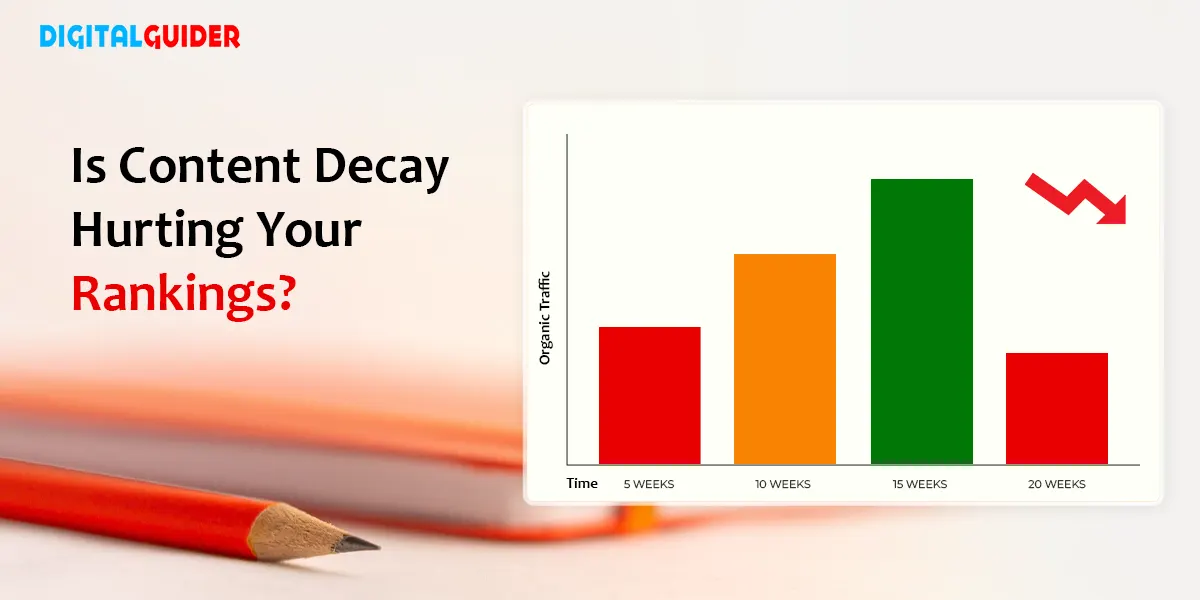
Content decay is the gradual loss of a webpage’s ability to attract visitors and maintain its position in search results over time.
It doesn’t happen overnight. A page may continue receiving traffic for months, but its performance can slowly weaken as the information, examples, recommendations, or answers it provides become less relevant.
But remember…Not every drop in traffic is content decay!
Why Did Your Traffic Drop? 🤔Content Decay vs. Other Factors
A drop in website traffic doesn’t always mean your content is losing its value. Sometimes, the reason has nothing to do with the content itself. Seasonal changes, Google algorithm updates, technical issues, or changing search trends can also affect your website’s performance.
So, before updating an old page or rewriting an entire blog, take a closer look at what changed. Here are some common reasons why your website traffic may drop and what you should check:
Common Causes:
| Cause | Typical Pattern | What to Investigate |
| Content Decay | A gradual decline in organic visibility | Outdated information, declining keyword rankings, missing topics, weaker relevance |
| Seasonality | Traffic rises and falls at predictable times | Compare the same period year over year |
| Changing Search Intent | Rankings weaken as the SERP shifts toward a different type of content | Compare your page with the current top-ranking results |
| Stronger Competition | Competitors gain positions while your page loses them | High-quality content gives readers fresh, expert, and deeply complete answers that satisfy exactly what they are looking for. |
| Technical Problems | A sudden or widespread drop across affected URLs | Indexing, crawlability, redirects, canonical tags, server errors, and accessibility |
| Google Update | A noticeable change begins around an update period | Timing, affected pages, query patterns, and whether the content has underlying quality or relevance gaps |
How to Measure Content Decay ⚙️
You can’t identify content decay just by looking at a drop in traffic. You need to compare your page’s past and current performance to understand what’s changed and why. Here are three ways to check:
1. Track Traffic and Keyword Rankings
Start with Google Search Console (GSC) and Google Analytics to identify pages losing traffic.
• Google Search Console: Compare clicks, impressions, CTR, and keyword rankings over different periods to identify pages losing search visibility.
• Google Analytics: Check organic traffic, landing page visits, and conversions to see whether fewer visitors are reaching your pages.
• Semrush or Ahrefs: Track lost keyword rankings, declining backlinks, and changes in competitor positions.
2. Check Your Page Against Competitors
Search for your target keyword on Google and review the pages ranking above yours. Look for differences in the information they provide, topics they cover, content freshness, and search intent.
Check whether competitors offer newer statistics, better examples, updated information, or answers that your page is missing. This will help you identify what needs improvement.
3. Rule Out Other Problems
Before calling it content decay, check whether something else caused the traffic drop.
• Technical issues: Use Screaming Frog to find broken links, redirect errors, indexing problems, and other website issues.
• Seasonality: Compare traffic with the same period from the previous year to identify seasonal drops.
• Google updates: Check whether the decline started around a confirmed algorithm update.
• Website changes: Review recent changes to URLs, content, redirects, and website structure.
Pro Tip: Don’t judge content performance by average ranking position alone. Google recommends monitoring clicks and impressions over time to understand changes in search performance.
How We Recovered a Decaying Blog Page in Just One Month
A blog can continue to exist on your website while gradually losing its ability to attract organic traffic. We experienced this with our Reverse Video Search Guide.
• The page had been receiving clicks and impressions from Google, but its search performance started declining.
• Instead of publishing another article on the same topic, we decided to revisit the existing page and improve what was already there.
Here’s how we approached it over one month:
Week 1: Identify What Needs Improvement
We reviewed the page’s search performance, checked its existing information, and identified areas that needed updating.
Week 2: Refresh the Existing Content
We updated outdated information, added useful insights, and improved the content to make it more relevant to readers.
Week 3: Publish and Monitor the Changes
After publishing the updates, we monitored the page through Google Search Console to track changes in clicks and impressions.
Week 4: Measure the Results
At the end of the month, we compared the page’s performance before and after the content refresh.
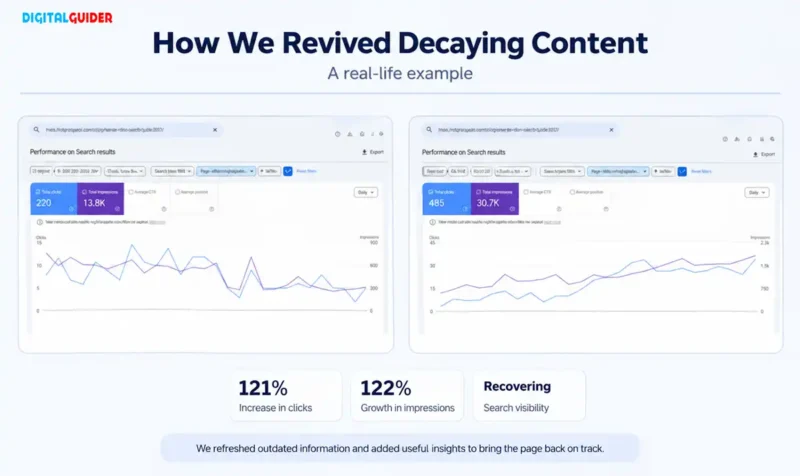
| Metric | Before Update | After 1 Month |
| Total Clicks | 220 | 485 |
| Total Impressions | 13.8K | 30.7K |
Results After One Month
121% increase in clicks
122% growth in impressions
The page showed a significant improvement in search performance within one month of the content refresh.
Key Takeaway: You don’t always need to publish new content to improve organic traffic. Sometimes, refreshing an existing page with updated information and useful insights can help it regain search visibility.
How to Fix and Prevent Decaying Content⚒️
Use your findings from the diagnosis stage to decide where the page needs improvement
1. Fix the Reasons Behind Traffic Loss
• Content gaps: Add missing information, examples, questions, or topics that users now expect.
• Relevance issues: Restructure sections to better align with the current search intent.
• Technical problems: Resolve indexing, canonical, redirect, or crawlability issues before making content changes.
• Competitive gaps: Strengthen areas where competing pages provide more useful, current, or credible information.
• Content pruning: Identify outdated, duplicate, or low-value pages that no longer serve users. Update, merge, or remove them where appropriate.
• Significant search changes: Reassess the page if rankings changed around a Google update rather than making changes based only on timing.
2. Match Current Search Intent
• Search for the primary keyword in your niche and review the pages that rank well.
• Compare their format, headings, depth, and covered questions with your page.
• Add useful answers to queries, including People Also Ask questions.
3. Refresh Outdated Content
• Update old statistics, examples, tool interfaces, prices, and processes.
• Replace unverifiable claims with reliable, current information.
• Add a “Last updated” date only after making meaningful changes.
4. Improve Content Quality
• Cover important subtopics your page misses.
• Support claims with credible sources and evidence.
• Add original data, practical examples, expert insights, or step-by-step guidance.
• Remove filler and repetitive paragraphs.
5. Optimize On-Page Elements
• Improve the on-page elements like the title tag with the primary keyword and a clear benefit.
• Keep the H1 focused and use descriptive H2s.
• Answer the main question early.
• Improve image alt text, readability, and meta descriptions where needed.
6. Strengthen Internal Links and Backlinks
• Add relevant internal links from useful, authoritative pages.
• Contact relevant websites that removed valuable backlinks and offer your updated resource.
• Earn new links with original research, useful checklists, or other link-worthy content.
7. Track Your Content’s Performance
• Track clicks, impressions, CTR, rankings, and conversions in Google Search Console and Analytics.
• Record the update date and compare results with the pre-decline period.
• Allow several weeks for changes to show results, then reassess if performance does not improve.
Conclusion
Content decay doesn’t mean your old blogs have lost all their value. With regular monitoring, timely updates, and the right SEO improvements, you can recover declining pages and keep your content relevant.
Don’t wait for traffic to drop completely. Review your content regularly and fix issues before they affect your website’s performance.
Don’t Let Content Decay Cost You Traffic!
Turn declining blog posts into traffic-generating assets with the right SEO strategy.
Ready to recover your lost rankings? Get in touch with our SEO experts today!
Frequently Asked Questions
1. Why Is My Website Losing Traffic Even After Publishing Good Content?
Your website may be losing traffic due to content decay, changing search intent, stronger competitors, technical issues, or Google algorithm updates.
2. How Do I Know If My Old Blog Posts Are Losing Rankings?
Compare their clicks, impressions, and keyword positions over time using Google Search Console. A consistent decline may indicate a performance issue.
3. Can Updating Old Blog Posts Improve SEO?
Yes. Updating outdated information, filling content gaps, and improving search intent alignment can help improve a page’s search performance.
4. How Do I Find Pages With Declining Organic Traffic?
Use Google Search Console to compare page-level clicks and impressions across different periods. Google Analytics can also help identify pages losing organic visitors.
5. What Should I Update in an Old Blog Post?
Update outdated facts, statistics, examples, screenshots, links, and information. Also, cover missing topics and questions relevant to your readers.
6. How Often Should I Update Old Website Content?
Review important pages every few months. Update them whenever information changes, search intent shifts, or performance starts declining.
7. How Long Does It Take for Google to Re-Rank Updated Content?
There is no fixed timeline. Google may reassess updated pages within days or weeks, but noticeable ranking improvements can take longer.
8. Should I Rewrite or Update an Old Blog Post?
Update it if the existing content is still relevant. Rewrite it when the structure, information, or search intent needs significant changes.
9. Does Deleting Old Blog Posts Help SEO?
Not always. Delete a page only when it has no meaningful value or purpose. Consider updating or consolidating relevant content before removing it.
10. How Can I Recover Lost Organic Traffic?
Identify the reason for the decline, refresh outdated content, address missing information, improve on-page SEO, and fix technical issues affecting the page.
Share This Article
About the Author: Lucia Ferrer

Related Articles
 November 2nd, 2026 | 6 minutes read
Why does a customer three blocks away get the same marketing message as someone three miles away? They shouldn't. While
 October 26th, 2026 | 9 minutes read
Most customers don’t buy the first time they visit a website. They may need a reminder, helpful information, or a
- October 22nd, 2026 | 9 minutes read
Finding a dentist used to start with a recommendation. Today, it often starts with a search. When patients face any
- October 19th, 2026 | 7 minutes read
The next patient for your dental office is probably already searching for you. The question is: Will they find you