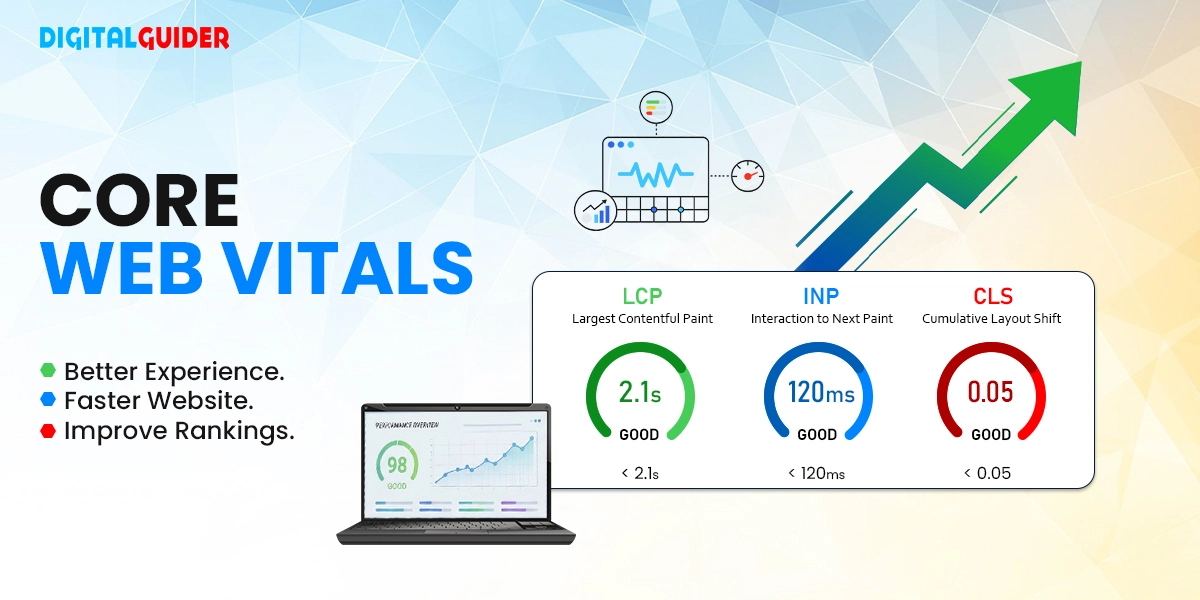
Synopsis Slow-loading pages, unresponsive interactions, and changing layouts are hurting your Google rankings in 2026. Learn how to achieve top performance metrics like LCP under 2.5 seconds, INP under 200 milliseconds, and CLS under 0.1 with this guide. It includes free tools like PageSpeed Insights, common fixes, and 7 simple no-code adjustments to improve website speed and SEO quickly.
If you’ve ever clicked on a website and left because it loaded too slowly or felt frustrating to use, you’ve already experienced why Core Web Vitals matter. Google introduced Core Web Vitals to measure how fast, responsive, and stable a webpage feels for real users.
These metrics help website owners understand whether visitors are getting a smooth experience and they can also influence how well a page performs in search results. In this guide, we’ll break down what Core Web Vitals are, why they matter for SEO, and how you can improve them.
What Are Core Web Vitals in SEO?
Core Web Vitals are a set of metrics that measure how users actually experience a website’s performance. They focus on how fast content loads, how quickly the page responds to user actions, and how stable the layout remains while loading.
In Short, when your site is slow, unresponsive, or visually unstable, Google will mark you down in favor of a site that offers a more enjoyable experience.
Why Core Web Vitals Matter for Ranking and User Experience
The Core Web Vitals matters for ranking and user experience because they:
- Show how fast your website loads, responds, and stays stable
- Help Google to decide which pages deserve higher ranking
- Faster pages keep users from leaving too quickly
- Quick responses make your site feel smooth and easy to use
- Stable layouts prevent annoying jumps and misclicks
- Better experience leads to more trust, engagement, and conversions
Core Web Vitals Metrics Explained
Understand the concept with these three metrics of Core Web Vitals (CWV):
Largest Contentful Paint (LCP): How Fast Your Page Loads
LCP measures the time at which the largest visual element, like a hero image, video poster, or block-level text, loads. It is the main indicator of perceived load speed. It is measured in seconds.
- The Technical Threshold: To meet Google’s 2026 standards, your LCP should load in 2.5 seconds.
- The SEO Impact: A poor LCP score usually results in a poor rating in Search Console, which usually indicates that your server response (TTFB) or render-blocking resources are impeding the user experience.
Interaction to Next Paint (INP): How Your Users Interact with Your Page
INP measures the latency of all user interactions (clicks, taps, and keyboard inputs) throughout the entire lifespan of a page. It has replaced FID as the standard metric for responsiveness as of the most recent changes in the Google algorithm.
- The Technical Threshold: An optimized page should have an INP of 200 milliseconds or below.
- The SEO Impact: INP scores with high values normally indicate congestion in the main thread as a result of heavy JavaScript. The slow site in Google is a broken site.
Cumulative Layout Shift (CLS) – Does Your Page Jump Around?
CLS is a measure of visual stability. It measures the total layout shift that happens during loading. You all have encountered an accidental click when an advertisement loads slowly and a button is tapped by mistake. This is where the CLS score is poor.
- The Technical Threshold: To be rated as Good, you must have a lower score of under 0.1 on CLS.
- The SEO Impact: Sites with a high number of layout shifts are labeled as bad UX, which may result in a huge decline in mobile search visibility where screen space is restricted.
What is a good Core Web Vitals score?
To stay competitive in the search results, your site needs to meet Google’s “Good” thresholds across all three metrics of CWV:
| Metric | Good Score (To Rank) | Why It Matters |
| Largest Contentful Paint (LCP) | Under 2.5 seconds | Ensures users see useful content quickly |
| Interaction to Next Paint (INP) | Under 200 milliseconds | Makes your site feel fast and smooth |
| Cumulative Layout Shift (CLS) | Under 0.1 | Prevents layout jumps and misclicks |
For Example:
The report below from Google PageSpeed Insights indicates that the Core Web Vitals test failed on mobile devices, mostly because the page took too long to load.
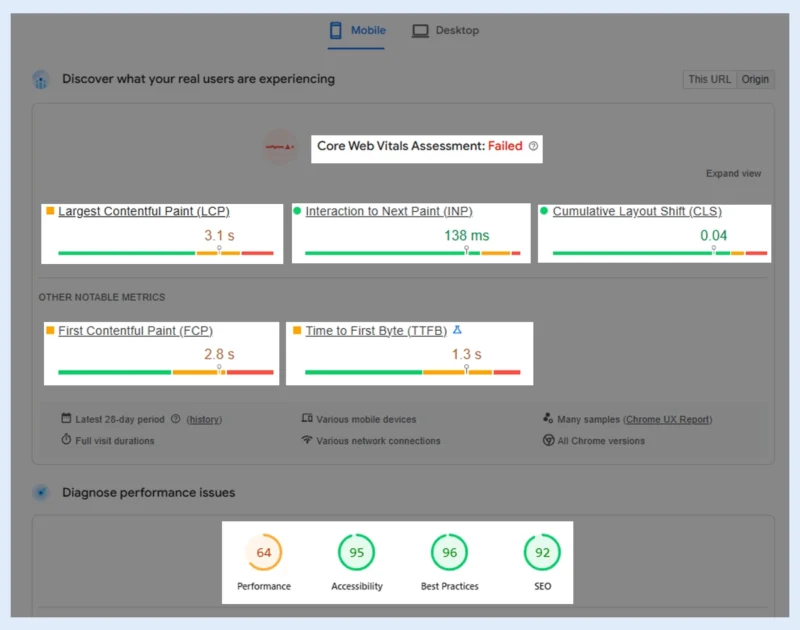
- The Largest Contentful Paint is 3.1 seconds, which is longer than the suggested 2.5 seconds, meaning the main content takes too long to show up.
- However, the Interaction to Next Paint (INP) is 138 ms, and the Cumulative Layout Shift (CLS) is 0.04, which are both within the good range, meaning the website feels quick to respond and stays visually steady.
- Other measures, such as FCP (2.8 seconds) and TTFB (1.3 seconds), also show that the website takes longer to start loading.
- This is probably because the server is slow to respond or because the page uses a lot of resources.
- Overall, even though the site is pretty responsive and stable, making the load speed faster is really important to meet the Core Web Vitals standards.
The Other Metrics That Matter for Performance
Core Web Vitals are the big ones, but there are other important metrics. These help you get to the bottom of why your site is slow or fast:
~Time to First Byte (TTFB): This is the time taken for your server to respond after a user clicks a link.
👉 If this is slow, your site looks slow to load.
~First Contentful Paint (FCP): It’s the time when the user first sees some content (text, image, background) on the screen.
👉 A quick FCP tells the user that your website is loading quickly.
~Total Blocking Time (TBT): This measures the time it takes for your page to be “frozen” and unresponsive to any clicks or actions.
👉 Long TBT makes your page slow and frustrating.
~Time to Interactive (TTI): This measures when your page becomes fully usable.
👉 The page is ready for users to click and scroll
~Speed Index: This measures how quickly the visible parts of your page load overall.
👉 It tells you how quickly your site appears to load.
What Causes Poor Core Web Vitals Scores?
1. Unoptimized images
The most significant reason for the LCP’s low scores is the large hero images.
2. Too much JavaScript
Poor INP is due to heavy scripts blocking the main thread.
3. No special section of advertisements or pictures
This results in layout changes and a large CLS.
4. Slow or unresponsive hosting/server response (TTFB)
A fast frontend cannot make up for a slow back end.
5. Third-party scripts overload
Chat widgets, trackers, and ads tend to lower all three metrics.
6. Fonts that introduce layout changes
Visible jumps can be caused by custom fonts that take longer to load.
How to Measure Core Web Vitals (Using Free Tools)
To check the Core Web Vitals, you do not have to pay for expensive tools to identify performance issues. Begin with the following free tools:
- Google PageSpeed Insights – Offers lab and real-world (CrUX) data and actionable suggestions.
- Google Search Console- Core Web Vitals report identifies the URLs not meeting the requirements in both mobile and desktop.
- Lighthouse – Added into Chrome DevTools to conduct performance audits on demand.
- Web Vitals Extension– Live CWV indicators as you browse your site.
How to Improve Core Web Vitals
The best practices to improve Core Web Vitals are for speed, responsiveness, and stability:
Improve LCP (Loading Speed):
✅Modern image formats (WebP/AVIF) should be used.
✅Enaction caching and CDN.
✅Reduce render-blocking CSS and JS.
✅Scale to higher hosting.
Improve INP (Responsiveness):
✅Minimize the time of JavaScript execution.
✅Split up long tasks (>50ms)
✅Lazy load non-critical scripts.
✅Optimize event handlers
Improve CLS (Stability):
✅Image and video width/height.
✅Book ad and embed space.
✅Do not add content when there are elements that are already present.
✅Load fonts in a stable manner.
7 Quick Ways to Improve Core Web Vitals (No Coding Needed)
Make fast, noticeable improvements to your site’s performance without touching code:
1. Compress and resize images– Use tools like TinyPNG or built-in CMS optimizers to reduce load time.
2. Use a performance plugin– Enable caching, minification, and file optimization (especially on WordPress).
3. Upgrade your hosting– Slow hosting leads to poor LCP; switch to a faster, reliable provider if needed.
4. Reduce third-party scripts– Remove unnecessary widgets, trackers, and external scripts.
5. Choose a lightweight theme– Avoid bloated themes that slow down your entire site.
6. Enable lazy loading- Load images and videos only when users scroll to them.
7. Preload important assets– Prioritize key images and fonts, so they load faster.
When to call a Developer
Some performance issues require deeper technical fixes. Consider hiring a developer if:
- Your INP remains high even after reducing plugins
- Your site relies heavily on JavaScript frameworks (like React or Angular)
- Your server response time (TTFB) is consistently slow
- You’re still seeing layout shifts (CLS) despite fixing dimensions
Conclusion
The Core Web Vitals are no longer optional; they are now a core ranking factor in 2026. Google is focusing on the actual user experience rather than the technical tricks, i.e., fast, responsive, and stable websites prevail!
Thanks for Reading!
Share This Article
About the Author: Elena Rossi

Related Articles
 September 21st, 2026 | 8 minutes read
Someone nearby is searching for a cannabis dispensary right now. They may want a specific strain, need to check store
- September 17th, 2026 | 8 minutes read
Austin is a competitive market for local businesses, tech companies, startups, and growing brands. The right agency can help you
- September 14th, 2026 | 7 minutes read
Search used to take minutes. AI changed it into seconds. People are not more interested in scrolling down 10 blue
- September 10th, 2026 | 13 minutes read
1. DigitalGuider 2. Thrive 3. WebFX 4. Coalition 5. Victorious SEO 6. First Page Sage 7. RankScience SEO 8. The