Imagine checking how your street looked before the new metro line arrived, or seeing what a tourist hotspot looked like before cafés, hotels, and traffic changed the entire vibe. That’s exactly why people are using Google Maps’ historical Street View feature more than ever in 2026. It turns everyday map browsing into something surprisingly personal.
Google’s “time machine” experience inside Street View lets users view older imagery captured over the years, helping you explore how places have changed over time. In some cities, you can literally watch skylines grow building by building. In older neighborhoods, the difference between a 2012 street and a 2026 street can feel unreal.
What makes this feature stand out now is how useful it has become beyond simple curiosity.
Real estate buyers use it to check how an area evolved before investing. Local businesses compare storefront visibility from previous years. Travelers revisit old vacation memories. Urban planners and researchers study infrastructure growth, traffic changes, and neighborhood development patterns. Even content creators use archived Street View timelines for storytelling and local history videos.
Now, let’s explore the latest features of Google’s Time Machine experience and see how it helps users travel through history without leaving their screen.
What is Google Time Machine?
Google Time Machine is a feature in Google Maps and Street View that lets you see how places looked in the past. You can go back to older street images from different years and explore streets, buildings, landmarks, and neighborhoods as they were before.
It’s like travelling back in time from your screen.
Whether you want to revisit your childhood area, see how a city changed over the years, or check what a famous place looked like before redevelopment, this feature makes it possible. Google uses old Street View images collected since 2007 to create this experience.
What makes it interesting is how personal it feels. Many people use it to relive memories, compare old and new streets, or simply explore how fast the world has changed. Sometimes you open an old street view and instantly remember places that no longer exist today.
“Now, with Street View, you can see a landmark’s growth from the ground up, like the Freedom Tower in New York City or the 2014 World Cup stadium in Fortaleza, Brazil,” said Shet.
How Does Google Time Machine Work?
Using Google Time Machine is like stepping into a virtual time portal. It’s as easy as pointing and clicking:
- Simply, you need to open Google Maps and search for the location you want to explore.
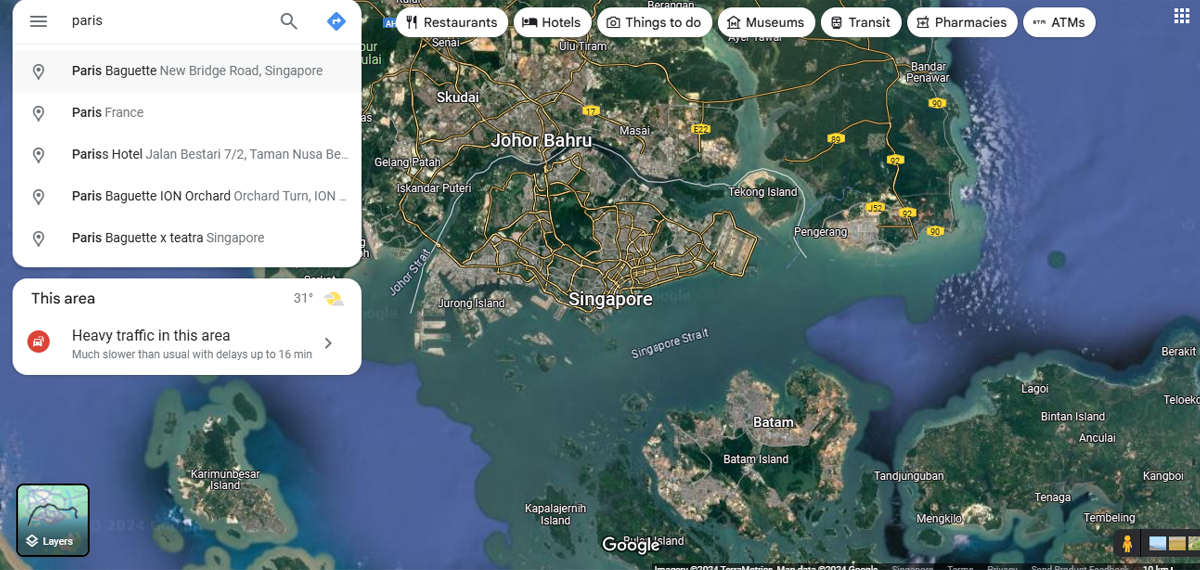
- Drag the little yellow street view icon onto the map. Once you’re in street view, look for the clock icon in the top left corner.

- Clicking that will show more dates, and a timeline slider will let you scroll back to previous years and seasons.
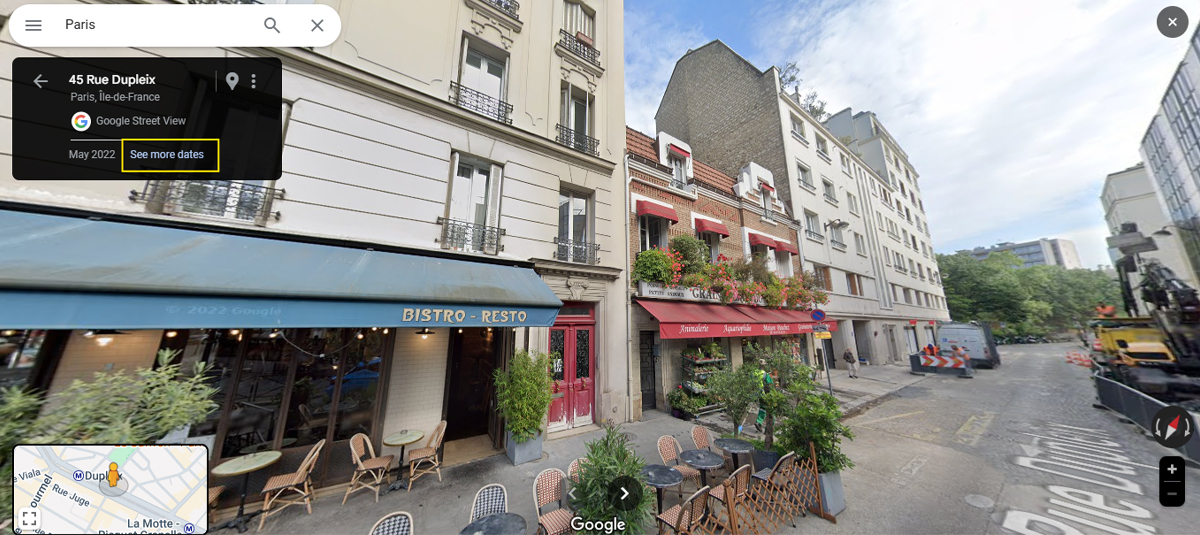
- Watch in awe as the location transforms in front of your eyes, shifting through the years with just a click!
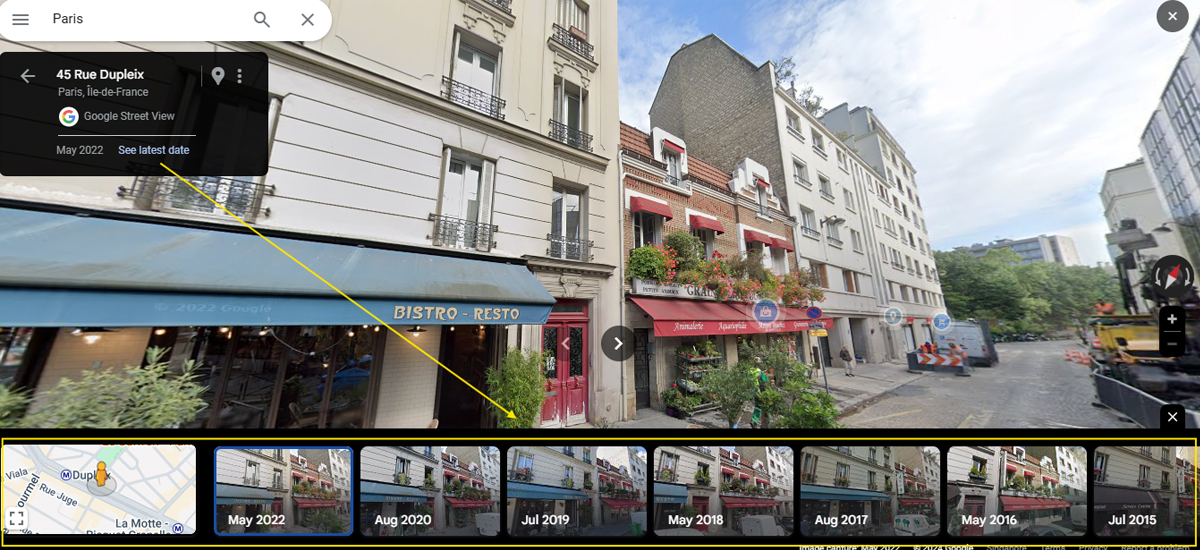
It’s a time-bending experience, where you can not only see a place from a specific year but also immerse yourself in a 360-degree view of what the world looked like at that time. You can compare how a landmark has changed, see the gradual growth of a city, or even revisit the past as it was before significant developments.
Applications of Google Time Machine in Various Fields
- Urban Planning: For city planners, Google Time Machine is like having a living, breathing blueprint of a city’s growth. By zooming in on street-level views from past years, they can study changes in infrastructure, track urban sprawl, and gain insights into how neighbourhoods evolved. This historical perspective helps in making future development decisions, from expanding transit systems to preserving historic sites.
- Real Estate: Google Time Machine is an essential tool for anyone involved in real estate. Imagine checking out the transformation of a neighbourhood over the years or exploring how a particular property has changed. With the ability to compare old and new images side by side, potential buyers or investors can get a clearer picture of a location’s history, helping them make more informed decisions.
- Education: Google Time Machine is a visual goldmine for educators. Students can dive deep into history, geography, or environmental studies by seeing how cities, landscapes, and landmarks have evolved. Teachers can use it as a tool for interactive learning, letting students explore real-world changes and better understand the forces that shape our world.
- Historical Exploration: Google Time Machine brings history to life in a way that’s never been possible before. Whether you’re a historian researching ancient sites or just a curious traveller interested in how a famous landmark looked decades ago, this tool lets you witness history in action. Watch the construction of iconic buildings like the Freedom Tower in New York, or take a stroll down memory lane by revisiting childhood locations that have long since changed.
12 Must-Know Features of Google Time Machine
Google Time Machine, a feature within Google Maps Street View, is like a digital time capsule, allowing users to witness changes in the world over time. This unique tool enables virtual time travel, whether for nostalgia, historical curiosity, or professional research.
Here are 12 must-know features that make Google Time Machine a standout tool.
1. Historical Timeline Slider
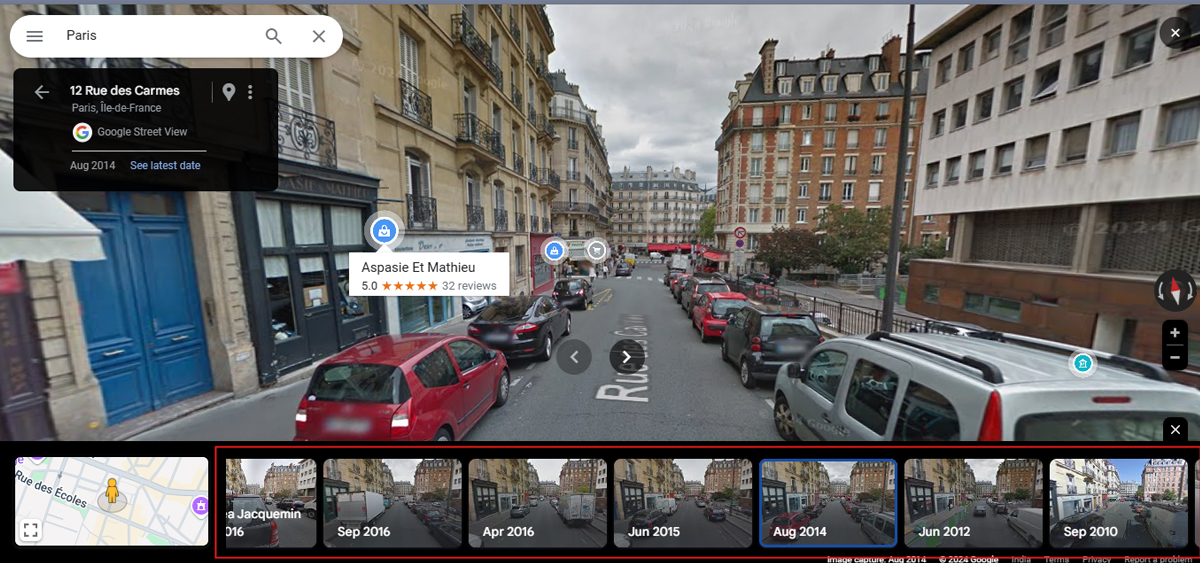
The Timeline Slider is central to Google Time Machine. It provides users with a horizontal slider to scroll through different years and seasons of archived images at specific locations. This feature allows users to select a time period, enabling them to see what a location looked like years ago and compare it to how it appears today.
The slider makes it easy to visualize shifts over time, from changes in a bustling city square to the slow transformation of quiet neighbourhoods.
2. Immersive 360-Degree View
Google Time Machine doesn’t just offer static images from the past—it allows users to explore them interactively. Each historical image is captured as a 360-degree panorama, giving users a realistic experience of “standing” in that spot during a particular year.
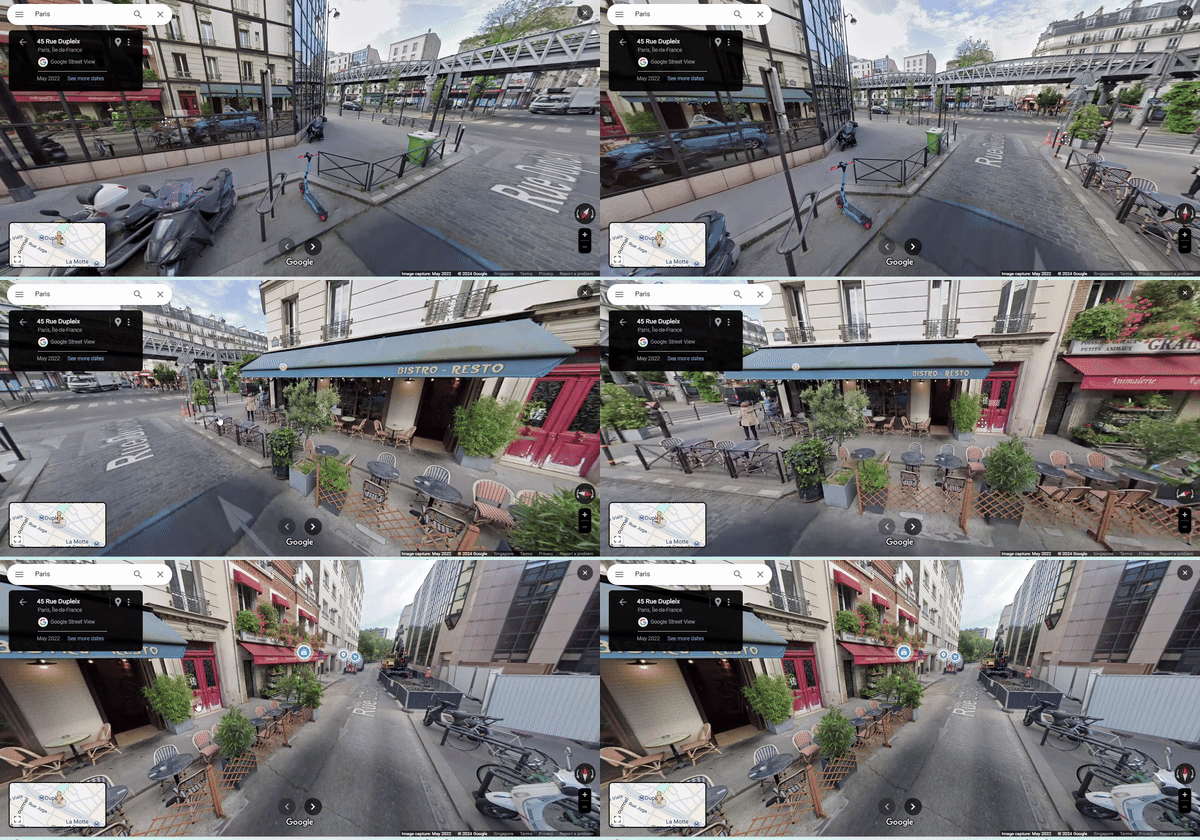
Users can look around, zoom in, and explore their surroundings, much like a virtual reality experience. This immersive aspect lets users feel like they’re actually visiting the location as it appeared in the past.
3. Side-by-Side Comparison of Old and New Views
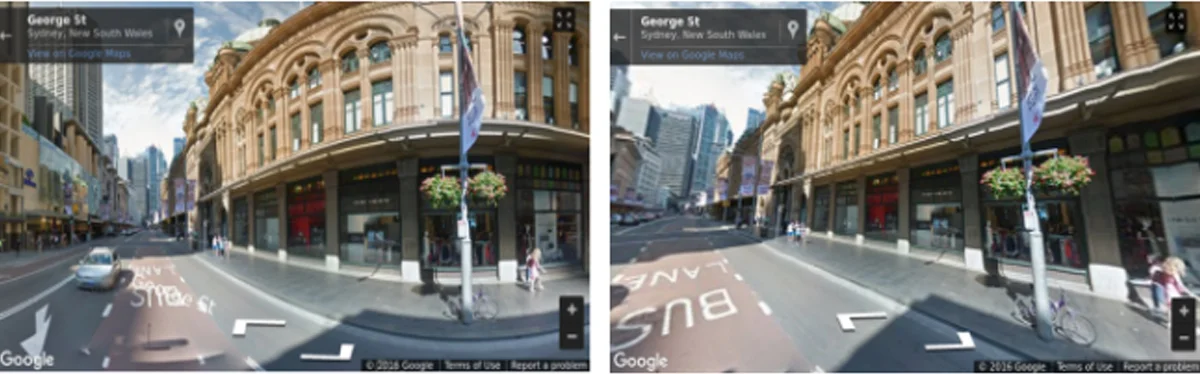
Google Time Machine allows users to view past and present images side by side. This feature is ideal for making direct visual comparisons, letting users quickly assess changes in an area, and enhancing search engine optimization strategies for location-based content.
For example, users can observe the growth of the urban regions or the reconstruction of a historic landmark after a renovation.
Source: Tech Crunch
This side-by-side view can be beneficial for professionals like architects and urban planners who want to see development patterns at a glance.
4. Tracking Environmental Changes Over Time
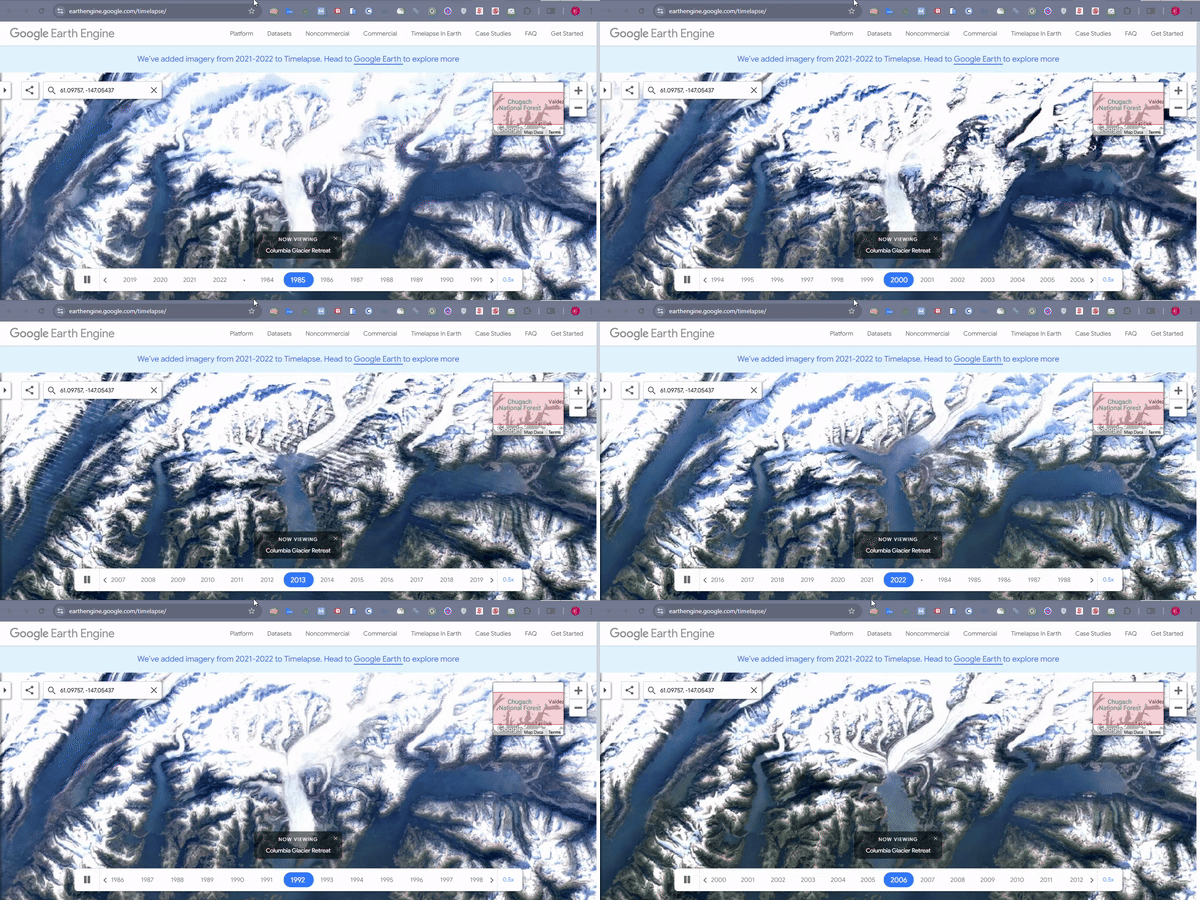
One impactful use of Google Time Machine is in tracking environmental changes. With the Timeline Slider, users can observe the slow progression of phenomena like glacial retreat, deforestation, or urban expansion into green areas.
This feature serves as a valuable resource for environmentalists, researchers, and the general public interested in climate change and environmental conservation.
5. Real Estate and Property Research
Google Time Machine is also a powerful tool for real estate professionals and homebuyers. By allowing users to see how neighbourhoods have changed over time, this feature helps in understanding neighbourhood growth, development trends, and potential property values.

By using Google Time Machine, users can explore a property’s history, including any renovations, demolitions, or other changes in the surrounding area, offering insights into a location’s character.
6. Analyzing Infrastructure Development
Urban planners and government officials find Google Time Machine invaluable for monitoring the development of infrastructure, such as new roads, bridges, and metro lines. They can view images before, during, and after major construction projects, giving a timeline of urban development.
For example, users can track the growth of highways and public transit systems in metropolitan areas such as New York, Tokyo, or Mumbai.
7. Documentation of Land Use Changes
Google Time Machine also shows how land use has shifted over time, revealing areas once devoted to agriculture that have since been urbanized or regions where parks and public spaces have been introduced. Urban developers and planners can observe these transformations to identify how a city’s spatial layout has evolved and plan accordingly for future land use requirements.
8. Revisit Childhood and Nostalgic Locations
For individuals seeking a personal connection, Google Time Machine offers a way to revisit places tied to memories. Users can type in the address of a childhood home, school, or favourite park and see how these places have changed over the years. This feature taps into nostalgia, allowing users to relive memories and feel a connection to their past, especially if they’ve moved away or if those places have drastically changed.
9. Educational Tool for Teachers and Students
Teachers and students can leverage Google Time Machine as an educational tool. In subjects like history, geography, and environmental science, students can witness urban growth, geographical changes, and the impact of climate change firsthand.
For example, students studying urbanization can use Google Time Machine to examine how cities expand, while environmental science students might explore deforestation or coastal erosion.
10. Enhanced Image Quality Over the Years
One exciting feature of Google Time Machine is the improvement in image quality over time. Early Street View images were often low-resolution and less detailed, but over the years, Google has upgraded its cameras, capturing more explicit, high-resolution photos. This improvement allows for a richer exploration experience when viewing recent images, adding more detail and vibrancy to locations.
11. Social Sharing for Public Engagement
Google Time Machine includes social sharing features, enabling users to share historical images with friends or on social media. Whether it’s a fun look back at a childhood neighbourhood or a significant historical change, sharing these images allows users to spread awareness, share personal connections, or engage friends in a nostalgic conversation. For businesses and influencers, this feature provides a way to share captivating “before and after” images with their followers.
12. Virtual Tours of Lost or Transformed Landmarks
Over time, specific buildings, monuments, and natural landmarks undergo transformations, renovations, or, in some cases, disappear altogether. With Google Time Machine, users can take virtual tours of locations that have since been remodelled or demolished. Preserving the history of places that no longer exist in their original form. This feature is invaluable for historians, tourists, and individuals wanting to connect with lost landmarks like the old Penn Station in New York or structures rebuilt after natural disasters.
Conclusion
Google Time Machine brings the past right to your screen, letting you explore how places and landmarks have changed over the years. It’s a fascinating tool for anyone curious about history, nostalgia, or urban transformation.
Looking to time-travel your business into the future? At Digital Guider, we use the latest SEO strategies to help you stay ahead of the competition. Connect us today to future-proof your online presence!
Share This Article
About the Author: Ryan Gosling

Related Articles
 June 15th, 2026 | 13 minutes read
Imagine you are an expert plumber in Toronto who knows how to fix a burst pipe even in the freezing
- June 8th, 2026 | 12 minutes read
Imagine you are running a coffee shop in Chicago. You know how to brew the best coffee in your neighborhood,
- June 1st, 2026 | 11 minutes read
TL, DR; People are now using AI tools like ChatGPT, Gemini, and Google AI to get direct answers online. ChatGPT
 May 25th, 2026 | 8 minutes read
List of Top 10 Digital Marketing Agencies in USA 1. DigitalGuider 2. WebFX 3. Disruptive Advertising 4. Ignite Visibility 5.