Synopsis Most small business owners try tool after tool but still don't see results. So we did the hard work for you: tested dozens of free SEO tools and picked the 17 that actually work in 2026. Keywords, local SEO, website fixes- it's all here, completely free.
List of 17 Best Free SEO Tools
Keyword Research Tools
1. Google Keyword Planner
2. Ubersuggest
3. Answer The Public
4. Keyword Surfer
Website Analytics Tools
5. Google Search Console
6. Google Analytics 4
7. Bing Webmaster Tools
Backlink Analysis Tools
8. Ahrefs Free Version
9. Moz Link Explorer
10. Neil Patel Backlink Checker
Technical SEO Tools
11. Screaming Frog SEO Spider
12. GTmetrix
13. Google PageSpeed Insights
On-Page SEO Tools
14. Rank Math
15. Yoast SEO
Local SEO Tools
16. Google Business Profile
17. BrightLocal Free Trial
Comparison Table for 17 Best Free SEO Tools
Not sure which tool to check out first? We tested and reviewed all these tools in May 2026 to make things easier for you. Whether you need help with keyword research, SEO, or technical website analysis, you’ll find the right tool here. Use the table below to quickly find what you need, then read the detailed information about each tool:
| Tool | What It Does | Best For | Why You’ll Love It | Free Access |
| Google Keyword Planner | Finds keyword search volume | Beginners | Accurate Google data | Free |
| Ubersuggest | Finds competitor keywords | Beginners | Easy competitor research | 3 searches/day |
| Answer The Public | Generates content ideas | Bloggers | Hundreds of topic ideas | 3 searches/day |
| Keyword Surfer | Shows keyword data in Google search | Quick research | No need to leave Google | Free |
| Google Search Console | Tracks search performance | Website owners | Real Google insights | Free |
| Google Analytics 4 | Monitors visitor behaviour | Marketers | Tracks conversions | Free |
| Bing Webmaster Tools | Tracks Bing search traffic | Businesses | Free SEO audits | Free |
| Ahrefs Free Tools | Analyzes backlinks | SEO professionals | Trusted authority metrics | Limited free access |
| Moz Link Explorer | Checks backlinks and spam links | Site owners | Identifies harmful links | 10 searches/month |
| Neil Patel Backlink Checker | Reveals competitor backlinks | Link builders | No sign-up required | 3 searches/day |
| Screaming Frog | Audits website SEO issues | Large websites | Comprehensive site scans | 500 URLs free |
| GTmetrix | Tests website speed | Website owners | Finds speed bottlenecks | 5 tests/month |
| Google PageSpeed Insights | Measures page performance | Everyone | Google-recommended fixes | Free |
| Rank Math | Optimizes WordPress SEO | WordPress users | Multiple keyword targeting | Free |
| Yoast SEO | Guides on-page SEO | Beginners | Simple SEO scoring | Free |
| Google Business Profile | Manages local business presence | Local businesses | Improves local visibility | Free |
| BrightLocal | Tracks local rankings | Local businesses | Visual ranking maps | 14-day trial |
Keyword Research Tools
Keyword research tools help you with your keyword research strategy to figure out exactly what your potential customers are typing into Google.
1. Google Keyword Planner
Google Keyword Planner tells you what people are actually searching for on Google. Type in your product or service and it shows you keyword ideas, search volumes, and competition levels for each keyword. It is completely free and the best place to start your keyword research.
How to use it:
a. Go to ads.google.com
b. Sign in with your Google account
c. Click “Start Now”
d. Select “Create an account without a campaign”
e. Complete the basic account setup and submit
f. Click the Tools icon (🔧) in the top menu
g. Under “Planning,” select “Keyword Planner”
| Best for: Keyword research beginners Free limit: Requires a free Google Ads account Standout feature: Best free tool for accurate search volume data |
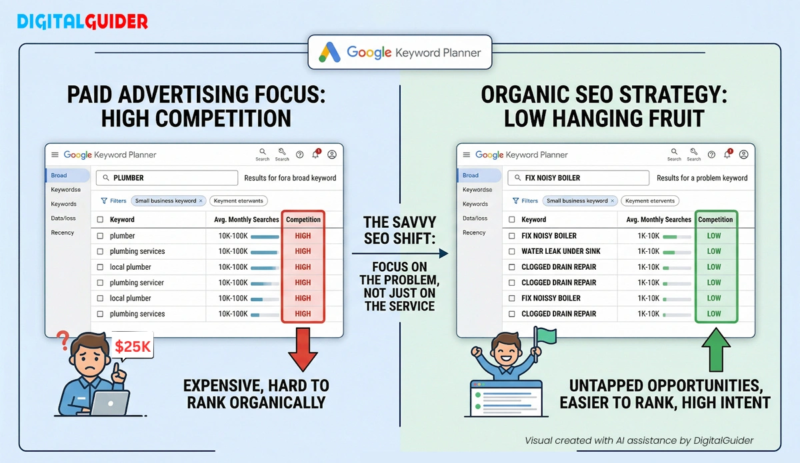
Comparison of high-competition service keywords vs. high-intent, low-competition problem keywords in Google Keyword Planner.
2. Ubersuggest
Ubersuggest is a free tool by Neil Patel that makes keyword research simple. Type in a keyword or a competitor’s website, and it shows you what people are searching for, how hard it is to rank, and lets you do competitor analysis. It also includes a free site audit and a backlink checker.
How to use it:
a. Go to app.neilpatel.com/ubersuggest
b. Enter a keyword or competitor’s URL
c. Click “Search”
d. View search volume, SEO difficulty, and CPC data
e. Scroll down to explore related keyword ideas
| Best for: Beginners who want an all-in-one free tool Free limit: 3 searches per day Standout feature: Competitor keyword analysis with a single URL input |
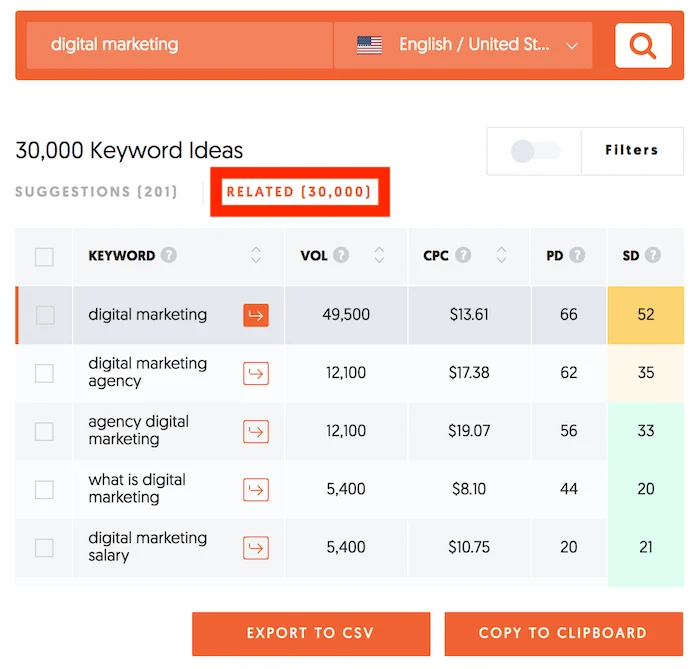
During our research, we used Ubersuggest to explore SEO keywords and found it helpful for identifying search volume, keyword difficulty, CPC data, and related keyword ideas. The tool also highlighted long-tail keyword opportunities and search trends, making keyword research simple and beginner-friendly.
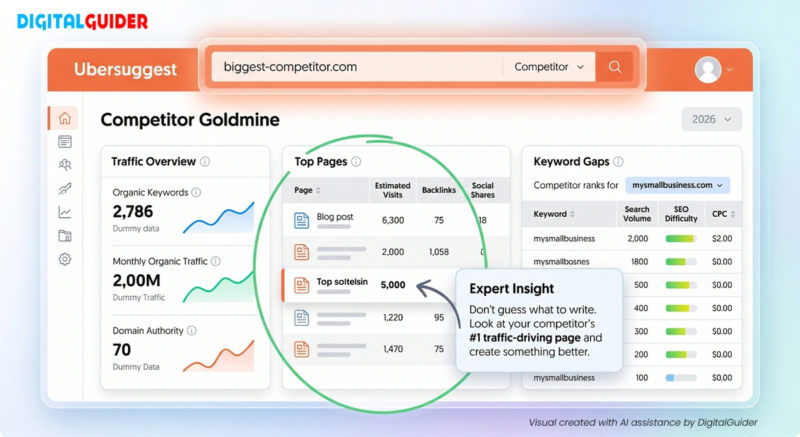
Using the ‘Competitor URL Trick’ in Ubersuggest. By entering a rival’s website, you can see their highest-traffic pages and the exact keywords they rank for
3. Answer The Public
Answer The Public shows you the exact questions people type into Google about any topic. Enter a keyword, and it gives you hundreds of question-based search queries, grouped by who, what, where, when, why, and how. A great tool for the People Also Ask (PAA) section on SERP.
a. Go to answerthepublic.com
b. Enter your main keyword or topic
c. Click the “Search” button
d. Review the question and keyword suggestions
e. Explore the visual search insights in the sunburst diagram
| Best for: Content creators and bloggers Free limit: 3 searches per day Standout feature: Visual keyword map grouped by question type |
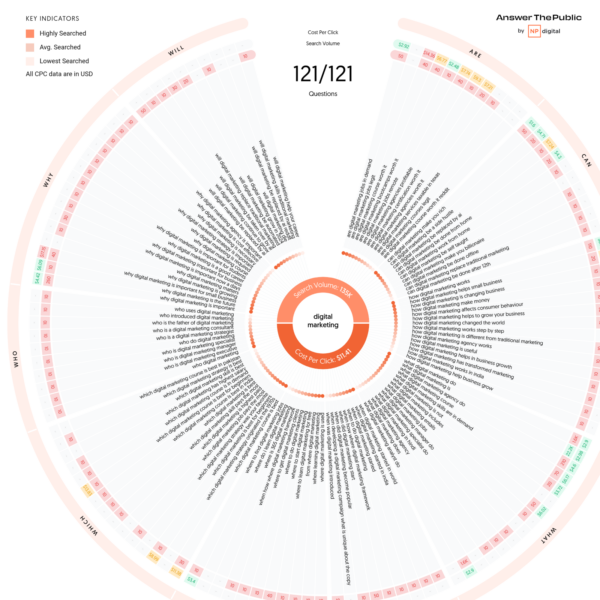
Visualize the questions your audience is asking with AnswerThePublic’s unique search cloud data
4. Keyword Surfer
Keyword Surfer is a free Chrome extension that shows you keyword data right inside Google search results. You type something into Google, and it instantly shows you the search volume, related keywords, and traffic estimates alongside the normal results. Install the extension, and it works quietly in the background every time you search.
How to use it:
a. Open the Chrome Web Store
b. Search for the Surfer SEO extension
c. Click “Add to Chrome”
d. Go to google.com and search for a keyword related to your business
e. View Surfer SEO data alongside the Google search results
| Best for: Quick keyword checks while browsing Free limit: Completely free Chrome extension Standout feature: Live keyword data without leaving Google |
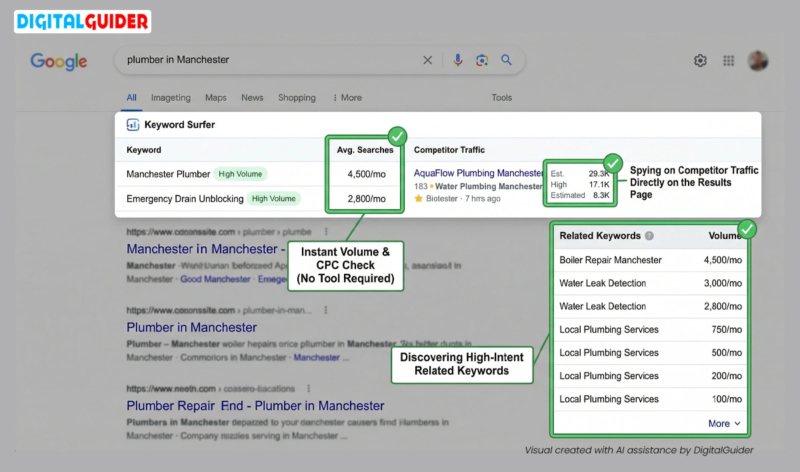
Live Google search results page including instant search volume, competitor traffic estimates, and a bank of related keywords
Website Analytics Tools
5. Google Search Console
Google Search Console shows you exactly how your website performs on Google. You can see which keywords bring people to your site, which pages get the most clicks, and whether Google has any crawling or indexing issues with your content. It is one of the most important tools for SEO reporting for digital marketing agencies.
How to use it:
a. Go to search.google.com/search-console
b. Sign in and click “Start Now”
c. Add your website property
d. Verify website ownership
e. Submit your XML sitemap
| Best for: Every website owner Free limit: Unlimited for your own site Standout feature: See the exact keywords driving impressions and clicks |
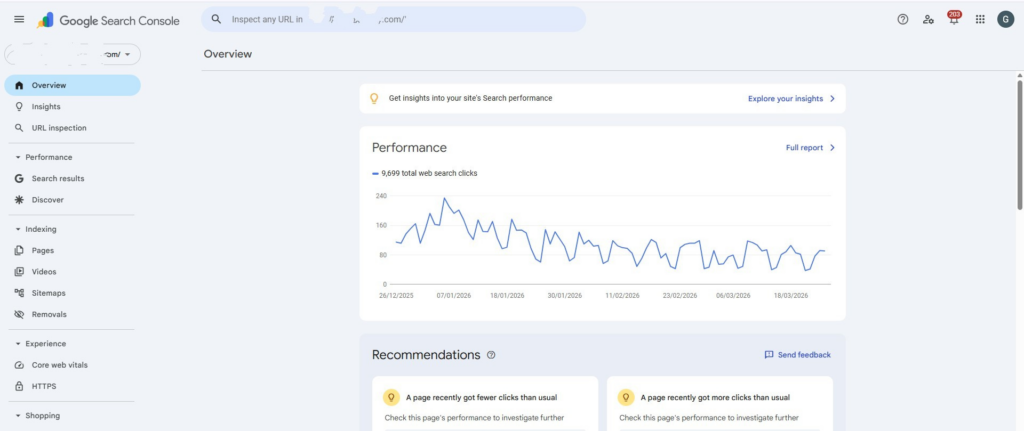
Monitor your site’s organic growth and search performance trends through the Google Search Console overview.
6. Google Analytics 4
Google Analytics 4 is a free website analytics tool by Google that tracks everything happening on your site. It shows you where your visitors come from (organic search, social media, direct, referral), which pages they land on, how long they spend, and where they leave. You can combine this tool with a website heatmap tool and get a better understanding of users’ behaviour on your website.
How to use it:
a. Go to analytics.google.com
b. Sign in and click “Start measuring”
c. Create a Google Analytics property
d. Add your website details
e. Install the tracking code on your website
| Best for: Understanding user behaviour and tracking conversions Free limit: Unlimited for your own site Standout feature: Tracks the full user journey from first visit to final action |
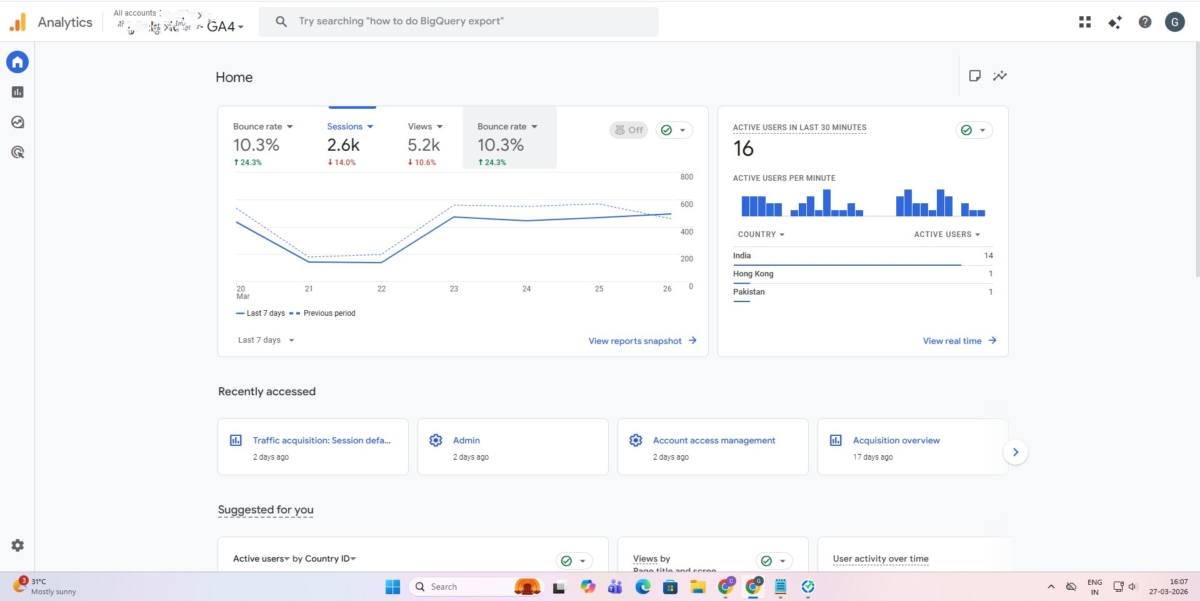
Track real-time user activity and key traffic trends directly from your GA4 home dashboard.
7. Bing Webmaster Tools
Bing Webmaster Tools is a free tool by Microsoft that works just like Google Search Console but for Bing search. It shows you which keywords bring traffic, how your pages are indexed, and any crawl errors that need fixing. It also gives you a free backlink report and SEO suggestions that you can act on straight away. Most website owners skip this tool, but Bing accounts for nearly 3% of global searches, and ignoring it means leaving free traffic on the table.
How to use it:
a. Go to bing.com/webmasters
b. Sign in with your Microsoft account
c. Add your website
d. Verify website ownership
e. Submit your XML sitemap
| Best for: Businesses wanting visibility from Bing Free limit: Unlimited for your own site Standout feature: Free SEO audit and keyword data straight from Microsoft |
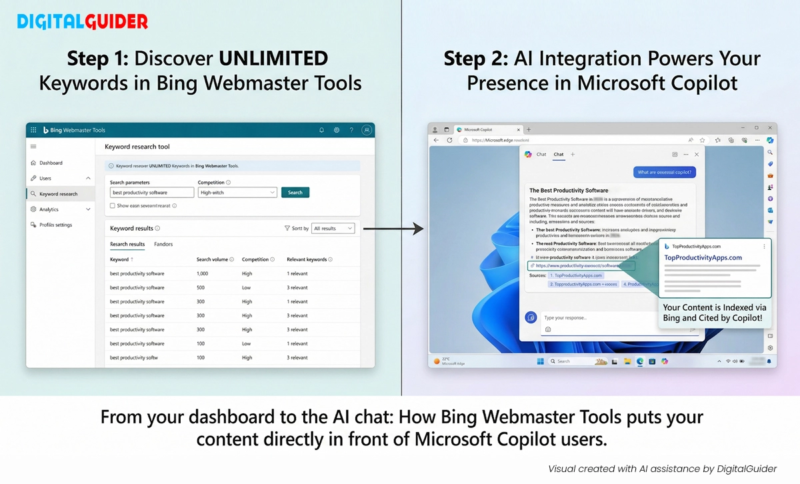
From your dashboard to the AI chat: How Bing Webmaster Tools puts your content directly in front of Microsoft Copilot users.
Backlink Analysis Tools
8. Ahrefs Free Version
On Ahrefs, you can check any website’s backlinks, domain rating, and top-ranking pages without spending a penny. The free plan shows the top 100 backlinks only, but that is enough to understand any site’s link profile. Verify your own site on Ahrefs and run a free site audit.
How to use it:
a. Go to ahrefs.com
b. Sign in and verify your website
c. Run a free Site Audit
d. Review the issues found
e. Fix the recommended SEO issues
| Best for: Checking backlink profiles and domain strength Free limit: Top 100 backlinks only Standout feature: Domain rating score trusted across the SEO industry |
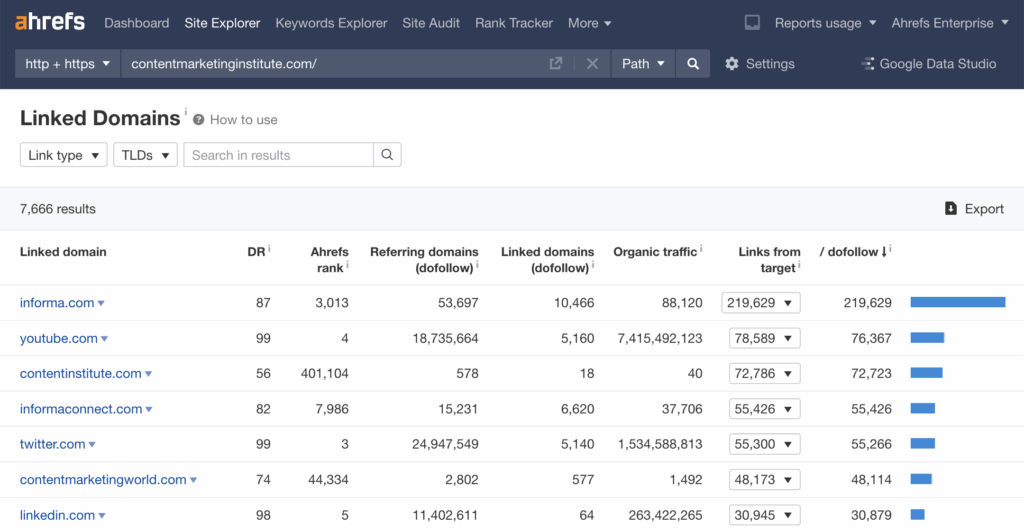
Use Ahrefs to identify which external sites your content is linking to most frequently.
9. Moz Link Explorer
Moz Link Explorer is a free backlink analysis tool that lets you check the link profile of any website. Enter any URL, and it shows you how many backlinks a site has, where those links are coming from, and how authoritative those linking sites are. The standout feature is Domain Authority (DA), a score from 1 to 100 that gives you a quick analysis of a website. However, while DA measures raw power, modern search also requires topical authority in SEO to prove to Google that your site is an expert in its specific niche.
How to use it:
a. Go to moz.com/link-explorer
b. Enter a website URL
c. Click “Analyze”
d. Review backlinks, Domain Authority, and top pages
e. Analyze competitor websites using the same process
| Best for: Checking domain authority and analysing backlink profiles Free limit: 10 queries per month Standout feature: Domain Authority score and spam link detection in one place |
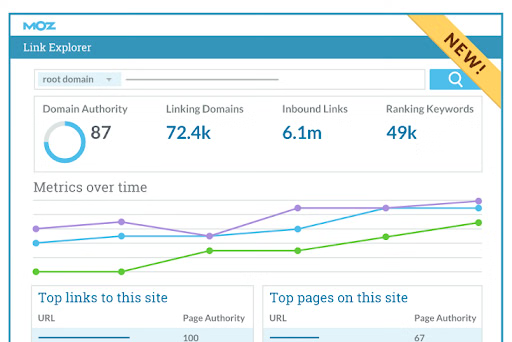
- Track your link growth and Domain Authority trends using Moz Link Explorer
10. Neil Patel Backlink Checker
Neil Patel Backlink Checker is a free tool that shows you the complete backlink profile of any website. What makes it particularly useful is competitor research. You can plug in any competitor’s URL and see exactly where they are earning their links from, then go after those same sources for your own site. No account or sign-up is needed, making it one of the most accessible free backlink tools out there.
How to use it:
a. Go to neilpatel.com/backlinks
b. Enter a website URL
c. Click “Search”
d. Review the backlink profile
e. Filter results by Domain Authority or anchor text
| Best for: Competitor backlink research and link prospecting Free limit: 3 searches per day Standout feature: Instant backlink data on any URL with no sign-up required |
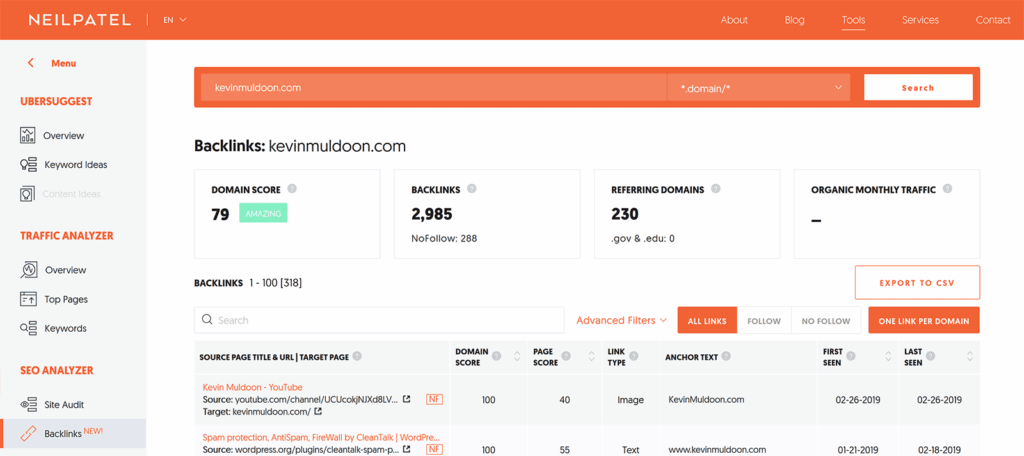
Easily monitor your backlink profile and Domain Score with the Neilpatel backlink checker
Technical SEO Tools
11. Screaming Frog SEO Spider
Screaming Frog SEO Spider is a desktop-based website crawler available for Windows, Mac, and Ubuntu. It browses your entire website by following every internal and external link, the same way Google’s search bot does, and collects critical SEO data on every URL. It identifies over 300 SEO issues, including broken links, duplicate content, missing meta tags, redirect chains, and blocked URLs, and puts everything into one clean, exportable report.
How to use it:
a. Go to screamingfrog.co.uk/seo-spider
b. Download and install the tool
c. Enter your website URL
d. Click “Start” to begin the crawl
e. Review the issues found and fix them
| Best for: Running a full technical SEO audit on your website Free limit: Up to 500 URLs per crawl Standout feature: Identifies over 300 SEO issues in a single crawl |
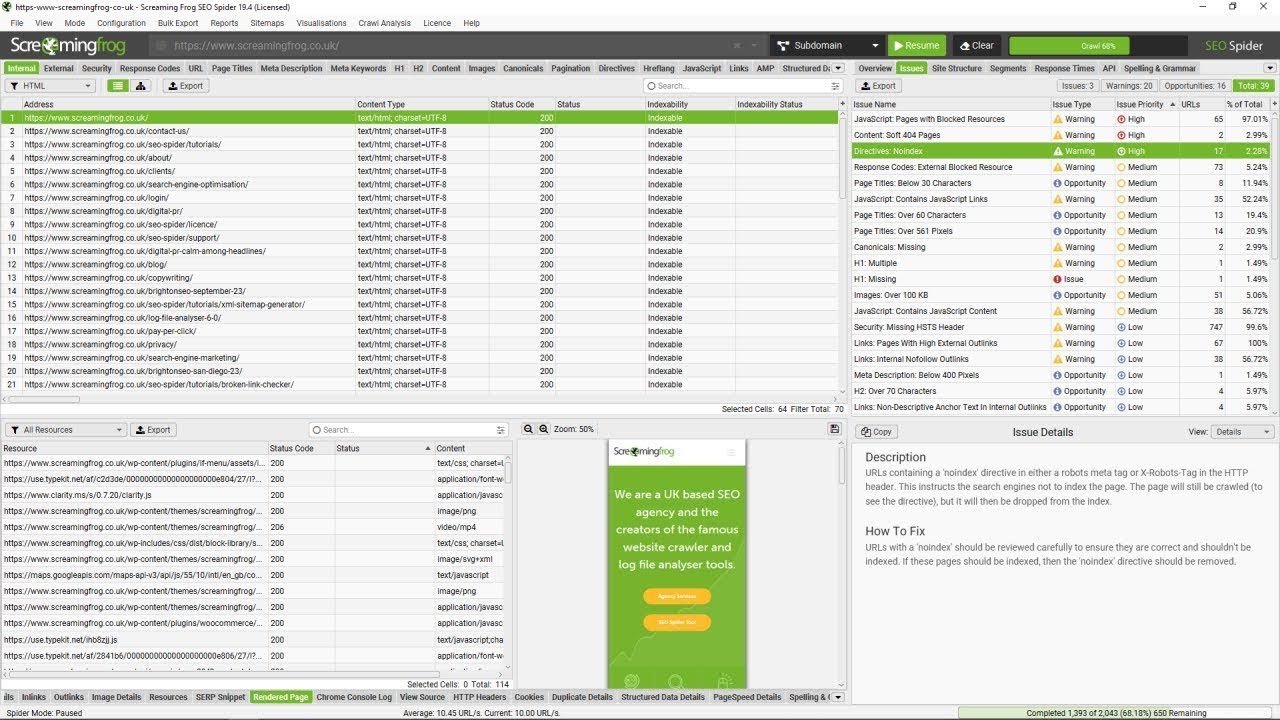
Run a comprehensive technical audit using Screaming Frog to identify and fix crawl errors.
12. GTmetrix
GTmetrix is a free website performance analysis tool that uses Google Lighthouse to measure your Core Web Vitals, which are the exact signals Google uses as ranking factors. What makes GTmetrix stand out is its waterfall chart, which shows you a visual breakdown of exactly how every element on your page loads, so you can pinpoint what is slowing things down. It also gives you video playback of your page loading, which helps you see the experience from a real visitor’s perspective.
How to use it:
a. Go to screamingfrog.co.uk/seo-spider
b. Download and install the tool
c. Enter your website URL
d. Click “Start” to begin the crawl
e. Review the issues found and fix them
| Best for: Diagnosing page speed issues and improving Core Web Vitals Free limit: 5 tests per month Standout feature: Identifies over 300 SEO issues in a single crawl |
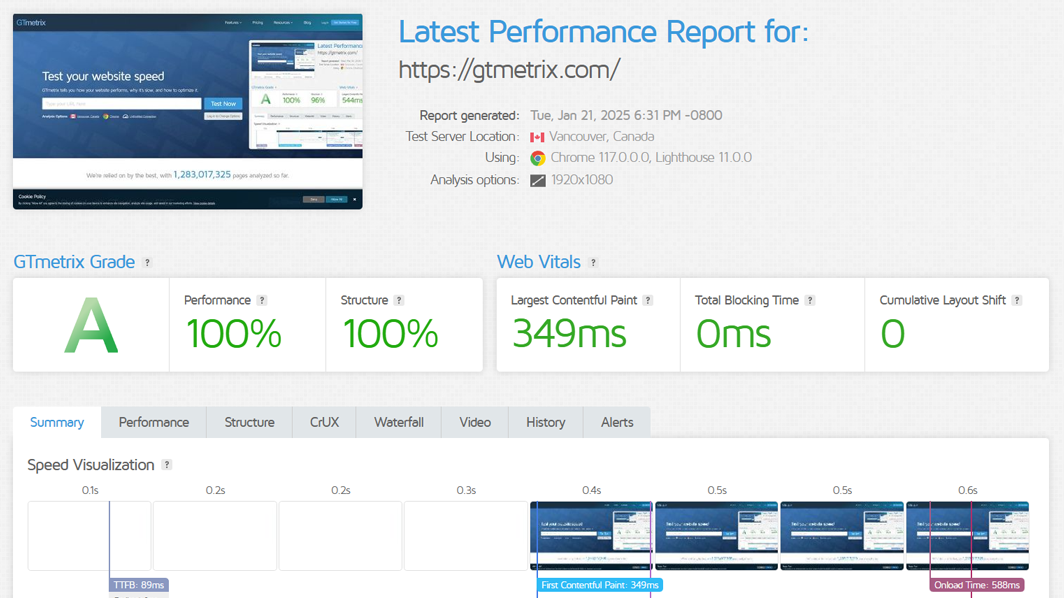
Analyze your website’s loading speed and performance with a GTmetrix grade report
13. Google PageSpeed Insights
Google PageSpeed Insights is a free tool by Google that scores your website speed and performance on both mobile and desktop out of 100. What makes it different from other speed tools is that it pulls real-world data from actual Chrome users who have visited your site, so the scores reflect genuine user experience rather than just lab results. It gives you a full Core Web Vitals assessment, a colour-coded performance score, and a detailed list of specific optimisation opportunities with estimated time savings attached to each fix.
How to use it:
a. Go to pagespeed.web.dev
b. Enter your page URL
c. Click “Analyze”
d. Check your mobile performance score
e. Review the Opportunities and Diagnostics sections
f. Fix the issues marked in red first
| Best for: Checking Core Web Vitals and mobile performance Free limit: Completely free and unlimited Standout feature: Real Chrome user data with fix recommendations and estimated time savings |
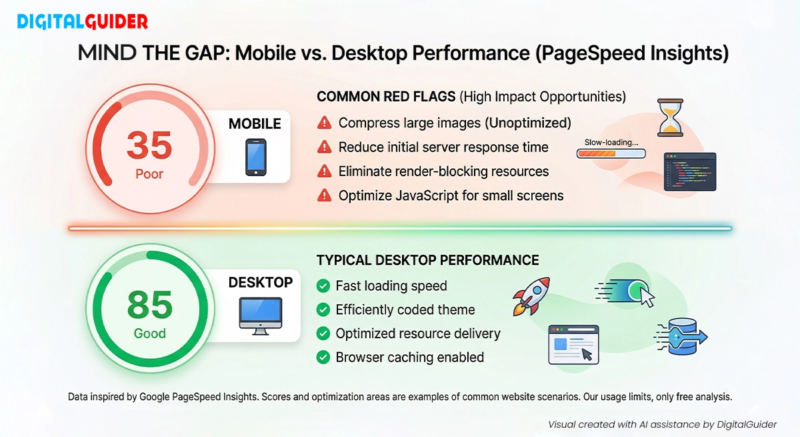
A visual guide to closing the performance gap between mobile and desktop devices.
On-Page & Local SEO Tools
On-page SEO is all about making each page on your website compelling for both Google and the visitor. Local SEO ensures your business appears in top local search results when nearby customers search for your services.
14. Rank Math- Free WordPress
Rank Math is a free WordPress SEO plugin that gives you more features in its free version. It analyses your content against 40-plus SEO factors in real time and gives you an SEO score out of 100 for every page and post you publish. Rank Math lets you optimise for up to 5 focus keywords per post for free. It also includes built-in schema markup, 404 error monitoring, redirect management, and Google Search Console integration, all without paying a penny.
How to use it:
a. Go to your WordPress Dashboard and click “Plugins”
b. Search for Rank Math SEO
c. Click “Install” and then “Activate”
d. Run the setup wizard to configure SEO settings
e. Open any page or post and access the Rank Math panel
f. Add your focus keyword
g. Follow the optimization recommendations
h. Aim for a green SEO score before publishing
| Best for: WordPress site owners Free limit: Up to 5 focus keywords per post, core features completely free Standout feature: Optimise for 5 keywords per post for free |
15. Yoast SEO
Yoast SEO is a free WordPress plugin for on-page seo that guides you through optimising every page and post on your site before you hit publish. It analyses your focus keyword, meta title, meta description, readability, and internal links in real time and gives you a simple green, amber, or red colour signal for each element so you always know what needs attention. The free version also automatically generates your XML sitemap, manages canonical tags, adds basic schema markup, and gives you social media preview cards.
How to use it:
a. Go to your WordPress Dashboard
b. Click “Plugins” and search for Yoast SEO
c. Install and activate the plugin
d. Open any page or post
e. Scroll to the Yoast SEO panel
f. Enter your focus keyphrase
g. Follow the color-coded SEO recommendations
h. Fix any issues marked in amber or red before publishing
| Best for: WordPress site owners optimising on-page SEO Free limit: One focus keyphrase per page, core features completely free Standout feature: Real-time colour-coded SEO and readability checklist on every page |
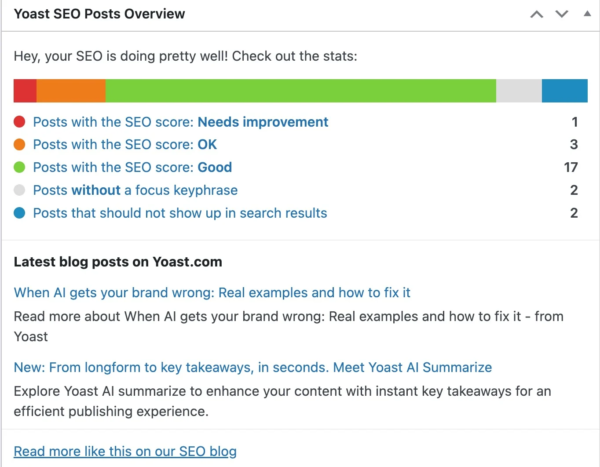
Use the Yoast SEO Posts Overview to quickly track the optimization status of your entire content library
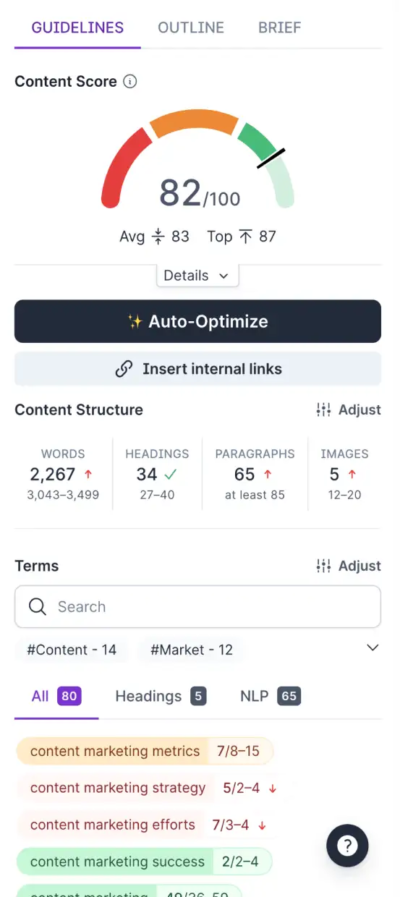
Optimize your articles in real-time with Surfer SEO’s content score and keyword density guidelines
16. Google Business Profile
Google Business Profile is a free tool from Google that controls how your business appears on Google Search and Google Maps. For any local business, this is the single most important free SEO tool on this list. In 2026, your profile data also feeds directly into Google AI Overviews, meaning an incomplete or inconsistent profile can cost you visibility at the exact moment a customer is making a decision. You can add your business hours, photos, services, collect reviews, post updates, and even enable direct booking and WhatsApp contact.
How to use it:
a. Go to business.google.com
b. Sign in and click “Add your business”
c. Enter your business name, category, address, and contact details
d. Complete the verification process
e. Fill out your profile with photos, services, and a business description
f. Start collecting customer reviews
g. Publish updates regularly, ideally once a week
| Best for: Local businesses wanting visibility on Google Search and Maps Free limit: Completely free Standout feature: Places your business in the Google Local 3-Pack above all organic results |
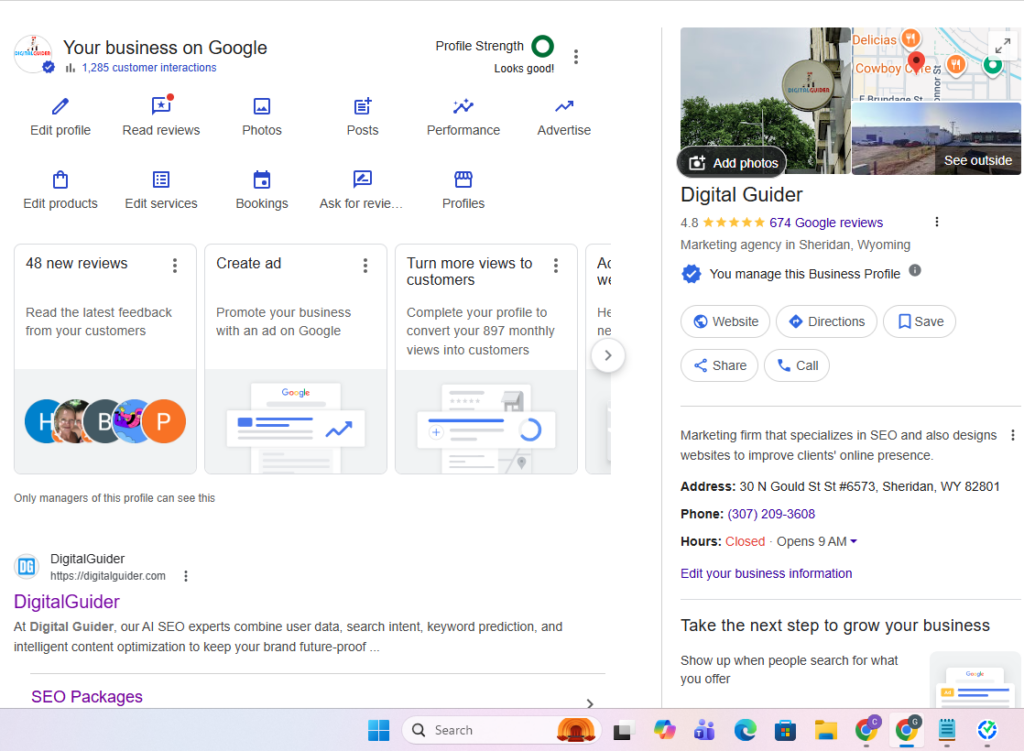
Manage your local search presence and customer interactions directly through the Google Business Profile dashboard
17. BrightLocal Free Trial
BrightLocal is a tool that brings together local rank tracking, citation management, Google Business Profile audits, and review monitoring all under one place. During the trial, you can run a complete local SEO audit, check how consistently your business information appears across online directories, track your rankings on Google Maps using the Local Search Grid, and monitor your reviews across Google, Yelp, and Facebook in one dashboard. For any local business serious about improving its local search presence, this trial gives you everything you need to identify your biggest gaps and opportunities.
How to use it:
a. Go to brightlocal.com and start your free trial
b. Run a Local Search Audit
c. Set up Local Rank Tracker
d. Check your rankings in Google Maps and local search results
e. Run a Citation Tracker to find missing or inconsistent listings
f. Use the GBP Audit to identify optimization opportunities in your Google Business Profile
| Best for: Local businesses and agencies managing local SEOs Free limit: 14-day free trial with full platform access, no credit card required Standout feature: Local Search Grid that shows exactly where you rank across a specific geographic area |
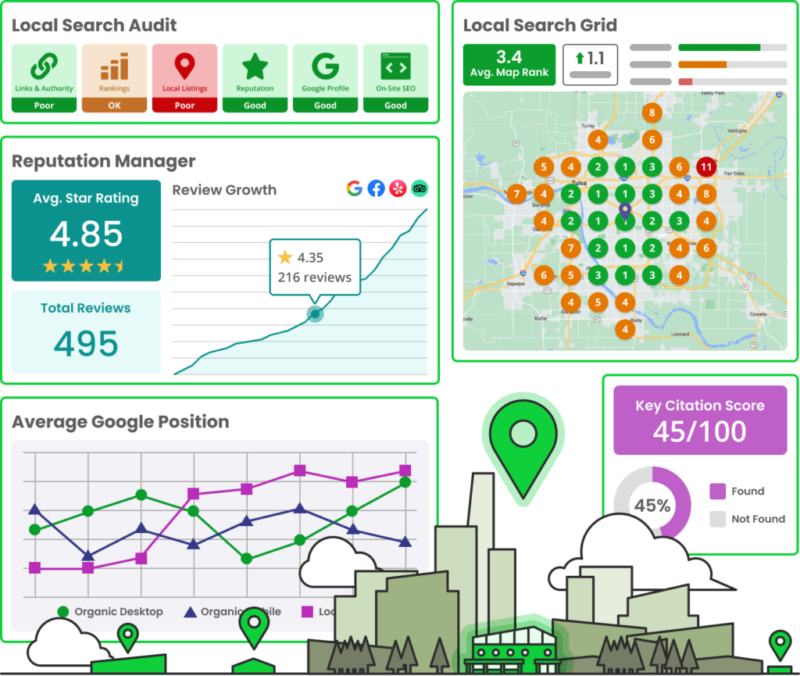
Track your local rankings and reputation growth with a comprehensive local SEO audit dashboard
These are the same tools used by professional SEO agencies, and now you have the full list. But knowing the tools is just the first step. Actually doing the keyword research, creating content, fixing technical issues, building backlinks, and keeping your Google Business Profile optimised takes consistent time and expertise that most small business owners simply don’t have.
That’s where DigitalGuider comes in. For over a decade, we’ve helped small businesses across the USA go from invisible on Google to ranking where it counts.
Share This Article
About the Author: Lucia Ferrer

Related Articles
 August 3rd, 2026 | 7 minutes read
Running a cannabis business sounds exciting until it comes to marketing it! That's where the struggle begins. No paid ads
- July 27th, 2026 | 8 minutes read
Are you missing out on new patients in your city? Google is now the front door to healthcare providers. When
- July 20th, 2026 | 6 minutes read
Every day, people search for dispensaries, CBD products, cannabis delivery, and answers to cannabis-related questions. If your business isn't appearing
- July 13th, 2026 | 7 minutes read
Ever searched "best cannabis SEO agency" and ended up opening ten different tabs that all say the same thing? Yeah,