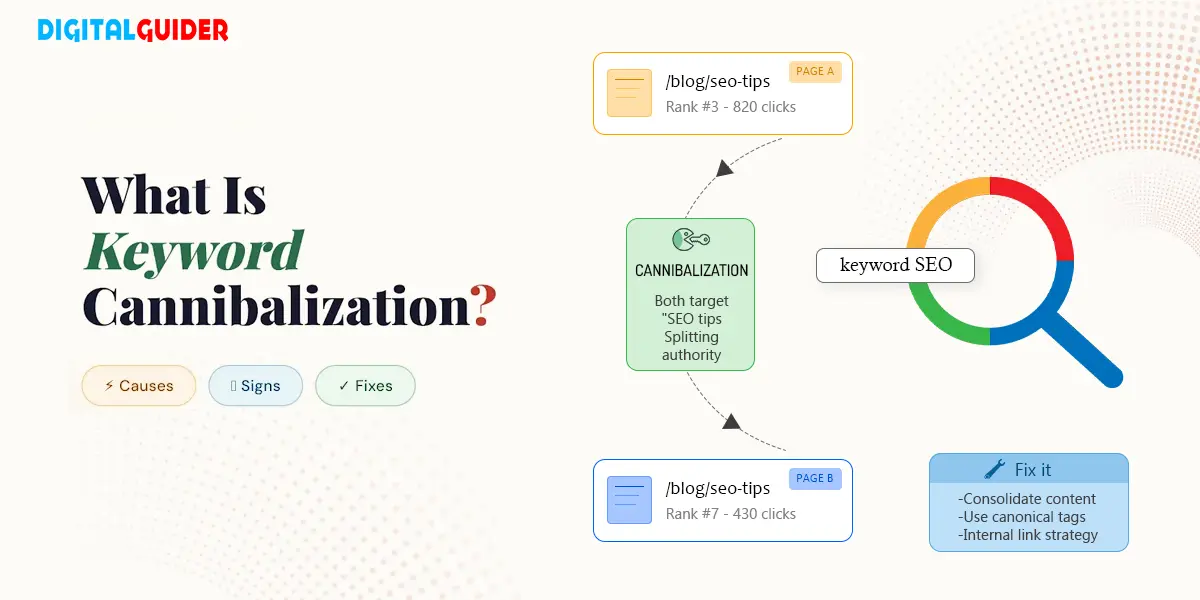
Synopsis Keyword cannibalization happens when multiple pages on your website target the same keyword, and it's one of the most overlooked reasons a site's rankings stall. This guide explains what keyword cannibalization really is, how to identify it using tools like Google Search Console, SEMrush, and Ahrefs, and the exact steps to fix it. You'll learn how to spot overlapping content, assign the right keywords to the right pages, and consolidate competing URLs so your strongest page gets the ranking it deserves.
Is your website targeting the same keyword across multiple pages?
If you’ve been told that having two pages target the same keyword will “confuse Google” and tank your rankings, that’s only half the story. Keyword cannibalization is real, but it’s also one of the most misunderstood problems in SEO.
The truth is, most websites have some degree of keyword overlap across pages and in many cases, it doesn’t hurt performance at all. The problem only becomes serious when competing pages are actually splitting traffic, diluting authority, and pushing the wrong page to the top of search results.
In this guide, you’ll learn exactly what keyword cannibalization is, how to tell when it’s actually hurting you (and when it isn’t), and the proven fixes that work – without deleting content that might still be pulling its weight.
What is Keyword Cannibalization?
Keyword cannibalization is an SEO problem that occurs when two or more pages on the same website target the same keyword and serve the same search intent – causing them to compete against each other in Google’s results rather than complement each other. When this happens, search engines aren’t sure which page to rank.
As a result, they may rank the weaker page, alternate between both, or dilute the authority that would otherwise go to a single, stronger page. The net effect is lower rankings, split traffic, and weaker overall performance – even though you may have good content on both pages.
Here’s a simple example:
| Page A | Page B | |
| Title | Top 10 SEO Tools for Beginners | Free SEO Tools for New Businesses |
| URL | xyz.com/seo-tools-beginners | xyz.com/free-seo-tools |
| Target Keyword | SEO tools | SEO tools |
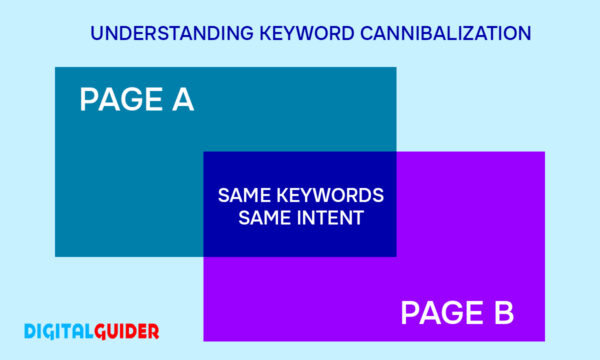
It is an unintentional SEO issue that happens when your website grows and content accumulates. When several pages revolve around the same topic or keyword, it confuses Google, splits your traffic, and weakens your overall SEO performance.
I hope you understand the meanng of what is Keyword Cannibalization, so now we are going to explore it that fits with your website.
What is the difference between keyword cannibalization, content overlap, and duplicate content?
Keyword cannibalization, content overlap, and duplicate content are often confused as similar in practice and understanding.
Although these terms may appear similar in practice, they impose major differences, and keyword cannibalization is not the same as content overlap and duplication.
Here’s a breakdown of the key differences between keyword cannibalization, content overlap, and duplicate content:
Issues | What it Means | Problem Caused |
Keyword Cannibalization | Multiple pages targeting the same keyword and search intent on your site | Pages compete in SERPs, diluting ranking power. |
| Content Overlap | Different keywords, but same topic or search intent. | Confuses users & search engines, weakens SEO. |
| Duplicate Content | Identical or nearly identical text on multiple pages. | Triggers content devaluation or gets ignored. |
✅ So, What Should You Watch For?
Now that you know the difference between keyword cannibalization, content overlap, and duplicate content, it’s time to focus on keyword cannibalization—when your website competes with itself, and understand when it truly hurts your SEO.
When Is Keyword Cannibalization a Problem and When Is It Not?
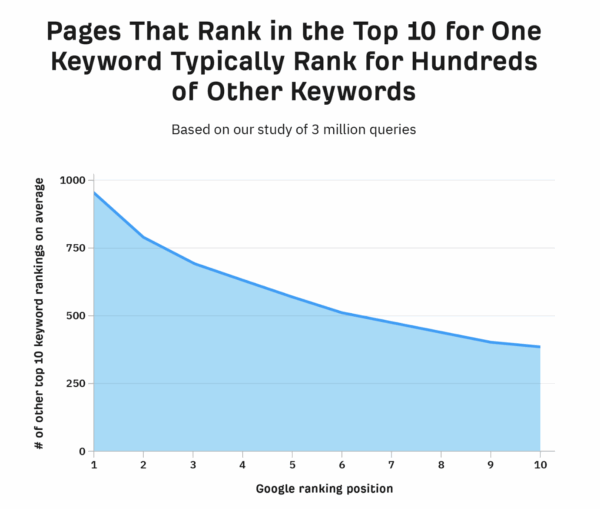
Here’s what most SEO guides won’t tell you: the majority of web pages rank for hundreds of keywords simultaneously – not just one. A study of 3 million search queries by Ahrefs found that pages ranking in the top 10 for a primary keyword typically also rank for hundreds of related terms. This matters because two pages that appear to “compete” on one keyword may actually be serving very different sets of related queries.
Removing or merging them just to “fix” cannibalization could cost you that secondary traffic – often without any gain on the primary keyword. So before you take action, ask: are these pages actually hurting each other, or are they independently covering ground? If both pages are getting impressions, clicks, and ranking for different query variations, leave them alone. Fix cannibalization only when one page is clearly stealing traffic from another – or when neither page is performing well despite the overlap.
Causes of Keyword Cannibalization
As we have understood the problems associated with keyword cannibalization, it is understood that it is rarely intentional.
Or it could have been affected due to the laid-back or outdated SEO tactics like keyword stuffing and one keyword pages, content duplicacy, etc, which is often the result of oversight.
How It Slowly Damages Your SEO?
Poor Content Strategy
Content publishing without a clear plan and effective SEO strategy can result in multiple pages covering similar topics or unintentionally targeting the same keywords.
| Solution: Make a content calendar or an Excel spreadsheet and match each topic with specific keywords and user intent. |
Lack of Keyword Mapping
Keyword mapping is important for planning your content strategy. Without it, different pages on your website can unintentionally compete with each other for the same keyword, confusing both Google and your audience.
| Solution: Use keyword mapping tools like Ahrefs or Semrush to assign one primary keyword per page, ensuring each page has a unique focus and avoids unnecessary overlap. |
Overlapping or Repetitive Content
Multiple pages on a website covering similar topics, especially blog posts or product pages, can compete for the same keywords and can cause cannibalization due to overlapping intent or topics.
| Solution: With regular content auditing and content merging, deleting or consolidating overlapping articles. |
Uncoordinated Content Strategy Across Teams
When marketing, SEO, and product teams generate content separately, several pages can be unintentionally optimized for the same keywords.
| Solution: Aligning the team with a shared content brief for a more parallel content strategy. |
Re-optimizing pages without redirecting to the old version
Updating or rewriting content and releasing it as a fresh page without redirecting from the previous one leads to two conflicting URLs.
| Solution: Use redirects like 301 from the outdated to the newer one |
Improper internal linking
When several pages are interlinked/ interconnected using identical anchor text (for instance, “top SEO tools”), Google might interpret that they all aim for the same keyword and lead to Search engine confusion
| Solution: Diversify anchor text and link contextually to the most relevant page for each topic. |
E-commerce Filters or URL Parameters
Dynamic URLs generated via filters or faceted navigation (such as size, color, price) can create numerous identical pages competing for similar keywords.
| Solution: setting rules in robots.txt, using canonical tags, and avoiding indexing unnecessary filter combinations. |
These key causes are often unintentional, but they directly impact your SEO health. From confusing search engines to weakening the page authority, keyword cannibalization can lead to several performance issues —
Let’s look at the major effects your website might suffer.
- Drop in search rankings
Competing pages confuse the search engine, causing a lower ranking in results.
- Reduced Click-Through-Rate
With multiple similar listings, users are less likely to click, reducing your overall CTR.
- Decreased Organic Traffic
Splitting relevance between pages leads to a decline in overall search traffic.
- Weakened Page Authority
Avoid building strength on a single page, authority is spread thin across many.
- Weakened link strength
Links from other websites tend to lose impact when divided among several similar pages.
How to Identify Keyword Cannibalization in Your Website
Before fixing cannibalization, it is essential to identify it. Here are two simple ways to find out if your site has pages competing for the same keyword:
- Manual Keyword Cannibalization Check
- Tool-based Keyword Cannibalization Check
1. Manual Keyword Cannibalization Check
1.1 Google Search Trick
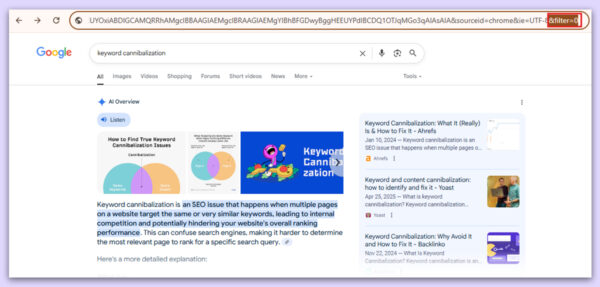
-Start with a site search by using the search function site:yourdomain.com “keyword” in Google to surface all pages relevant to a particular term.
For example, A simple site search using your domain along with a keyword will display all the pages that are ranked for that specific term.
let’ s type the function- site:digitalguider.com “keyword cannibalization”
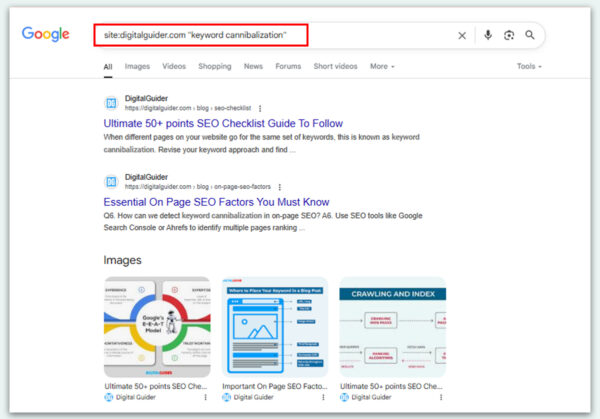
A quick but important note: seeing multiple pages appear in a site: search doesn’t automatically mean you have a cannibalization problem. It simply means Google has indexed those pages and found the keyword mentioned somewhere in the content – they may not all be actively competing for the same ranking position.
To confirm actual cannibalization, you need to go one step further and check real ranking data. The site: search is a useful starting point for spotting overlap, but it should always be paired with performance data from Google Search Console or a tool like Ahrefs or Semrush to see which pages are genuinely competing against each other in search results.
2. Tool-based Keyword Cannibalization Check
2.1 Google Search Console (GSC)
Google Search Console (GSC) is a reliable tool for identifying cannibalization of keywords. It can be done with some easy steps.
-Open the GSC tool
-Navigate to Performance- Search results
-Click to add a filter and choose the query
– Type the desired keyword
– To see all the variations of the keyword, click on the “Queries”
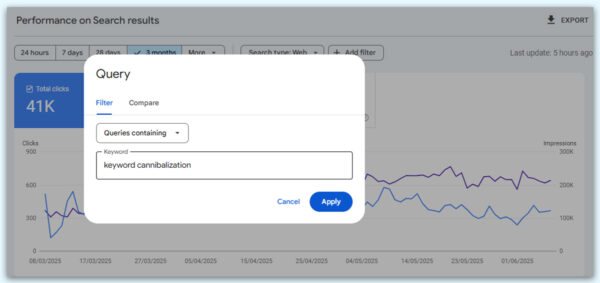
– Click on “Pages” to see the impressions & clicks
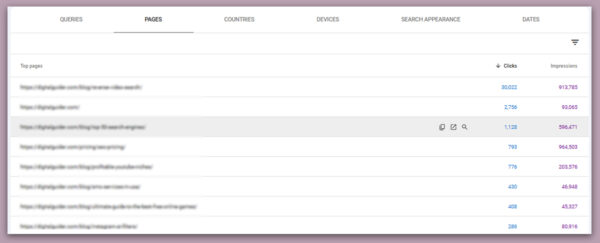
By using the data from GSC, you can plan your content strategy by understanding which pages should be redirected, consolidated, or revamped based on their performance.
2.2. Semrush
Semrush can be a great help to your website in identifying the keywords competing with each other on the same website. Here are some simple steps to follow.
-You will need an active premium subscription plan to access the full suite of SEO tools.
-Go to the “Position Tracking” tool, and select the Cannibalization Report. This will highlight if multiple pages from your site are competing for the same keywords.
-Filter the result by URL, keyword, or ranking position to pinpoint overlapping content. Semrush even grades your site’s cannibalization health, making it easier to prioritize fixes.
-Once cannibalization issues are identified, you can use Keyword Overview to refine your content strategy
-In addition to Semrush, tools like Ahrefs, Screaming Frog, and TrueRanker can also help you identify and make relevant changes to the cannibalised content.
Thus, streamlines the process and protects your site from SEO performance drops caused by cannibalised content.
7 Key Steps to Fix Keyword Cannibalization
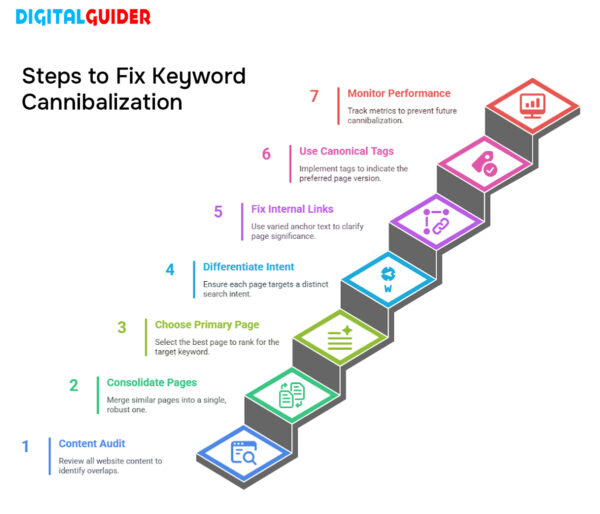
Identifying cannibalization on your website is the first step toward protecting your rankings and reclaiming your authority in search results.
There’s no need to panic — here are the most effective steps to fix keyword cannibalization and strengthen your SEO:
Step 1: Conduct A Thorough Content Audit
Review all the content on your website from the keyword to the intent. For an easy audit process, use a spreadsheet or SEO auditing tools, such as Semrush, GSC, or ScreamingFrog, to properly catalogue your URLs, focus keywords, and existing rankings with minimal time.
Pro Tip: Group your content by keyword themes to understand which ones overlap. Look for duplicate or very similar content targeting the same keyword.
Step 2: Consolidate Competing Pages
If two or more pages are aiming for the same keyword and presenting the same content, merge them into a single, more robust, and thorough page.
Pro Tip: Use a 301 redirect (or moved permanently HTTP status code) to send visitors from old pages to the main page, thus helping keep your link value.
Step 3: Choose a Primary Page
Decide the page you want to rank for the target keyword. This will be considered as your primary or “canonical” page for that subject.
Pro Tip: While choosing your primary page, consider pages with better backlinks, traffic, or conversion potential. It the stronger candidate to retain and can be optimized further.
Step 4: Differentiating Keyword Intent
Ensure that every page on your site has a distinct purpose and targets a different search intent — whether it be informational, transactional, navigational, or commercial—based on thorough keyword research.
Pro Tip: Use long-tail or secondary keywords to change the focus of pages and match them with different steps of the user journey (for example, “how to pick SEO tools” instead of “best SEO tools for beginners”).
Step 5: Fix Internal Links
Internal links inform search engines about which pages hold significance. When several pages interlink with identical anchor text, it creates confusion for search engines.
Pro Tip: Link contextually using varied and specific anchor text.
Step 6: Use Canonical Tags
In cases of similar or nearly identical content, implement a canonical tag to indicate the preferred version to search engines.
Pro Tip: Add (link rel=”canonical”) to in the <head> of the duplicate pages to avoid indexing issues.
Step 7: Monitor SEO Performance
After applying fixes, keep tracking keyword rankings, traffic, and engagement metrics for the affected pages. Keyword cannibalization may resurface as you introduce new content.
Pro Tip: Use position tracking tools like Ahrefs, SEMrush, or Google Search Console regularly to catch new overlaps.
Is Keyword Cannibalization Always a Threat?
Keyword Cannibalization- a threat- Not necessarily.
It’s crucial to keep in mind that the majority of web pages do not solely rank for a single keyword. In reality, pages that appear in the top 10 for a keyword frequently also rank for a hundred other keywords. This indicates that even if two pages on your website appear to be competing for the same keyword, they might still be benefiting your site by ranking for different sets of keywords.
📊 Let’s take a look at the study by Ahrefs based on 3 million search queries — it shows that pages ranking in the top 10 for one keyword also rank for hundreds of others, especially those in the higher positions:
What does this mean?
👉 If two pages rank for many different keywords, removing or merging them just to “fix” cannibalization might do more harm than good.
👉 You might actually lose traffic from all the other keywords those pages were ranking for.
So instead of panicking about one overlapping keyword, it’s smarter to look at the big picture: how are these pages performing overall?
TL;DR: Keyword Cannibalization – What You Need to Know (and Do)
As your website grows, so does the risk of unintentionally duplicating content, leading to keyword cannibalization. This happens when multiple pages target the same or similar keywords, potentially hurting your rankings instead of helping them.
What’s the risk?
When two or more pages compete for the same keyword, they split traffic, dilute authority, and confuse search engines, resulting in lost visibility.
How to detect it:
Use tools like Semrush, Ahrefs, or even a simple Google search trick to spot overlaps.
Why does it happen?
- Similar or overlapping content
- No clear keyword-to-page mapping
- Disjointed SEO efforts across teams
How to fix it:
Merge duplicate pages, assign unique primary keywords, implement redirects, and optimize your internal linking strategy.
The outcome?
Clearer keyword targeting, improved rankings, and more relevant organic traffic.
FAQs
Q: Does keyword cannibalization directly cause a Google penalty?
No. Google does not issue a manual or algorithmic penalty for keyword cannibalization. However, it can indirectly hurt your rankings by splitting link equity, confusing crawlers about which page to surface, and reducing CTR – all of which affect your organic performance over time.
Q: How do I know which page to keep when two pages cannibalize each other?
Keep the page with stronger backlinks, better conversion data, more organic impressions, or the one that more accurately matches the target search intent. Use Google Search Console to compare impressions and average position for both URLs before deciding.
Q: Can blog posts and product/service pages cannibalize each other?
Yes – this is one of the most common cannibalization scenarios. A blog post targeting “best SEO tools” and a service page targeting the same term can compete. The fix is to ensure each page serves a clearly different intent: the blog is informational, the service page is transactional. Adjust the keyword focus, content angle, or internal linking to reduce the overlap.
Q: Is keyword cannibalization more of a problem in 2025 with AI Search?
Yes, increasingly so. AI Overviews and tools like Perplexity look for the single most authoritative, comprehensive page on a topic. If your signals are split across two competing pages, neither may be selected as the source. Consolidating cannibalizing content improves your chances of being cited in AI-generated answers.
Q: How long does it take to recover from keyword cannibalization after fixing it?
Recovery typically takes 4 to 12 weeks depending on how quickly Google re-crawls the affected pages and how authoritative the consolidated page is. Submitting updated URLs via Google Search Console can speed up re-indexing.
Q: What’s the difference between a canonical tag and a 301 redirect for fixing cannibalization?
A canonical tag tells Google which version is preferred, but both URLs remain accessible. A 301 redirect permanently moves one URL to another, passing all link equity. Use canonicals when you need both pages to exist (e.g. for UX reasons). Use 301s when the old page has no standalone purpose.
Share This Article
About the Author: Kenji Tanaka

Related Articles
 October 26th, 2026 | 9 minutes read
Most customers don’t buy the first time they visit a website. They may need a reminder, helpful information, or a
- October 22nd, 2026 | 9 minutes read
Finding a dentist used to start with a recommendation. Today, it often starts with a search. When patients face any
- October 19th, 2026 | 8 minutes read
The next patient for your dental office is probably already searching for you. The question is: Will they find you
- October 12th, 2026 | 6 minutes read
Imagine someone needs a lawyer today. What do they do? They pull out their phone, search Google, compare a few