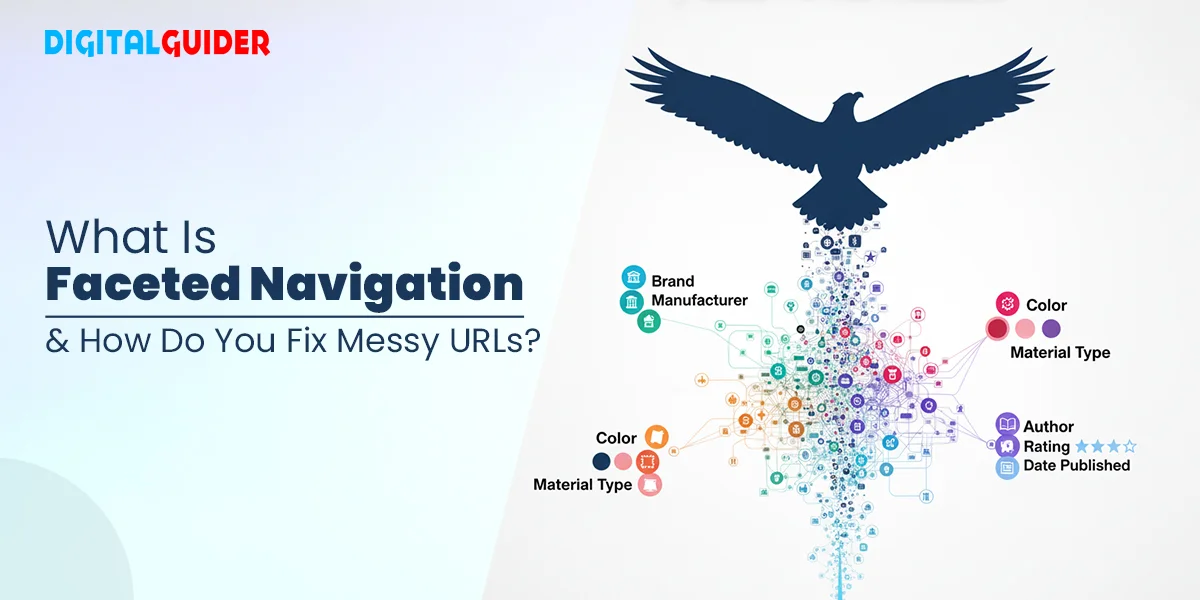
Synopsis Faceted navigation is awesome for users, but a nightmare for SEO if left unchecked . Messy URLs, duplicate content, and wasted crawl budget can drag your rankings down. In this guide, we break down what faceted navigation really is, the SEO traps to avoid, and the best (and worst) practices to keep your site clean, crawlable, and conversion-ready.
E-commerce websites are like massive mazes, where shoppers can easily get lost among the endless listings and filter options. That’s when faceted navigation helps customers to customize their search and make it a happy purchase.
These easy-going searches can also create an ever-growing tangle of URLs, confusing search engines and hurting SEO (if left unseen). In this blog, we will explore the following sections
- What is faceted navigation?
- How are filters different from facets?
- How does it work?
- Common challenges caused
- And practical ways to fix this chaos
Faceted navigation is defined as a UX hierarchy that allows users on the site to choose filters or facets like color, price, occasion or delivery time. It’s widely used in e-commerce to facilitate faster and easier product discovery.
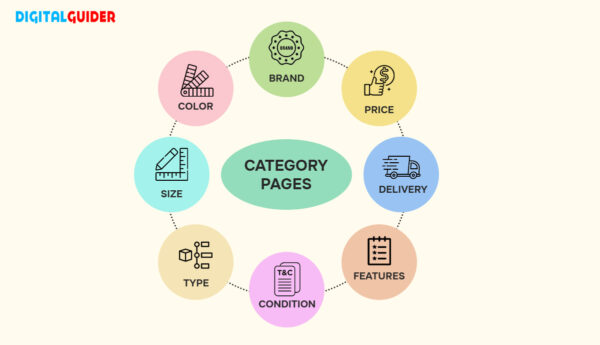
People also term faceted navigation as “faceted search” or “guided navigation”, allowing users to refine search results quickly in an easy way.
Faceted navigation examples include browsing Amazon for earphones, or booking flights & hotels in Expedia or finding a paper in JSTOR, you’ll notice options to filter results by facets (attributes) like colour, price range, customer reviews, popularity, genre or year of publication. This ability to refine results across multiple attributes is exactly what faceted browsing is all about.
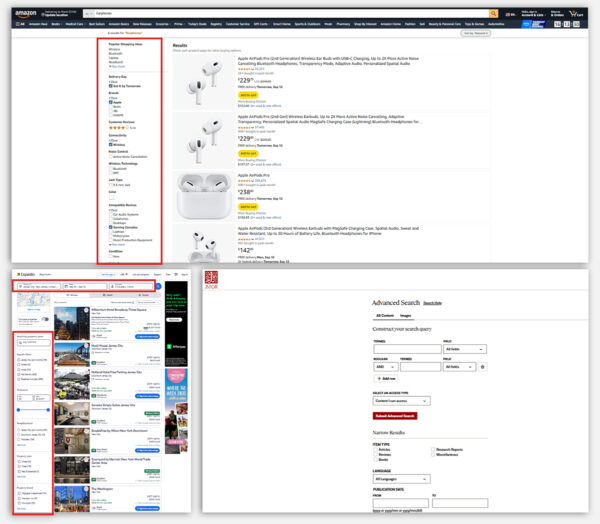
| 📌 Types of sites that use faceted search for better UX are:
|
Faceted search is widely used on e-commerce websites, digital libraries, and news portals, helping to improve UX (user experience). It allows users to efficiently use multiple filters and refine their search results, reduce browsing time, and thus promote and discover relevant content or products more effectively. These faceted data not only keep users engaged but also drive higher conversions.
Instead of endless scrolling or repeating search queries, faceted data provides users with greater control over their search queries, making the experience smoother and frustration-free.
The key features that make website facets important for improved UX are:
Prevents information overload:
A quick, intuitive, and effective search experience leads to higher user satisfaction, which can drive repeated visits and build customer loyalty for specific characteristics, significantly minimizing the time and effort required to answer their search query.
New content & product discovery:
By presenting users with different curated content and product features, faceted data highlights attributes or options they may have overlooked, thereby enhancing engagement and potentially boosting conversions.
Boosts User satisfaction:
Facets simplify extensive content libraries by allowing users to browse and explore choices in an organized manner, rather than depending on extensive, wide-ranging searches.
Simplifies Navigation:
A fast, user-friendly, and efficient search experience fosters greater user satisfaction, which can encourage return visits and strengthen customer loyalty.
While faceted search makes the browsing experience easy and manageable, many confuse it with simple filters, and sometimes they are used interchangeably.
Understanding the difference between filters and facets is crucial before diving into how faceted navigation works and the SEO challenges it creates.
Facets and filters are two different ways to refine users’ search results. Though these terms are used interchangeably and considered the most common misconception among users. These are sophisticated tools used to help users find the distinct search features.
They work together to narrow down search results and play a distinct role in the search experience. But with this similarity, they hold differences as well, especially in how they are applied and used.
Let’s look into the difference between filter vs facets (faceted navigation), and understand the strategic implementation of these tools.
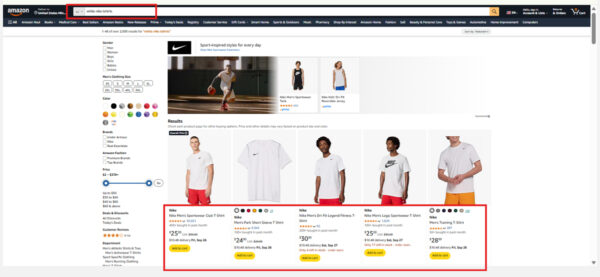
Search FilterSearch filter or filter is the broader categories of a website that help the user eliminate options based on initial criteria. It is a specific search query and is more elaborate and specific. Example: A search query like “white Nike shoes” works as a filter. It directly eliminates all irrelevant results (e.g., non-white items, non-Nike brands, or products that aren’t shoes). The search itself acts as a filter, narrowing down the dataset from the start Filters remain constant, providing a reliable guide to narrow down the initial search. Simple analogy: Filter = Gatekeeper (blocks irrelevant things right away). | Faceted Navigation (Facets)Faceted navigation or facets dynamically change with each search, refining the results based on specific features. It’s used in the front end to limit the search results to a more specific set, rather than eliminating the results. Example: If you search for a broad query like “T-shirt,” you can then use facets such as color, brand, size, or price range to refine the results. Facets don’t eliminate; instead, progressively narrow down options based on attributes. Facets adapt to each search by providing filters that match the unique aspect. Simple analogy: Facet = Fine-tuning dial (lets you adjust results to your exact preference) |
Let’s look into the example showing the difference between filter vs facets
- Filter section in an e-commerce site for query “white t-shirt nike”
- Example Facets section in an e-commerce site “t-shirt”
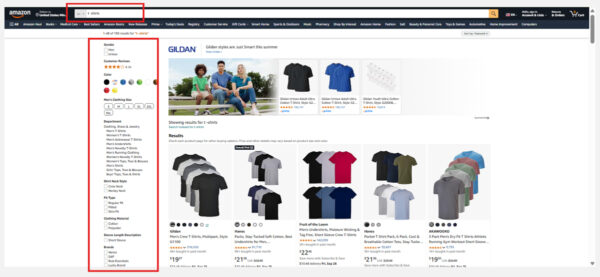
These differences conceptualize how filters and facets are different, but both play a crucial role in improving UX. But mixing them up often leads to misconceptions.
Further, in this blog, let’s clear up some of the most common misconceptions about faceted navigation.
Common myths/misconceptions about faceted Search
Faceted navigation, as it is common in ecommerce websites, the more it is also surrounded by a lot of common myths. These myths/ misconceptions can be harmful, leading to wasted crawl budget, duplicate content issues and disappearing pages from Google’s index.
So, let’s clear the air and talk about the most common misconceptions around faceted navigation:
# Myth 1:
Faceted search has zero SEO value; it’s a myth that can cost you traffic on your site. Some facet combinations, like “Crocs slippers at $50”, can actually bring traffic. The trick is to know which combination can be indexed and which one should be hidden.
# Myth 2:
Facilitated navigation is always bad for SEO; it is a significant misconception which can happen if faceted data and navigation are poorly implemented. When done correctly, it can improve the UX by providing efficient filtering and sorting options.
# Myth 3:
Faceted searches automatically create duplicate content, though faceted searches can create similar URLs with different filtering options, isnt harmful if managed correctly. Proper use of canonical tags tells the search engine the actual content conversion and gets indexed, preventing the duplicate content issue.
# Myth 4:
AJAX or JavaScript facets are invisible to Google, a truth that’s not true anymore. Google can render JavaScript, which means those AJAX-based filters can still end up in the index if you don’t handle them properly.
# Myth 5:
Faceted navigation always creates “spider traps” that confuse search engines. It’s a classic myth, but in reality not true. Spider traps happen when faceted filters create endless URL combinations with no unique value. With proper controls like canonical tags, noindex rules, or limiting crawlable parameters, faceted navigation can be SEO-friendly and still improve user experience.
# Myth 6:
Blocking parameters in robots.txt solves everything. Robots.txt is a good way to stop crawlers from wasting time, but it can also block pages with actual ranking potential. Excess of anything is bad; over-blocking is just as bad as over-indexing.
# Myth 7:
Adding filters always causes index bloat. It is not necessarily possible; Index bloat only happens when every filter creates duplicate or low-value pages. With some strategies and rules, like using canonical tags or setting crawl priorities, the website owner can keep filters clean and search-friendly.
These myths are more than just misunderstandings — they lead to real SEO headaches.
So now, let’s get into the actual working faceted search and the creation of URLs.
Faceted navigation or faceted browsing is an easy way for users to get what they want to buy. It might look simple in the front end with checkboxes and left sliders that let you refine a product list. But behind this clean interface is a powerful system that dynamically generates new URL combinations every time a user applies a filter or facet.
📌Here’s a step-by-step example of how facetec navigation works:
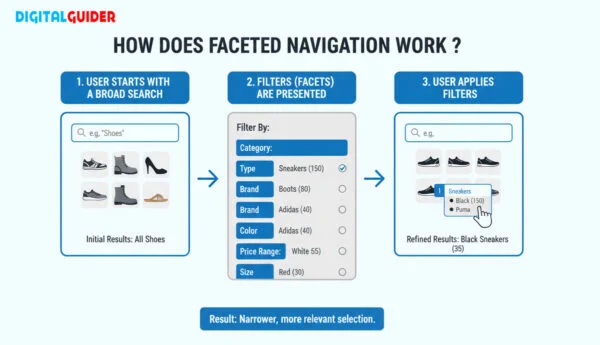
Broad search
A user starts with a broad search like “ stilettos heels”
Initial URL created:
| www.example.com/heels |
First facet applied
User applies the first facet, i.e “brand” (Jimmy Choo)
URL is updated to:
| www.example.com/heels?brand=jimmychoo |
Second facet applied
User applies the second facet, i.e. “color”(red)
URL is updated to:
| www.example.com/heels?brand=jimmychoo&color=red |
Similarly, more filtering can be done by adding other attributes like size, price, style and delivery time and more. In this process, a single product set can produce hundreds or even thousands of unique URLs like
| www.example.com/shoes?brand=nike&color=red&size=10&price=$50-100 |
Faceted searches reply to the technical elements that shape how URLs are created and crawled:
- URL parameters: These strings monitor filters and create new, indexable URLs for every combination
- Session IDs: Additional URL strings are incorporated to recognize a browsing session. If not handled properly, they can create numerous nearly identical pages.
- AJAX or JavaScript calls: Employed to dynamically load filtered results. If they are not optimized for SEO, crawlers might overlook or misunderstand the content.
📌To understand these SEO terms well, read on SEO Terms & Definitions: Ultimate’s Guide To SEO Glossary
Faceted navigation offers a seamless and customized shopping experience, travel experience and educational purpose for users of different purposes on the web.
On the other hand, it might create an uncontrolled chaos for search engines with variations in URLs by consuming crawl budget, which leads to duplicate content problems, weakening link equity across pages (related pages).
This is why faceted browsing is frequently characterized as both an enhancement for user experience and a challenge for SEO. Let’s look into the SEO issues and fixes caused by faceted search.
Faceted navigation is great for users, but can be very helpful or absolutely detrimental from an SEO perspective. If not managed properly, it can overwhelm both users and search engines.
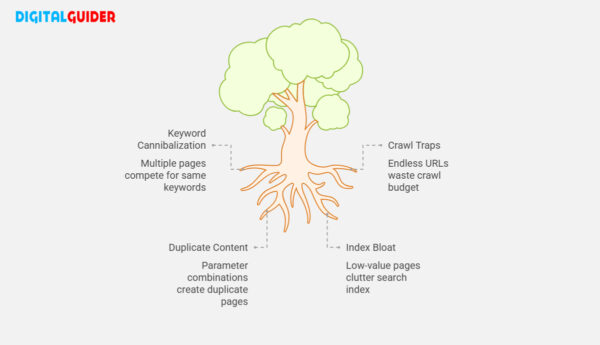
Let’s explore the key SEO & UX challenges and explore their best fixes possible, along with tools to help detect and resolve them.
Keyword Cannibalization
Definition:
Keyword cannibalization is an SEO problem where multiple pages on the same website compete for the same search terms, diluting the ranking of the website and confusing the search engines.
The Challenge:
Every new attribute (face) (brand, color, size, price, etc.) chosen by a user generates a unique URL. Many of these URLs target the same or very similar keywords. As a result, multiple pages compete for the same ranking in search engines. This dilutes authority, spreads link equity thinly, and often prevents the most relevant page from ranking.
The Fix:
The cannibalization of keywords can be fixed with the following fixes:
- Using canonical tags on the primary category pages to extract the duplicate facet pages
- We can create dedicated landing pages or a lead capture page for high-intent keywords like “Nike running shoes” or “white men’s t-shirt” while canonicalizing others.
- Conducting a keyword mapping can help avoid overlapping of intent and help avoid Keyword cannibalization.
Tools to Detect:
For a quick and easy understanding, we can use SEO tools to check the cannibalization issues
- Screaming Frog SEO Spider (duplicate content and canonical checks)
- Ahrefs or SEMrush (identify cannibalization in keyword reports)
Crawl Traps
Definition:
Crawler traps, also known as “spider traps,” are structural issues within a website that hurt a crawler’s ability to explore your website. These issues result infinite number of irrelevant URLs leading to duplicate content and a loss in crawl budget.
The Challenge:
Faceted navigation can lead to endless crawl loops by creating many deep URLs that may not need to be indexed by a search engine.
For example, selecting multiple filters may generate ‘n’ number (infinite) of URL combinations like,
(size → color → price → reorder → back to size).
Thus, it wastes crawl budget on low-value, repetitive pages instead of indexing your important product/category pages.
The Fix:
Crawl trap issues in faceted search can be fixed by:
- Implementing robot.txt disallow rules to block unimportant parameter combinations.
- Using nofollow on filter links that don’t add a unique value
- Setting crawl parameter rules in GSC (Google Search Console) can help handle query strings.
Tools to Detect:
- DeepCrawl / Lumar (detect crawl loops and traps)
- Botify (crawl path analysis)
- Google Search Console (parameter handling reports)
Duplicate Content
Definition:
Duplicate content refers to the part of the content or text that slightly resembles or nearly resembles across different websites, or even within the site. It severely impacts SEO and the duplicate content consideration.
The Challenge:
Faceted navigation often adds multiple query parameters to URLs (e.g., ?brand=jimmychoo&color=black&size=6). These combinations may display nearly identical products, creating duplicate or thin-content pages. When search engines crawl these duplicates, it confuses indexing signals and risks penalties.
The Fix:
The duplicate content issues due to the multiple parameters can be fixed by:
- Apply canonical tags (rel=”canonical”) to point parameterized URLs back to the main category or preferred filtered page.
- Using noindex tags (e.g., <meta name=”robots” content=”noindex” />) for low-value facet pages that dont need to be indexed.
- Merge critical filter combinations into static, SEO-friendly landing pages
- Prepare URL parameter handling in GSC to reduce unnecessary crawling
Tools to Detect:
- Screaming Frog SEO Spider (duplicate URL reports)
- Ryte (duplicate and thin content analysis)
- SEMrush Site Audit (parameterized URL detection)
Index Bloat
Index bloat is an SEO issue that refers to a situation where Google crawlers index excessively low-quality or irrelevant pages on a website. It can reduce a website’s authority and relevance ranking in search engine results.
The Challenge:
Faceted browsing can create thousands of low-value or early duplicate pages, all of which may be indexed by Google. This influx of irrelevant variations can clutter the index, making it more difficult for search engines to recognize and prioritize the important pages.
The Fix:
Index bloat in faceted navigation SEO can be addressed and identified by:
- Applying a “noindex, nofollow” directive on non-essential filter pages to prevent them from appearing in search results while still passing link equity.
- Utilizing robots.txt rules to block the crawling of unnecessary parameter combinations.
- Prioritizing parameter handling in Google Search Console to instruct Google on which URLs should be indexed.
Tools to Detect:
- Google Search Console Coverage Report (check for indexed low-value pages)
- SEMrush Site Audit (identify index bloat issues and warnings)
- Ahrefs Site Audit (spot unnecessary indexed pages and parameter-based duplicates)
Faceted navigation SEO is not a complete nightmare. It can enhance SEO and UX if used with the right approach. These adjustments can be managed by keeping a balance between user convenience with search engine requirements.
Below are some of the best and worst practices based on Google’s recommendations:
✅Best Practices
Use Standard URL Parameters
The parameter should always be structured as key=value, and to join multiple parameters use of “&” should be made.
Example: www.example.com/category?category=t-shirt&sort=high-to-low
Prioritize on Searcher-Value Filters
Sorting between non-valuable filters and valuable filters is crucial. It helps the bot to identify what to crawl and what to avoid. Parameters like brand, category, size, and price are crucial and crawlable as they align with real user searches.
Whereas, non-valuable filter search parameters (i.e.low to high or high to low) should be blocked.
Disallowing Useless URLs
Add session IDs, tracking codes, timestamps, etc., as URL parameters but disallow them via robots.txt or configure in Google Search Console.
Use Pagination Correctly
Implement rel=”next” and rel=”prev” for paginated series or by using a canonical to a “view all” page if it provides a good user experience.
Maintain a Clean Sitemap
Ensure your XML sitemaps include only index-worthy URLs — no session IDs, duplicate variants, or parameter-heavy links.
❌ Worst Practices
Non-Standard Encoding of Parameters
Avoid using commas, brackets, or any symbols other than = and &.
Example of poor practice:
| www.example.com/category?[category:gummy-candy][sort:low] |
Using Directories for Non-Content Values
Never include session IDs or tracking codes in file paths.
Poor example: www.example.com/c123/s789/product?whitet-shirt
Good example: www.example.com/product?item=whitet-shirt&size=XL
Infinite URL Variations from User-Generated Values
Avoid creating crawlable URLs with values such as latitude/longitude or “days ago.”
Example: www.example.com/article?days-ago=7
Appending Parameters Without Logic
Do not duplicate or endlessly stack categories/parameters.
Poor example: www.example.com/product?cat=gummy-candy&cat=lollipops&cat=gummy-candy
TL;DR
Faceted navigation is a powerful tool for users, but only if managed properly. Without regular audits and a lack of SEO knowledge, it can become a silent SEO liability.
If not looked upon and left unchecked, faceted search or faceted browsing can lead the site to crawl budget waste, duplicate content, and index bloat, affecting the ranking ability.
But, the good news is?
With technical fixes, thoughtful filter prioritization, and regular website audits, you can keep faceted navigation both SEO-friendly and user-friendly, letting your most valuable pages shine in the SERPs.
Businesses that take the time to optimize their navigation will not only avoid penalties and ranking drops but also boost visibility, user experience, and conversions.
👉 Think of faceted navigation as a strategic SEO asset, not just a design feature. It’s important for many websites, but not always essential for every site.
FAQs
Q1. How can I spot faceted navigation issues early?
A1. Watch for duplicate URLs, sudden crawl spikes, or keyword overlap — classic signs your filters are running wild.
Q2. How does faceted navigation mess with crawl efficiency?
A2. Too many URL combinations can confuse crawlers, wasting crawl budget on endless duplicates instead of key pages.
Q3. Should I allow search engines to crawl every facet?
A3. No. Only allow indexing of high-value combinations; block low-value ones using noindex or robots.txt.
Q4. What’s the best way to control duplicate pages from facets?
A4. Combine canonical tags with noindex and smart internal linking — it’s teamwork, not a solo fix.
Q5. What’s the risk of ignoring faceted navigation SEO?
A5. You’ll end up with index bloat, diluted authority, and lost rankings — a silent SEO killer most sites overlook.
Q6. Why do SEOs love clean, static URLs?
A6. They’re easier for users and crawlers to understand — plus, they help avoid messy parameter chaos.
Q7. Which CMS platforms handle faceted navigation best?
A7. Shopify, Magento, and WooCommerce offer built-in or plugin-based solutions, but SEO settings still need customization.
Q8. How can I test if my filters are crawlable?
A8. Use tools like Screaming Frog or site:search in Google to see if parameterized URLs are being indexed.
Q9. Should faceted navigation be different for desktop vs. mobile?
A9. The logic remains the same, but mobile UX should prioritize collapsible or swipe-based filters for ease.
Q10. How often should I audit my faceted navigation setup?
A10. Once every quarter, or after major website/product catalog updates, to catch index bloat or duplicate issues early.
Share This Article
About the Author: Mathew

Related Articles
 October 26th, 2026 | 9 minutes read
Most customers don’t buy the first time they visit a website. They may need a reminder, helpful information, or a
- October 22nd, 2026 | 9 minutes read
Finding a dentist used to start with a recommendation. Today, it often starts with a search. When patients face any
- October 19th, 2026 | 8 minutes read
The next patient for your dental office is probably already searching for you. The question is: Will they find you
- October 12th, 2026 | 6 minutes read
Imagine someone needs a lawyer today. What do they do? They pull out their phone, search Google, compare a few