Synopsis A sitemap is a file that helps search engines crawl and index your website more efficiently. This guide explains what a sitemap is, why it’s important for SEO, the different types (XML, HTML, image, video, news), and how to create and submit one to Google. You’ll also learn best practices, common issues, and FAQs to ensure your sitemap supports stronger rankings and visibility.
Imagine you’re organizing a huge event with hundreds of guests.
You want everyone to easily find their way to the right spots—whether it’s the dining area, dance floor, or restrooms. Without a clear map or signs, people might get lost, frustrated, or leave.
A sitemap plays a similar role for your website. It helps search engines like Google navigate through your pages and understand the structure, leading to better visibility and traffic.
In this blog, we’ll break down the importance of sitemaps, how to optimize them, and the tools you can use to build and maintain a well-structured website.
What is a Sitemap?
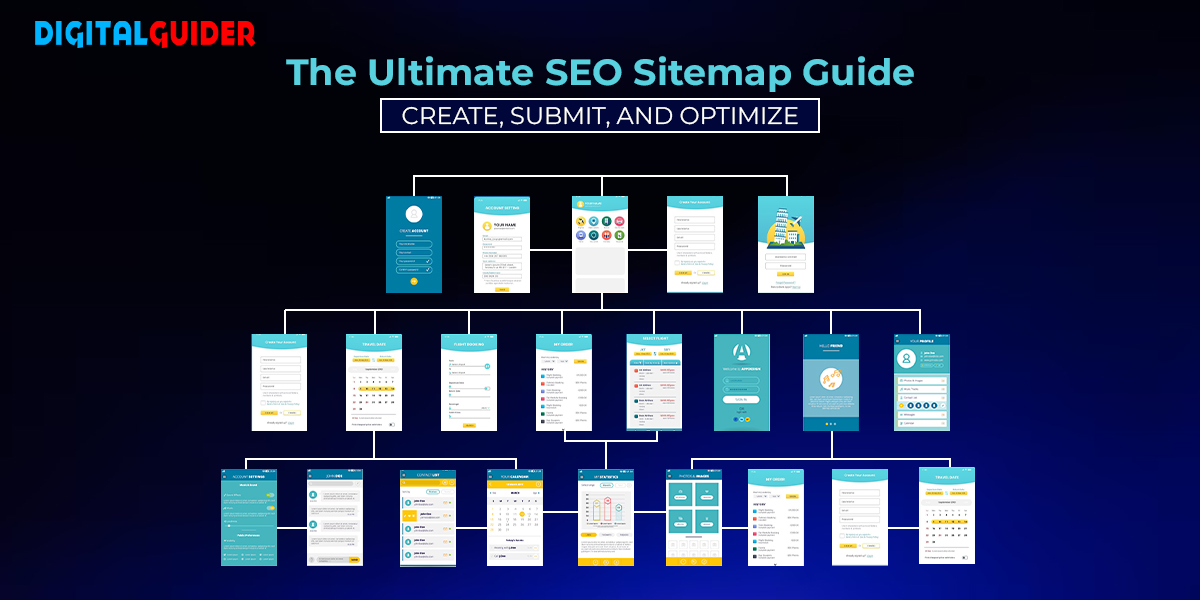
A sitemap is essentially a blueprint of your website that helps search engines find, crawl, and index all of your website’s content. It lists all the important pages of your website in an organized structure.
Think of it as a backstage pass that tells Google where everything is located on your website.
Why Sitemaps Are Important for Your SEO Strategy?
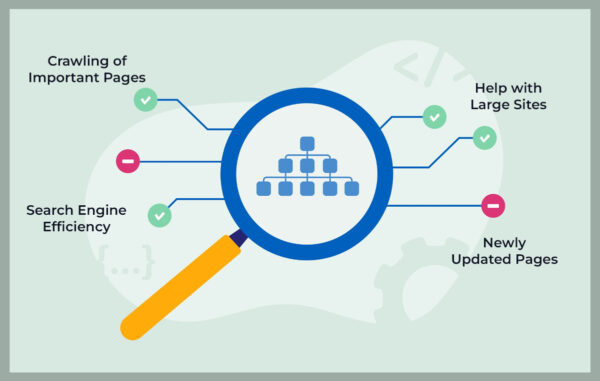
Sitemaps are crucial for SEO because they enhance the discoverability of your website by search engines.
Sitemaps don’t guarantee higher rankings, but they:
Help search engines discover new pages faster.
Ensure deep or orphan pages aren’t missed during crawling.
Highlight the most important content on your site.
Speed up indexing for large or frequently updated websites.
Support rich media and multilingual content indexing.
👉 Google’s official guidelines on sitemaps confirm that sitemaps are especially useful for big, complex, or new websites.
Types of Sitemaps
There are two main types of sitemaps:
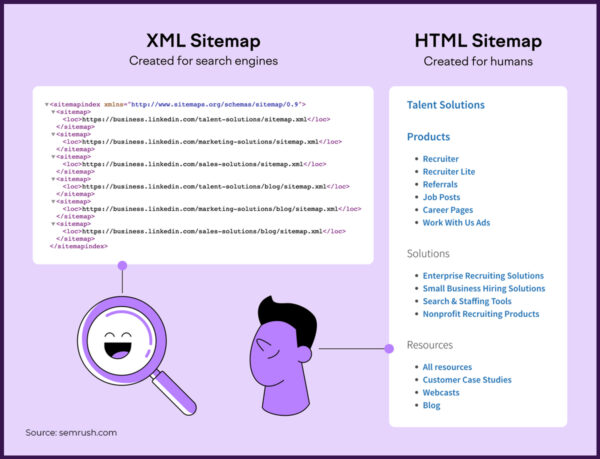
- XML sitemaps: Specifically created for search engines, providing them with detailed information about your website’s content.
- HTML sitemaps: Designed for users to help them navigate your website easily.
XML Sitemaps
An XML sitemap is a specific type of sitemap that is designed primarily for search engines. It is written in XML (Extensible Markup Language) and serves as a roadmap, listing all the essential URLs on a website.
In short XML sitemap is:
Designed for search engines.
Lists URLs plus metadata (last updated date, change frequency, priority).
These sitemaps look something like this:
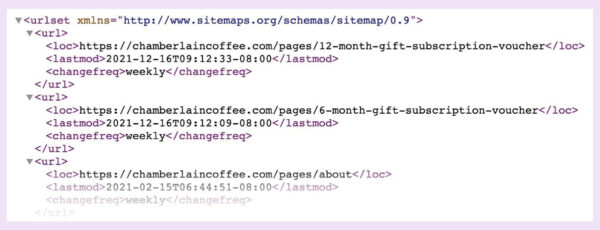
An XML sitemap not only lists the URLs but also provides additional information about each URL, such as:
When was the page last updated?
How often will the page change (e.g., daily, weekly, monthly)?
The page’s importance is relative to other pages on the site.
By providing this information, an XML sitemap helps search engines prioritize which pages to crawl and index first. This is especially useful for large websites or sites with complex structures, where search engines might otherwise miss some pages.
An XML sitemap is a critical tool for improving a website’s SEO. It ensures that search engines can easily find and index all its important pages.
HTML Sitemaps
An HTML sitemap is a page on your website that lists and links to all the crucial pages in a user-friendly format.
Unlike XML sitemaps, which are designed primarily for search engines, HTML sitemaps are designed for human visitors. They help users navigate your site by providing a clear overview of its structure, making it easier to find specific content.
Here’s an example of an HTML sitemap from H&M Group:
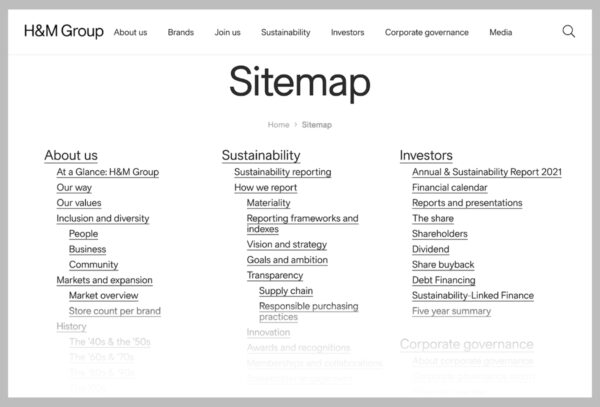
As you can see, it’s a standard page with links to various pages organized hierarchically.
Even though HTML sitemaps are not as prevalent these days, there are still some voices in the SEO community for their importance. This is because HTML sitemaps can improve your internal linking and offer an additional navigation feature for complex websites containing numerous pages.
However, avoid relying solely on an HTML sitemap for effective site navigation components (like menus, footer links, breadcrumbs, categories, etc.).
Google’s John Mueller spoke to this:

In other words, users shouldn’t need a sitemap to navigate their website effectively.
Why a Good Sitemap Structure Matters?
A well-organized sitemap ensures that search engines can quickly and efficiently crawl your site, making sure that even the deepest pages are indexed. The more organized your site, the more likely search engines are to prioritize your pages.
Google says, A sitemap helps search engines discover URLs on your site, but it doesn’t guarantee that all the items in your sitemap will be crawled and indexed. However, in most cases, your site will benefit from having a sitemap.
How Often Does Google Crawl Sitemaps?
Google regularly crawls sitemaps, but the frequency can vary depending on factors like how often your content is updated and the overall size of your site.
Generally, Google may crawl a website anywhere from once every three days to four weeks. To know how frequently Google visits your sitemap, you can use tools like Google Search Console, which offers insights into your website’s crawl stats and performance.
How to Find a Sitemap?
Finding the sitemap of any website is quite simple. You can typically find it by adding /sitemap.xml or /pages-sitemap.xml to the website’s main URL.
Below are some best ways to find a sitemap on the website:
1. Manual Check
Locating an XML sitemap is a straightforward process. Typically, you can find a website’s XML sitemap at this URL address: https://digitalguider.com/sitemap.xml.
It’s important to note that if the website uses WordPress and the Yoast SEO plugin, you’ll often be redirected to a sitemap index (/sitemap_index.xml). This is a common occurrence and nothing to be concerned about.
In that case, it’ll look like this:
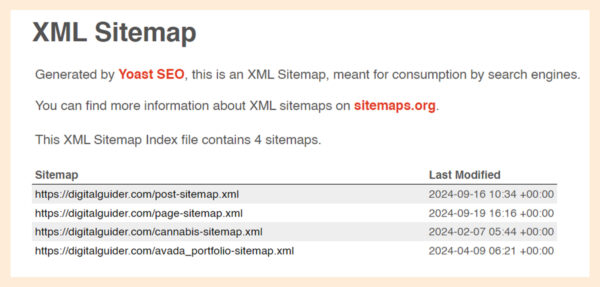
As you can see, a sitemap index is a simple file that lists all the sitemaps a website has. (Yes, there can be multiple sitemaps.)
To see the actual sitemap, click the link to the specific sitemap in the index.
2. Search Operators
Search operators are special commands you can add to search queries to return more specific results.
Here are some search operators you can use to find a website’s sitemap:
- “site:[domain.com] filetype:xml”
- “site:[domain.com] inurl:sitemap”
- “site:[domain.com] intitle:sitemap”
Simply enter the operator into the search bar and replace “domain.com” with the actual website’s address.
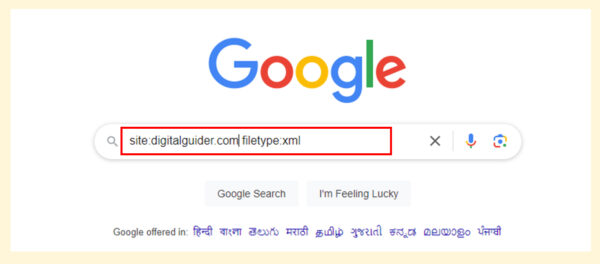
The search results should return the location of the website’s sitemap—if it exists and the search engine you’re using has indexed it.
3. Google Search Console
If you have access to your website’s Google Search Console (GSC), there’s a chance the sitemap has been submitted there.
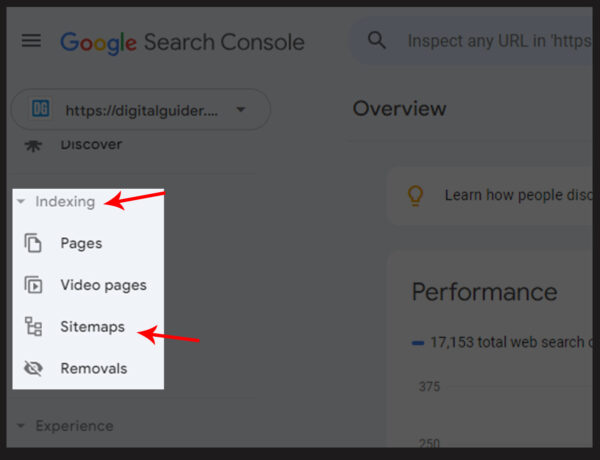
Head to the “Sitemaps” report in the “Indexing” section of the left menu.
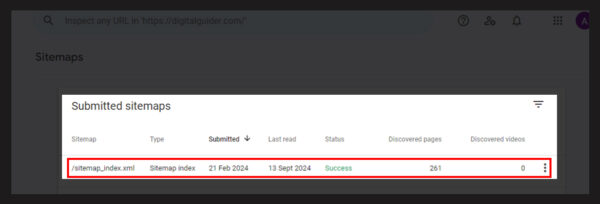
Here, you’ll see a section called “Submitted sitemaps.”
If someone has submitted an XML sitemap before, you’ll find its URL in the list.
4. Robots.txt
Your robots.txt file is a powerful tool that guides search engine crawlers, giving you the control to dictate which sections of the website they should crawl and which they should avoid.
Remember, the robots.txt file should be placed in the root folder of your site, which is typically located at “https://digitalguider.com/robots.txt.”
If the robots.txt file follows best practices, it’ll link to the website sitemap. Just search for “sitemap” within the robots.txt file.
The section that links to a sitemap in the robots.txt file will be easily identifiable, as it will look something like this:
How to Create a Sitemap?
1. Choose a Sitemap Generator Tool
Building a sitemap manually can be tedious, especially for large websites. Thankfully, there are tools like sitemap generator websites that can automate this process.
For example, tools like SearchAtlas offer features that create, update, and optimize your sitemap automatically.
2. Include Categories in Your XML Sitemap
As a website owner, it’s your responsibility to ensure that when creating an XML sitemap, you include your website’s major categories. This proactive step helps search engines understand the structure of your content better, especially if your site covers various topics or services.
For example, if you run an e-commerce store, you should ensure that each product category (e.g., electronics, clothing, accessories) is included in the sitemap. This strategy helps search engines give priority to the key sections of your website.
3. Don’t Forget About Pages-Sitemap.xml
Many website owners need to pay more attention to the importance of the /pages-sitemap.xml file. This file lists all the individual pages of your site, which is crucial for ensuring all your content gets crawled and indexed.
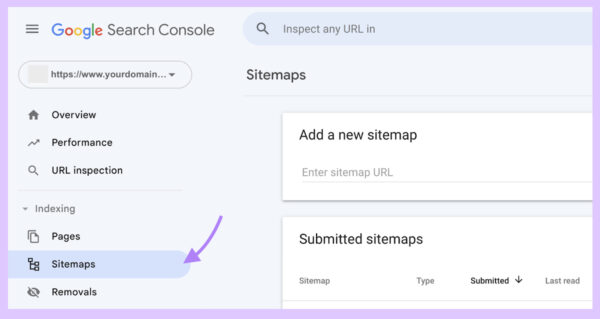
4. Submit Your Sitemap to Google Search Console
Once your sitemap is ready, the next step is to submit your sitemap to Google Search Console. This process helps Google quickly discover your new pages, leading to faster indexing and potentially higher rankings.
Best Practices for Optimizing Your Sitemap
Follow these best practices to ensure your sitemap continues to serve your website well:
Include only indexable, canonical pages.
Exclude duplicate content, tag pages, and search result pages.
Keep the file size under 50 MB and fewer than 50,000 URLs per sitemap.
Update the sitemap regularly when new content is published.
Use a sitemap index file if your site has multiple sitemaps.
Common Sitemap Issues and Fixes
| Issue | Cause | Fix |
|---|---|---|
| Broken URLs | Deleted or redirected pages included | Update sitemap & remove outdated URLs |
| Non-canonical URLs | Duplicate or parameterized URLs | Ensure sitemap lists only canonical versions |
| Blocked URLs | Pages disallowed in robots.txt | Remove blocked pages or update robots.txt |
| Incorrect format | Missing tags, invalid XML | Validate with Google’s Sitemap Testing Tool |
Final Thoughts
A well-structured sitemap is essential for boosting your website’s SEO and driving more traffic. It helps search engines like Google understand the hierarchy and importance of your content, which can improve your rankings. Regularly update and optimize your XML sitemap, and always submit it to Google Search Console for the best results.
👉 Need help with sitemap creation or technical SEO? Contact Digital Guider for expert assistance.
Sitemap FAQs
Q1. Do I Need a Sitemap for a Small Website?
Ans. Not always. Google can crawl small sites (a few hundred pages) without one. But even small business sites benefit if they add new content often.
Q2. What Shouldn’t Be Included in a Sitemap?
Ans. Avoid including dynamic pages, low-quality content, or pages that are not publicly accessible.
Q3. How Big Is Too Big for a Sitemap?
Ans. While there’s no strict limit, excessive sitemaps can slow down your site and might not be fully processed by search engines.
Q4. How Often Should I Generate a Sitemap?
Ans. Ideally, generate a sitemap whenever you make significant changes to your website’s structure or content. At a minimum, update it monthly.
Q5. How often should I update my sitemap?
Ans. Update whenever you add or remove important pages. For dynamic sites (e-commerce, news), automated sitemap updates are best.
Q6. Do sitemaps affect SEO?
Ans. Yes, sitemaps can positively impact SEO. To make your website visible and SERP, contact us now at info@digitalguider.com
Q7. What should not be included in a sitemap?
Ans.
- Non-indexable pages
- Parameterized URLs (e.g., tracking links)
- Duplicate pages
- 404 or redirected URLs
Q8. Can I have more than one sitemap?
Ans. Yes. Large sites use multiple sitemaps (for images, videos, or sections) combined under a sitemap index file.
Q9. What makes sitemaps different from a robots.txt file?
Ans. A sitemap lists every page you want to be indexed, while a robots.txt file tells search engines which pages not to crawl.
Q10. Can I include all pages of my website in my sitemap?
Ans. Yes, you can, but exclude low-quality or duplicate content.
Share This Article
About the Author: Steven Tyler

Related Articles
 July 9th, 2026 | 9 minutes read
SEO can often feel like a marathon without an end goal. You are constantly tweaking minor codes, creating endless keyword
- July 6th, 2026 | 13 minutes read
Let’s be honest, running a business in Columbus in 2026 is not the same as it used to be. Our
- June 29th, 2026 | 8 minutes read
A few years ago…I thought SEO was something only big companies with huge marketing budgets could afford. Every time I
- June 22nd, 2026 | 10 minutes read
Finding a good SEO company in Seattle is easy. Finding one that's affordable and delivers real results? That's the hard