Updated: Mar 05, 2026
In this blog, we will discuss:
- What is a CDN?
- How does CDN work?
- What content does a CDN deliver?
- Why Your Website Needs a CDN
- SEO Benefits of Using a CDN
- Common CDN Pitfalls
What is a CDN?
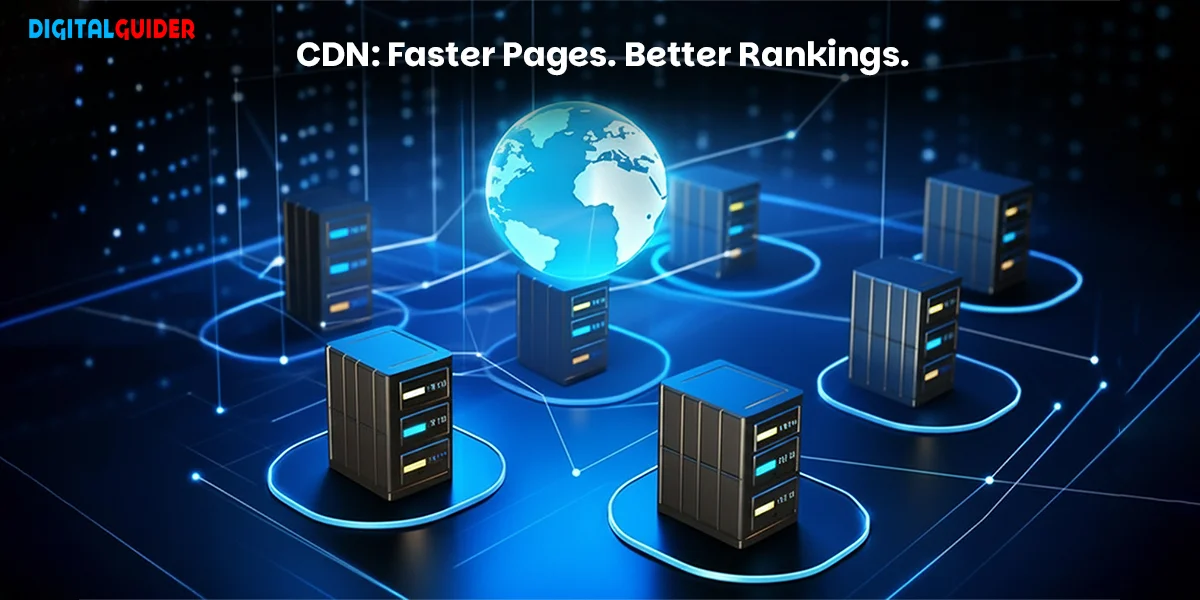
Think of a Content Delivery Network (CDN) as a global chain of local convenience stores for your website’s data. Instead of forcing every visitor to travel to your “main warehouse” (your origin server) in New York or London, a CDN serves high-quality content from the Edge Server closest to them.
The Technical Reality
In more formal terms, a CDN is a geographically distributed group of servers that work together to provide fast delivery of Internet content. A CDN allows for the quick transfer of assets needed for loading Internet content, including:
- HTML pages
- JavaScript files
- Stylesheets (CSS)
- Images and Videos
But in 2026, a CDN is more than just a speed booster—it’s a critical SEO requirement. Because Google’s ranking algorithms now prioritize Interaction to Next Paint (INP) and instant mobile responsiveness, the physical distance between your data and your user can be the difference between Page 1 and Page 10.
CDN vs. Web Hosting: What’s the Difference?
A common misconception is that a CDN replaces web hosting. In reality, they are partners.
Web Hosting is your website’s “home.” It stores your original files (HTML, databases, and code) on a single server (or cluster) in one specific location. Without hosting, your site has no place to live.
A CDN is like a “delivery service” for that home. It takes copies of your files and places them in “storage units” (Edge Servers) all over the world. When someone visits your site, the CDN delivers the content from the closest storage unit instead of making the user travel all the way to your home server.
| Aspect | Web Hosting (The Origin) | CDN (The Edge) |
| Primary Role | Stores and serves the “Master” files. | Distributes copies of files for speed. |
| Location | One fixed data center. | A global network of 100+ locations. |
| Data Type | Handles Dynamic & Static content. | Primarily optimizes Static content. |
| Speed | Slower for distant users. | Consistent, fast speed worldwide. |
| Security | Basic server-level firewalls. | Advanced DDoS & WAF protection. |
| The Verdict | Mandatory: Every site needs it. | Optional but Critical for growth. |
How a CDN Works: The Journey from Origin to Edge
A CDN works by storing “cached” copies of your website across a global network of Edge Servers.
Without a CDN, every visitor must connect to your Origin Server (your website’s “home base”). If your server is in London and your visitor is in Tokyo, the data must travel 10,000 miles, which can cause a delay. With a CDN, the “journey” is shortened: the visitor in Tokyo pulls data from a local Tokyo Edge Server.
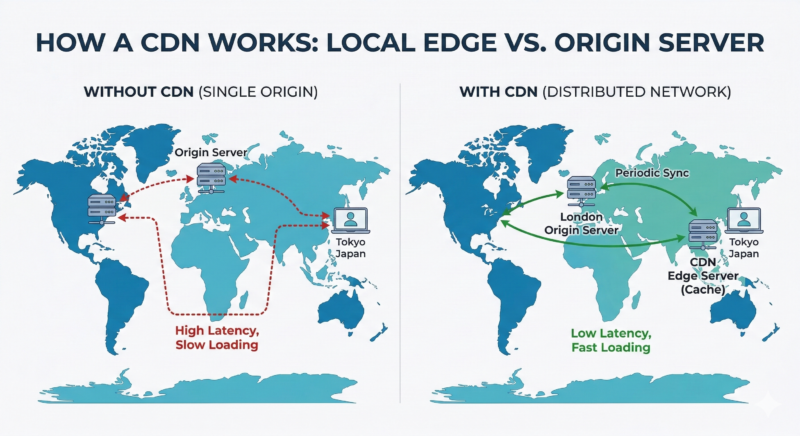
Figure 1: Technical diagram illustrating website data travel distance between a single origin server in London and a distributed CDN edge network in Tokyo for reduced latency.
The Benefits of This Architecture:
Reduced Latency: Data travels a shorter physical distance, slashing your Time to First Byte (TTFB).
Origin Shielding: It reduces pressure on your main server, preventing crashes during viral traffic spikes.
Global Reliability: If one edge server goes down, the CDN automatically reroutes the user to the next closest one, ensuring 100% uptime.
What Content Does a CDN Deliver?
Modern CDNs in 2026 are highly advanced. While they primarily handle Static Content (files that don’t change frequently), they are increasingly used to speed up the delivery of some dynamic elements through “Edge Computing.”
📦 Typically Delivered by CDN:
- Images & Media: (WebP, AVIF, PNG, MP4) – These are usually the “heaviest” files on your site.
- Code Files: (CSS and JavaScript) – Essential for your site’s layout and functionality.
- Static HTML: The structural bones of your pages.
- Web Fonts: Custom fonts that can often slow down “First Contentful Paint.”
🚫 Usually Not Delivered by CDN:
- Dynamic Data: Personalized user dashboards, bank balances, or shopping carts that change for every user.
- Real-time Data: Live stock tickers or instant messaging chats.
Why Your Website (and Your SEO) Needs a CDN
In 2026, Google doesn’t just look at whether your site is “fast”—it looks at Core Web Vitals. A CDN is the most effective way to improve these specific metrics:
- Interaction to Next Paint (INP): By loading JavaScript files from the edge, your site responds faster to user clicks.
- Largest Contentful Paint (LCP): Serving heavy images from a nearby server ensures your main content appears almost instantly.
- Crawl Budget Optimization: Because your site responds faster, Googlebot can crawl more of your pages in less time, helping your new content get indexed faster.
5 Reasons Your SEO Rankings Need a CDN in 2026:
In 2026, SEO has moved beyond simple “loading speed” into more technical areas like AI crawling and interaction responsiveness.
Here is what you should write under this heading to make it high-authority:
- Crushing the “Interaction to Next Paint” (INP) Metric:
In 2026, Google prioritizes INP, which measures how fast your site responds when a user clicks a button or menu. By serving heavy JavaScript files from an edge server right next to the user, a CDN ensures those scripts execute instantly, keeping your INP score in the “Good” (under 200ms) range. - Improving “Largest Contentful Paint” (LCP):
LCP tracks how long it takes for your biggest image or text block to appear. Without a CDN, a high-res hero image can take seconds to travel across the ocean. A CDN delivers that image in milliseconds, which is a direct ranking signal for Google’s “Page Experience” score. - AI Crawler Optimization:
Search is now driven by AI agents (like Google Gemini and GPTBot). These bots need to “scrape” your site efficiently to include you in AI Overviews. A fast-responding CDN ensures that these bots don’t time out, helping your content get indexed and cited by AI search engines faster than your competitors. - Global “Crawl Budget” Efficiency:
Google only spends a certain amount of time crawling your site. If your server is slow, Googlebot will leave before indexing all your pages. A CDN makes your site so fast that Google can crawl 3x more pages in the same amount of time, ensuring your latest blogs and products show up in search results immediately. - Security as a Ranking Factor (HTTPS & DDoS):
Google prefers secure, stable sites. Modern CDNs provide automatic SSL (HTTPS) and protect you from DDoS attacks that could take your site offline. If your site goes down, you lose your rankings; a CDN acts as a “shield” that keeps you visible 24/7.
Key SEO Benefits of Using a CDN (The 2026 Checklist)
Using a CDN is no longer a luxury—it’s a baseline requirement for modern SEO. While speed is the most obvious gain, the secondary benefits to your site’s health and crawlability are what truly move the needle on rankings.
- ⚡ Improved Page Load Speed
Page speed is a direct ranking factor. Faster load times lead to lower bounce rates and higher engagement. Google prioritizes websites that provide a near-instant experience. - 📉 Reduced Latency & TTFB
By caching your static files (images, CSS, JS) on a global network, a CDN ensures data takes the shortest path to the user. This drastically reduces Time to First Byte (TTFB), which is critical for making your site feel “alive” the moment a user clicks. - 📊 Enhanced Core Web Vitals
A CDN is the most effective way to turn your “Red” metrics into “Green”:
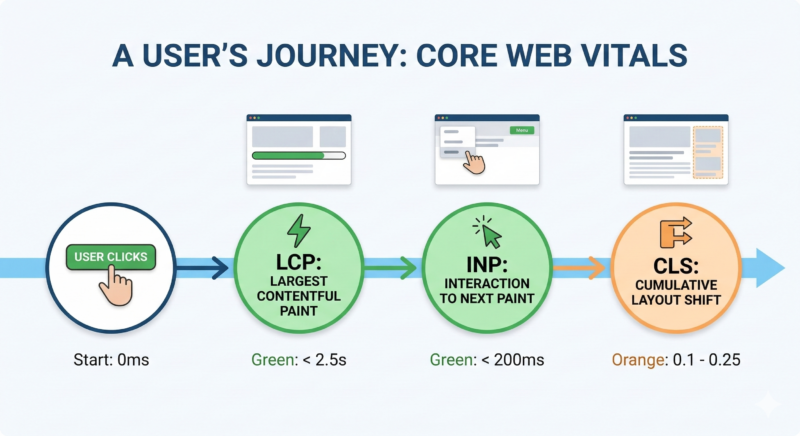
Figure 2: Linear timeline of a page load, showing the key moments Google measures to calculate your User Experience score.
-
- Largest Contentful Paint (LCP): Delivers large images and videos from a nearby server, slashing the time it takes for your main content to appear.
- Interaction to Next Paint (INP): By offloading and speeding up script delivery, your page becomes more responsive to user clicks and taps.
- Cumulative Layout Shift (CLS): Stable delivery of fonts and media prevents that annoying “jumping” effect as a page loads.
- 🛡️ Increased Uptime & DDoS Protection
Downtime is an SEO killer. If Googlebot tries to crawl your site and it’s down due to a traffic surge or a DDoS attack, you risk losing your rankings. A CDN absorbs these spikes and ensures your site stays online 24/7.
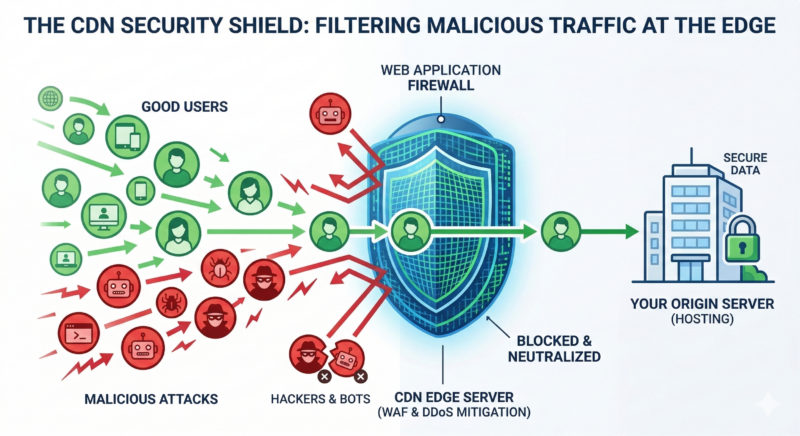
Figure 3: How a CDN filters malicious bot traffic at the edge to prevent server crashes and maintain search visibility.
- 🤖 Improved Crawl Efficiency
Since your origin server isn’t struggling to serve every single image, it responds faster to Googlebot’s requests. This increases your Crawl Budget, allowing Google to index more of your pages, more often.
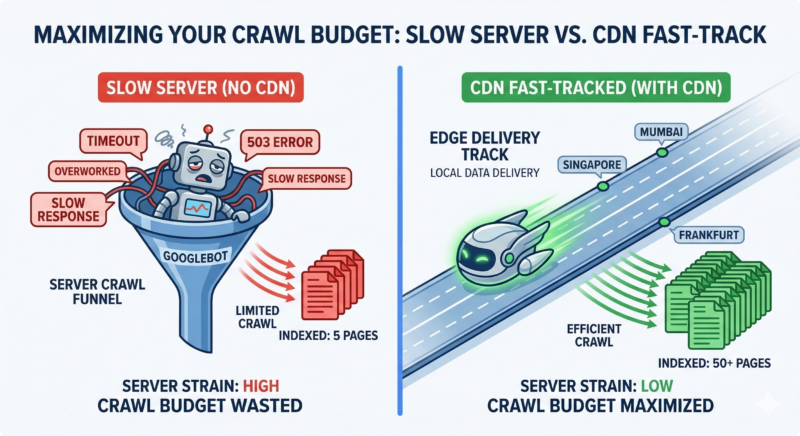
Figure 4: Infographic comparing Googlebot crawl efficiency on a slow origin server versus a fast-track CDN edge network with maximized crawl budget.
Quick SEO Impact Summary Table
| SEO Factor | How CDN Helps | Ranking Benefit |
|---|---|---|
| Page Speed | Serves files from the nearest edge server | Direct ranking boost |
| Core Web Vitals (LCP, CLS, FID) | Reduces latency & optimizes delivery | Higher scores in Google Search Console |
| Bounce Rate | Instant loads keep users on site | Indirect ranking improvement |
| Mobile Experience | Faster mobile delivery | Better mobile search rankings |
| Uptime | DDoS protection & failover | Avoids ranking drops |
| Crawl Budget | Faster server responses | More pages indexed |
Common CDN SEO Pitfalls (and How to Avoid Them)
While a CDN is a powerful tool for your rankings, a “set it and forget it” approach can lead to technical issues. In 2026, Google’s algorithms are smarter, but they still require you to follow these best practices to avoid ranking drops.
- The Duplicate Content Trap (Canonical Headers)
When you use a CDN, your content technically exists in two places: your origin server (yoursite.com) and the CDN’s cache. If not configured correctly, Google might see these as two different websites with the same content.
The Fix: Ensure your CDN is configured to serve Rel=”Canonical” headers. This tells Google, “Even though you’re seeing this on the CDN server, the original and ‘official’ version is at yoursite.com.
- Failing to Purge After Updates
There is nothing worse for SEO and UX than a user (or a search engine) seeing an old version of your page. If you update a product price or a news headline, but the CDN is still serving the “cached” version from yesterday, you lose credibility.
The Fix: Set up Automatic Cache Purging. Most modern CDNs (like Cloudflare or Akamai) have plugins for WordPress or APIs for custom sites that “clear the shelf” the moment you hit the ‘Update’ button.
- Blocking “Good Bots” with WAF Rules
CDNs often come with a Web Application Firewall (WAF) to block hackers. However, if the settings are too aggressive, you might accidentally block Googlebot or Bingbot. If they can’t crawl your site, your rankings will disappear overnight.
The Fix: Always “Whitelist” known search engine crawlers and AI bots in your CDN’s security settings.
- Image URL Fragmentation
Some CDNs change your image URLs to something like cdn-assets.provider.com/image-123.jpg. This can make it harder for you to “own” your image SEO in Google Images.
The Fix: Use a Custom CNAME (e.g., assets.yourdomain.com). This keeps your brand in the URL and ensures all “link equity” stays with your domain.
Which Websites Benefit the Most from a CDN?
While almost any site can see an improvement, certain industries find a CDN to be a non-negotiable part of their infrastructure in 2026.
- 🛒 E-commerce Stores
For online retailers, speed equals revenue. A CDN prevents cart abandonment by ensuring product images and checkout scripts load instantly, even during massive sales like Black Friday.
Key Impact: Higher conversion rates and 100% uptime during traffic spikes.
- 📰 News & Media Outlets
High-res images and viral videos can easily crush a standard server. A CDN offloads this “heavy lifting” to the edge, ensuring your site stays live even when a story goes viral.
Key Impact: Reduced bounce rates and maximized ad impressions.
- ⚙️ SaaS & Web Applications
SaaS users expect a “native app” feel. By serving your JavaScript and CSS files from the nearest server, you ensure the interface is snappy and responsive for users in London, Tokyo, or New York.
Key Impact: Improved user retention and lower “Time to Interactive.”
- 🌍 Global & Multilingual Sites
A local Edge server in Singapore or Mumbai bridges that gap. However, speed is only half the battle; you also need a localized International SEO strategy to truly dominate global markets.”
Key Impact: Consistent global UX and improved international SEO rankings.
- 📈 SEO-Focused Websites (Ranking in Top 20)
When you are fighting for the #1 spot, every millisecond counts. A CDN ensures you pass Core Web Vitals with flying colors, signaling to Google that your site provides a superior experience compared to slower competitors.
Key Impact: Protects rankings from “speed-based” drops and improves crawl budget.
- 💰 Websites Running Paid Ads (PPC)
Don’t waste your ad budget on a slow landing page. A CDN ensures that when a user clicks your ad, the page is ready before they can change their mind.
Key Impact: Higher Quality Scores and lower Cost-Per-Click (CPC).
When You DON’T Need a CDN
- If your website is small, local, and light.
- If most of your visitors come from the same city or country, a CDN won’t make a big difference because your hosting server is already close to them.
- If your site has very low traffic, only a few pages, and most of the content loads quickly.
- If your site doesn’t use heavy images, videos, scripts, or global audiences.
For example, if you are a local plumber in Chicago and 100% of your customers live within 20 miles of your server, a global CDN might actually add a tiny layer of unnecessary complexity.
If you’re in a hurry, here is the “cheat sheet” for mastering CDN SEO this year:
- Speed is Non-Negotiable: A CDN is the fastest way to hit Google’s “Good” thresholds for Core Web Vitals (LCP < 2.5s and INP < 200ms).
- Latency Kills Rankings: Use a CDN with a wide global network to ensure your Time to First Byte (TTFB) is low for users, regardless of their physical location.
- Crawl Budget Matters: By offloading static assets to the edge, you free up your origin server to respond faster to Googlebot, allowing for deeper and more frequent indexing.
- Safety is SEO: Modern CDNs protect against DDoS attacks and server crashes, ensuring your site stays online and maintains its search visibility during traffic spikes.
- Don’t forget the Technicals: Always use Canonical Headers and a Custom CNAME (like assets.yourdomain.com) to prevent duplicate content issues and keep your brand’s link equity.
| Provider | Best For | Key 2026 Feature |
| Cloudflare | Small to Mid-Sized Businesses | Auto-Minify & WAF: The best “all-in-one” for easy SEO. |
| Bunny.net | Budget-Conscious / High Speed | Price-to-Performance: Currently, the fastest for global image delivery. |
| Fastly | Developers & Tech Startups | Instant Purge: Best for sites with constant content updates. |
| Akamai | Large Enterprises | Global Scale: Unmatched reliability for massive traffic spikes. |
🏁 Conclusion: Is a CDN Mandatory for SEO in 2026?
The short answer is: Yes. In an era where AI search engines and users expect sub-second response times, the physical distance between your server and your audience is a hurdle you can’t ignore. By using a CDN, you aren’t just “fixing speed”—you are optimizing for Core Web Vitals, protecting your Crawl Budget, and ensuring your site is ready for the future of the web.
Ready to see how your site stacks up? Use our “free Core Web Vitals checker” to see if a CDN could boost your 2026 rankings today!
FAQ
Q1. What are the main components of a CDN?
A1. The main components of a CDN include edge servers, an origin server, Points of Presence (PoPs), caching mechanisms, and smart traffic routing.
Q2. Is a CDN just a cache?
A2. No. A CDN does more than caching by managing traffic distribution, improving security, and optimizing content delivery performance.
Q3. What is an open-source CDN & how does it work?
A3. An open-source CDN uses publicly available software to distribute content across servers, allowing greater control and customization.
Q4. Is a CDN only useful for large websites?
A4. No. A CDN benefits small and mid-sized websites by improving load speed, reliability, and server performance.
Q5. Is a CDN useful for mobile users?
A5. Yes. A CDN reduces latency and improves content delivery for mobile users on slow or unstable networks.
Q6. How does a CDN improve website security beyond speed?
A6. A CDN protects websites with DDoS mitigation, web application firewalls, bot filtering, and encrypted data delivery.
Q7. Can a CDN reduce hosting and bandwidth costs?
A7. Yes. By offloading traffic from the origin server, a CDN lowers bandwidth usage and hosting expenses.
Q8. Can a CDN work with CMS platforms like WordPress?
A8. Yes. Most CDNs integrate easily with WordPress and other CMS platforms through plugins or DNS configuration.
Q9. How do I know if my website actually needs a CDN?
A9. If your website has global visitors, heavy media content, traffic spikes, or slow load times, a CDN is recommended.
Q10. Does a CDN help with AI Search results?
A10. Yes. Fast-loading sites are easier for AI bots (like Google Gemini) to crawl and process, increasing your chances of being cited in AI-generated answers.