
Finding affordable flights used to mean opening ten tabs and comparing prices one by one. But Google Flights has made that headache a thing of the past.
It doesn’t just list fares; it gives you price insights, flexible calendar views, and now even ‘Flight Deals’, a new, AI-powered search tool that tells you when a fare might drop or when you should book before prices jump.
This guide walks you through how Google Flights works right now (with 2025 updates), shows you how to use its hidden features, and explains how travel businesses can turn it into a powerful tool for winning more bookings.
What is Google Flights?
Google Flights is a flight search engine or travel search tool, and also an excellent travel planning tool. It lets users find and compare flights from more than 300 airline and online travel agency partners. When you look for flight options on Google Flights, you get the most competitive prices for your destination and flight dates.
What’s new: Google now layers in machine learning to predict whether prices are likely to go up or down, by its AI-powered flight search tool – ‘Flight Deals’. It’s based on years of fare history and real-time trends, giving travelers more confidence about when to click “book.”
With Google Flights, you can –
- Explore and book one-way, round-trip, and multi-city tickets.
- Find the best fares with an interactive calendar and price graph.
- Your flight search can be filtered by cabin type, airline, and number of stops.
Most importantly, Google Flights is a flight search engine that lets you compare airfares across hundreds of airlines and OTAs in seconds. It’s not a booking site; once you find the right flight, you’re sent to the airline or travel agency to book directly.
You can also select to view only low-emissions options or organize flights by how many carry-on bags are allowed.
Some flights aren’t included in Google Flights.
To display its offers, Google Flights works with more than 300 partners, such as airlines, online travel agents, and aggregators. Not all airlines and available flights are included because a partnership is required with Google. Most of them provide Google with all the prices and flight options they would display on their websites or third-party websites.
This way, you get a comprehensive view of all the flights and prices related to your search without having to search prices on multiple websites. Some flights may not appear when:
- The flight is sold out or unavailable
- The carrier still needs to be added to Google Flights.
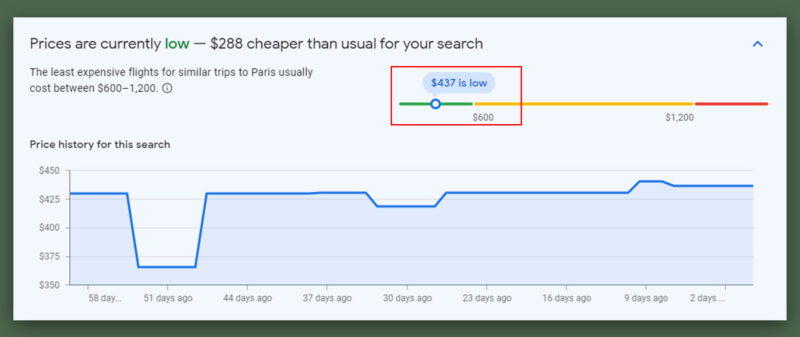
Craig Ewer from Google said the tool will let you know when you can expect the lowest airfares for booking your dates and destination.
For example, if you book a flight from NY to Paris this December, you can expect to pay $288 cheaper, with a typical range of $600–1,200.
How to Use Google Flights: The Basics (Step-by-Step)
Step 1: Access Google Flights
You can access Google Flights by visiting the website or by simply typing “Google Flights” into the Google search bar.
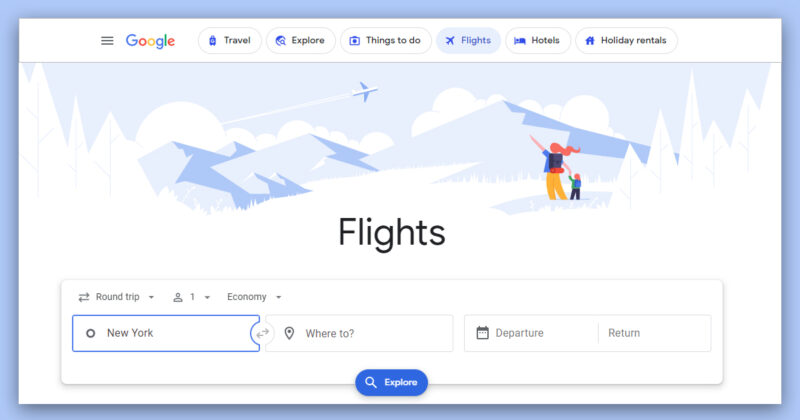
The toolbar also has a few other trip-related options, such as:
- Things to do
- Hotels
- Vacation rentals
- A shortcut to an exciting tool called “Explore.”
But for now, we’ll use the tool to book flights.
Step 2: Enter Your Travel Details
Once you’re on the homepage, type in the departure city, destination city, or airport, and select the date you plan to depart. If your trip is round-trip, select the return date.
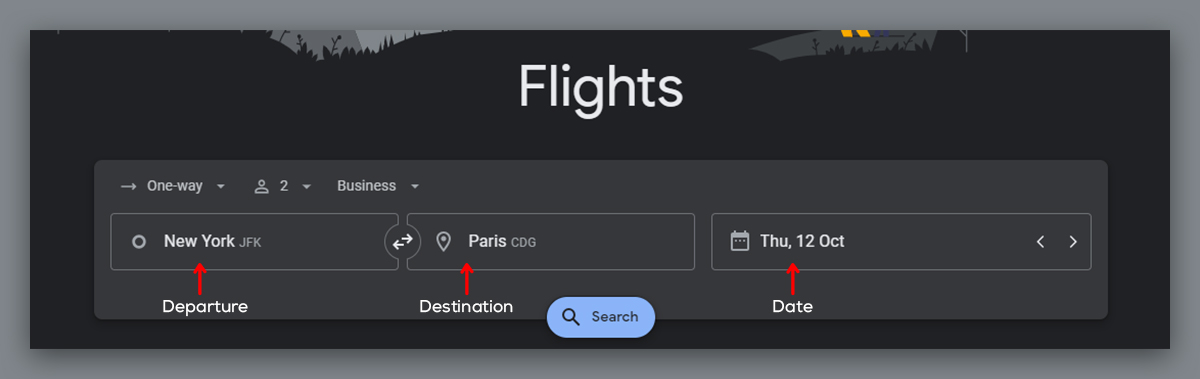
Leave this field blank for one-way trips and specify the number of adults, children, and infants traveling. Then click the “Search” button to find flights matching your criteria.
Suppose you’re looking for an affordable trip anywhere in America, for example. In that case, you might put as your destination ‘JFK, LAX, ORD, DFW, ATL, SFO, DEN’ to see where the cheapest flight is from Chicago to either New York (JFK), Los Angeles (LAX), Chicago (ORD), Dallas (DFW), Atlanta (ATL), San Francisco (SFO), or Denver (DEN).
Remember that some cities with multiple airports have city codes. These include NYC (New York City) or WAS (Washington, DC), which count for 3 each because NYC includes JFK, LGA, and EWR, while WAS includes DCA, IAD, and BWI.
Step 3: Explore Flight Options
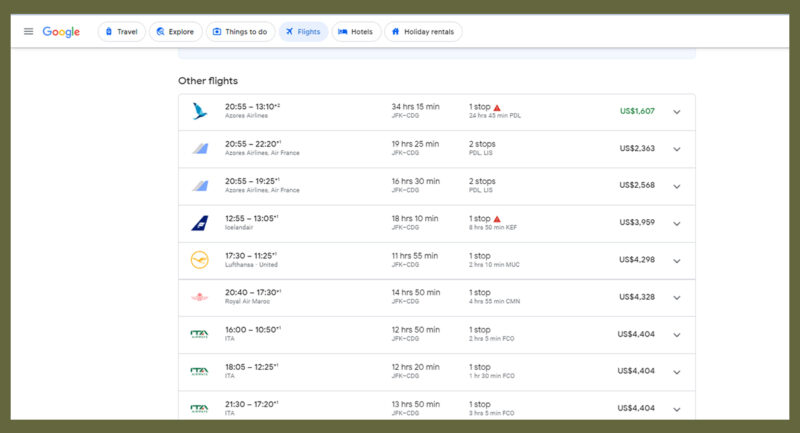
Google Flights displays a list of available flights based on your search parameters.
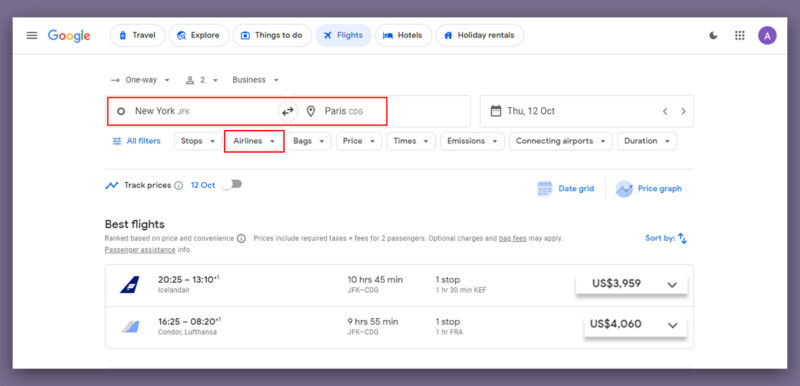
Once you’ve entered your travel details, Google Flights shows a list of available flights that match your preferences.
You can:
- Sort by price, duration, or airline.
- Use filters to remove long layovers or choose specific flight times.
- Switch to the calendar view to quickly spot the cheapest days to fly.
- Use the Explore Map to see fares to multiple destinations at once if your plans are flexible.
Next, let’s look at a brand-new tool Google added for travelers who want inspiration first: Flight Deals.
Step 4: Try Flight Deals (New 2025 Feature)
If you’re not set on a specific destination or date, Google now gives you a smarter way to search: Flight Deals.
Google’s new Flight Deals feature assists travelers who are flexible with their dates or destinations. Instead of entering fixed routes, you can input prompts like “7-day Europe trip next spring, nonstop flights only,” and Google will provide suggestions that align with your request.
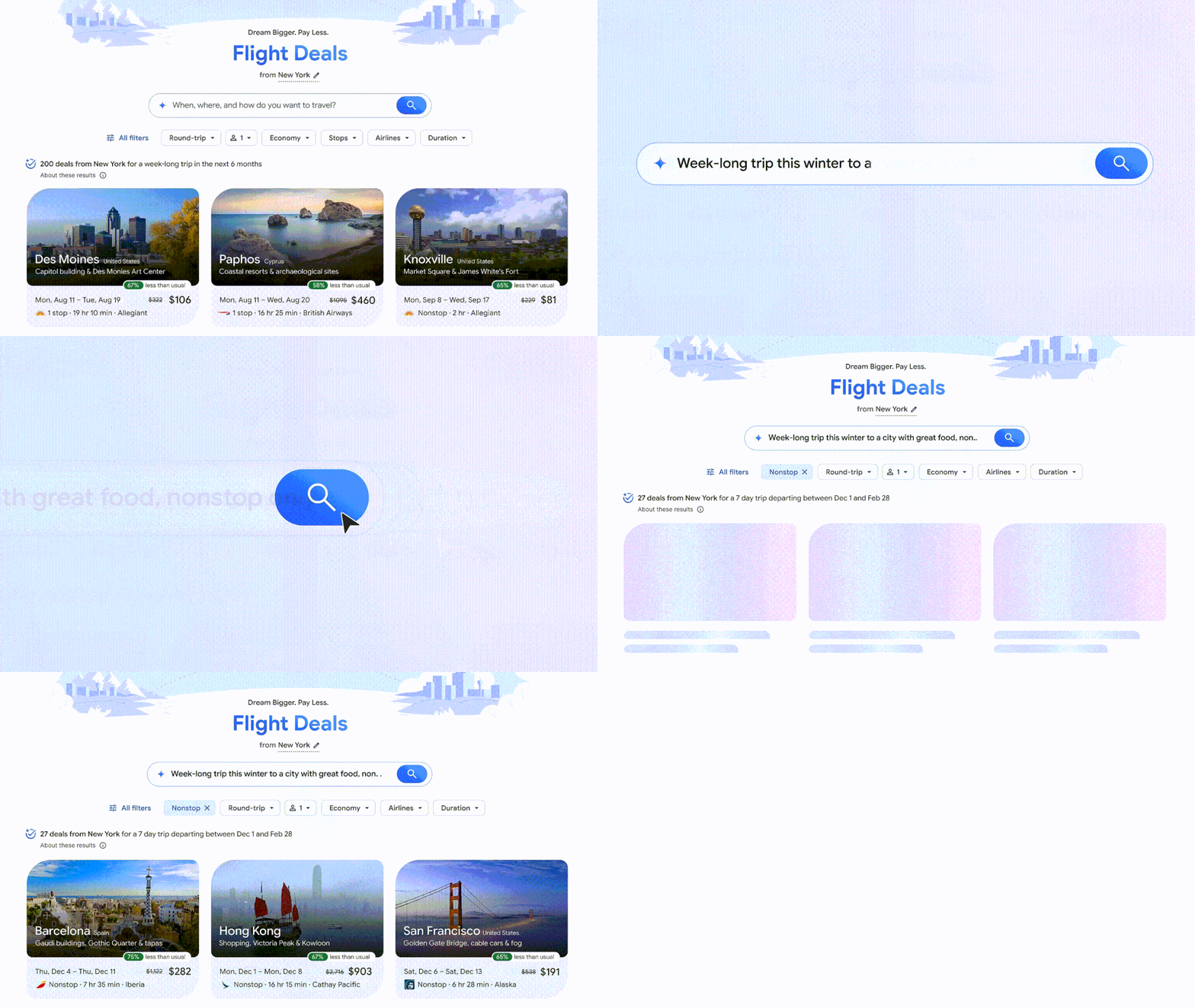
Source: blog.google
This feature is ideal for travelers who simply want to explore where their budget can take them.
For example, if you know you want a beach vacation but haven’t chosen a destination, Flight Deals may suggest Cancun, Miami, or Honolulu — all with real-time pricing.
For travel businesses, this presents more opportunities to connect with users in the inspiration stage. Ensure your offers remain competitive and visible across routes that are likely to be suggested.
Right now, Flight Deals is rolling out in the U.S., Canada, and India, and works alongside the regular Google Flights search.
Step 5: Select Your Flight and Book
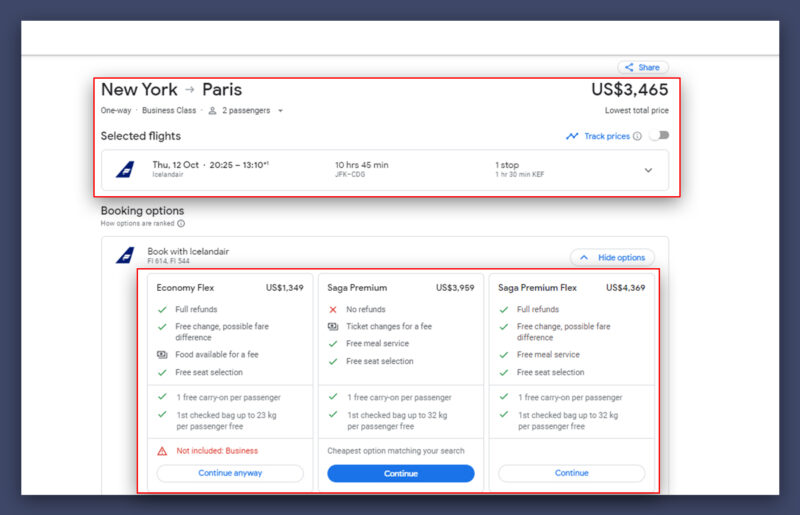
Click on the flight option for more details, including the full itinerary, baggage fees, and layovers. Once you’ve decided on a flight, click “Select” to proceed with booking.
Google Flights Explore Map: Find Cheapest Destinations Easily
The most exciting & rewarding feature for any travel & hotel stay is the ‘ Explore feature.’ It displays a map with many popular travel destinations worldwide and how much a trip would cost you.
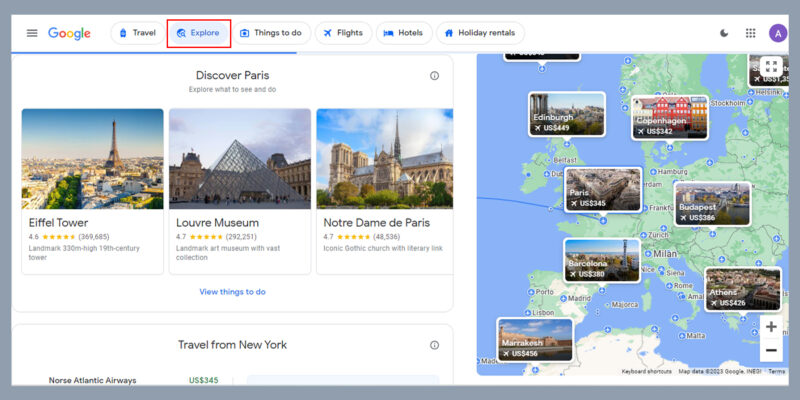
It’s a fun way for travelers to find and explore places within their budget with things-to-do options. The more you zoom into the map, the more specific the flight destinations get. It also has filters for customized explorations.
It also shows the best deals for hotel stays and flights.
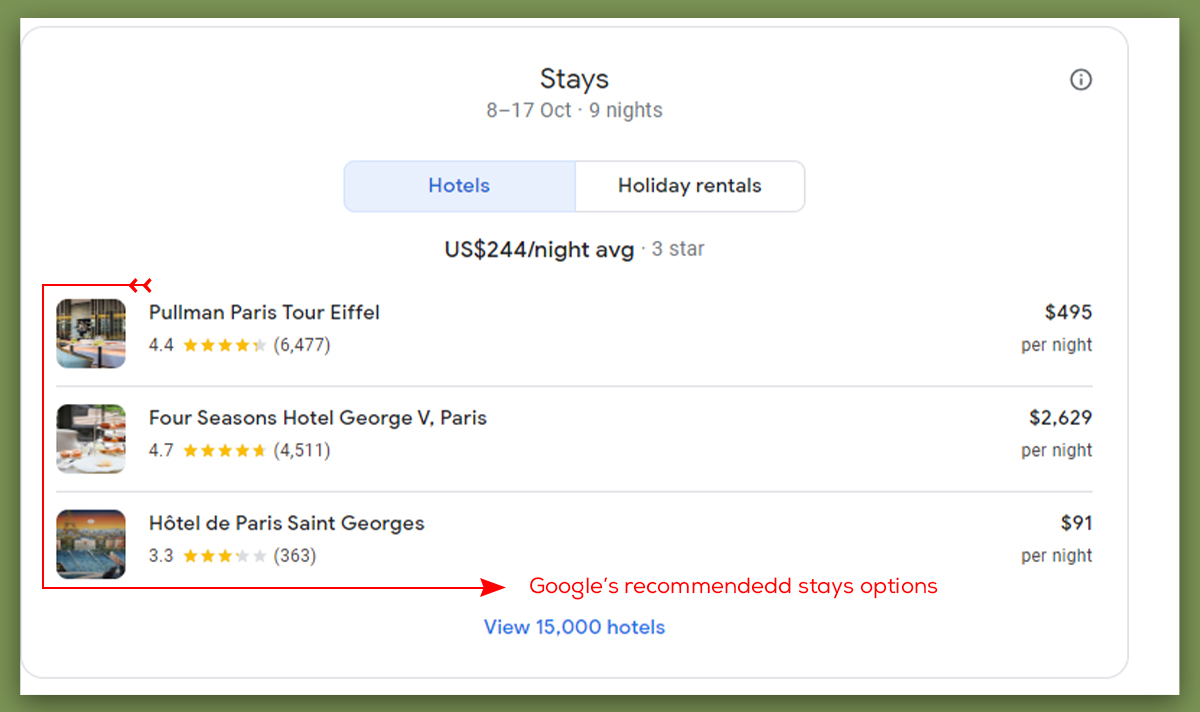
Note: Explore does not always show all flight offers; it presents suggestions prioritized by Google’s algorithm, which may factor in predicted trends.
Recent updates make Explore more personal; Google might show popular places and price trends that match when you want to travel.
This is especially useful for last-minute trips or finding the cheapest time to go.
Google Flights for Travel Businesses: Opportunity for OTAs & Agencies
Google Flights makes excellent bookings directly. When you select a flight, it will typically redirect you to the airline’s website or a third-party booking site to complete your reservation.
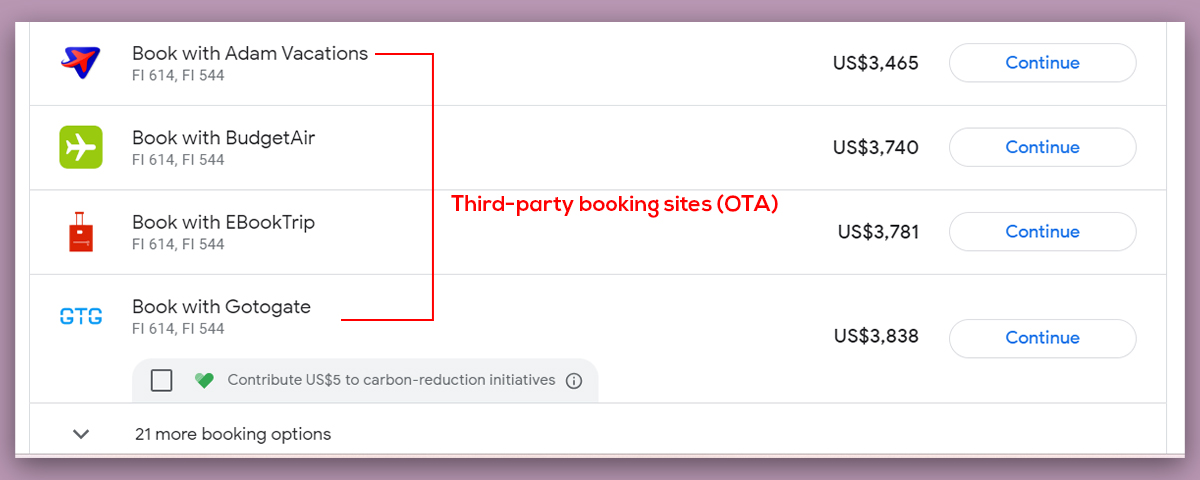
This means it’s an opportunity for online travel agents (OTAs) to get more bookings.
Google Flights is a great way for OTAs & hotels to capture leads.
Google Flights or the explore feature isn’t a sponsored listing. This means that all search results will be ranked based on their relevance to the end user.
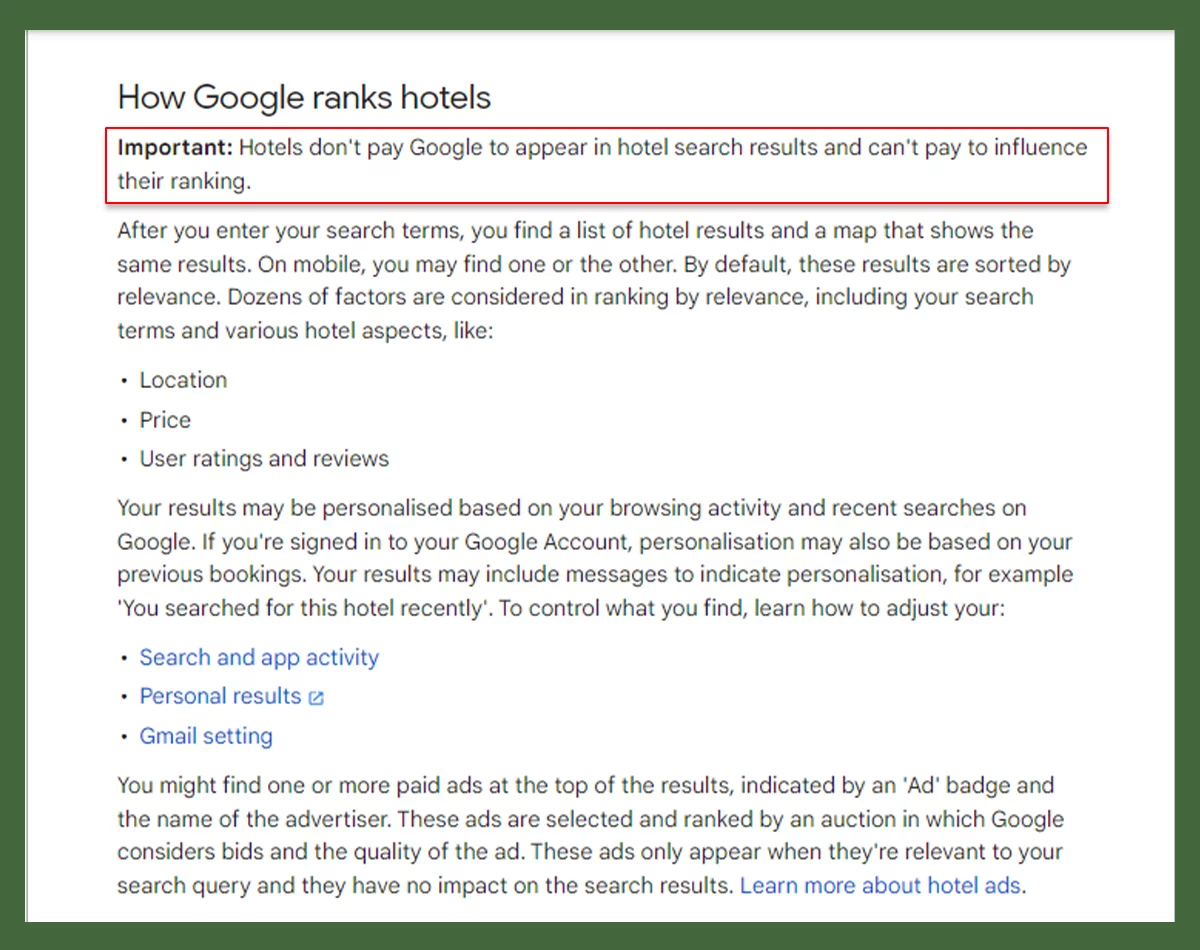
If you want to get ahead of Google Flights or the Hotel module, you can use the best travel SEO techniques to get your website to the top of the search engine results page (SERP).
If you want to attract more clients, use SEO best practices to ensure your content is up-to-date, your page is optimized for usability, and you’re strategic about your targeting.
As the size of the flight pack continues to grow, organic listings that appear below the pack tend to rank higher in search engine results pages (SERPs).
Here are some more ways Google Flights could help travel companies.
Google Flights Travel Features
Increased Visibility with Competitive Pricing
If you’re an OTA, Google Flights is a great way to get your flight offers. When people search for flights, they see what airlines and OTAs have to offer, which can help you attract more customers.
Must Read: 15 Ways to Optimize Your Google Business Profile (GMB) to Rank Locally
A traveler is looking for a summer vacation flight from New York City to Paris. He is searching on Google Flights for flights from New York City (JFK). You see many airline options and an OTA called “TravelBargains”.com.
The OTA’s fare is $100 less than the airline’s fare on the same route. So, you click on the TravelBargains offer, and that click-through means more traffic to the OTA and more bookings.
Multi-City Bookings
Google Flights allows you to plan a multi-city itinerary as well as a complex itinerary. As an OTA, you can help plan a more extensive trip by offering custom travel packages, including flights to several destinations.
For example, let’s say someone is looking to travel to Europe. As an OTA, you’ve created a package for your travelers, including flights between Europe’s major cities, accommodations, and even guided tours.
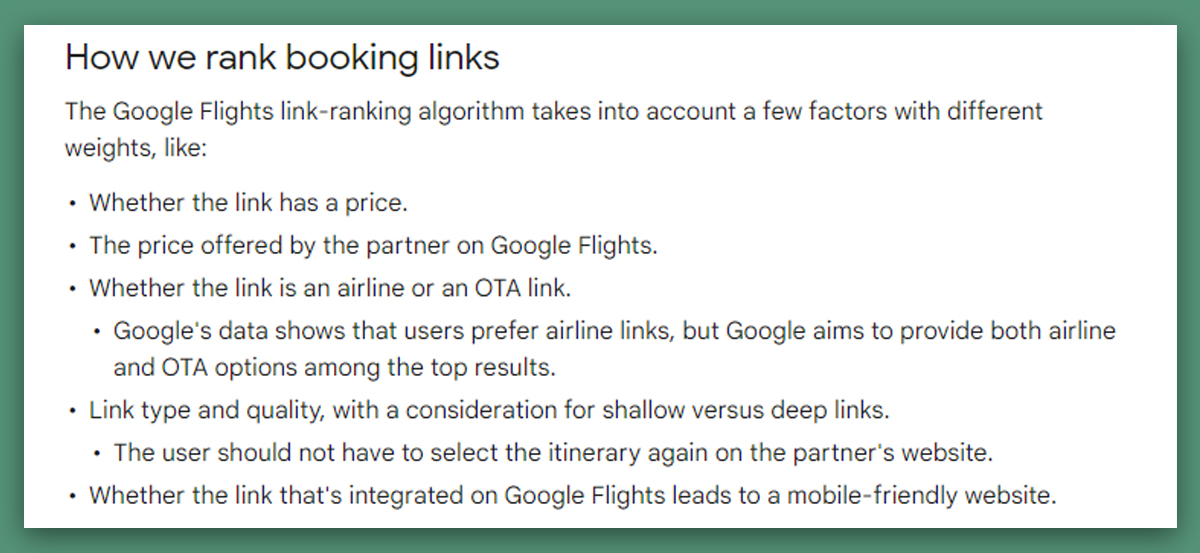
NOTE: Google Flights analyzes offers from more than 300 travel partners, such as airlines, online travel agents, and travel aggregators. The results may include only some available suggestions.
Travel partners do not pay Google to appear on the list of flights. Google’s relationships with these partners do not affect the list order.
Also Read: Google Maps Marketing – How To Use Google Maps For More Sales
Making the Most of Google Flights
Google Flights is more than just a tool to compare prices; it’s now a helpful assistant for travelers and a useful platform for travel companies. With features like the calendar view, explore map, and new AI-powered Flight Deals, it helps people find trips that fit their budget and schedule.
For travelers, this means less uncertainty and more trust when booking.
For travel businesses, it’s a way to reach eager customers who are ready to plan or book a trip. Whether you’re planning your next vacation or trying to grow your travel & hospitality business, using Google Flights wisely can save you time, reveal new opportunities, and help you reach your goals.
Frequently asked questions – Google Flights
How does Google Flights actually work?
Google Flights pulls prices from hundreds of airlines and travel agencies and puts them in one place. You can compare flights, see which days are cheapest to fly, and even get AI predictions telling you if fares might go up or down.
What’s the easiest way to open Google Flights?
Just type “Google Flights” into Google or go straight to google.com/flights. It opens right in your browser, no sign-in or app download needed.
Does Google Flights show every airline?
Not quite. Most major airlines are included, but a few, like Southwest in the U.S., don’t share their prices with Google. It’s always a good idea to double-check the airline’s website if you don’t see them listed.
What’s a multi-city search on Google Flights?
Multi-city lets you book a trip with more than one stop — like New York → London, then Paris → New York. It’s perfect if you want to visit more than one city on the same trip.
How do I set up price alerts on Google Flights?
After you search for flights, toggle “Track prices” on. You’ll get emails when the price changes, so you can wait for a better deal before booking.
Are Google Flights prices always accurate?
Usually, yes. But flight prices can change quickly. What you see on Google Flights is what’s available at that moment, and it might shift a little by the time you click through to book.
Does Google Flights raise prices if I search a lot?
Nope. Prices go up and down based on demand and airline rules — not because you searched multiple times. Clearing cookies or switching devices won’t make flights cheaper.
Can I book or cancel a flight through Google Flights?
Google Flights doesn’t sell tickets directly. Once you pick a flight, you’ll be redirected to the airline’s or OTA’s website to book. If you need to cancel or change it, you’ll have to contact them directly.
Can travel agents use Google Flights for clients?
Absolutely. Many travel agents use Google Flights to quickly compare routes and prices, then build custom itineraries for their clients. It’s especially helpful for finding multi-city options or seeing which airlines have the best connections.
Does Google Flights help travel businesses get more bookings?
Yes, if your flights or offers are listed, you can get clicks from travelers who are already ready to buy. Keeping your prices competitive and your listings accurate improves your chances of being selected.
Do OTAs have to pay to appear on Google Flights?
No, participation is free, but OTAs need to share accurate fare and availability data with Google. Some choose to run ads on Google Flights for extra visibility, but it’s optional.
Share This Article
About the Author: Twinkle

Related Articles
 July 13th, 2026 | 5 minutes read
Ever searched "best cannabis SEO agency" and ended up opening ten different tabs that all say the same thing? Yeah,
- July 9th, 2026 | 9 minutes read
SEO can often feel like a marathon without an end goal. You are constantly tweaking minor codes, creating endless keyword
- July 6th, 2026 | 13 minutes read
Let’s be honest, running a business in Columbus in 2026 is not the same as it used to be. Our
- June 29th, 2026 | 8 minutes read
A few years ago…I thought SEO was something only big companies with huge marketing budgets could afford. Every time I