What is People Also Ask aka PAA Box?
The People Also Ask or commonly known as PAA box is a Google SERP feature that shows related questions users commonly search for, along with quick answers. It shows questions people frequently ask about the topic you searched. Each time you click on a question, more related questions load. In short:
▶️ It helps users see related queries
▶️ Users get quick answers
▶️ Answers are pulled from different websites
▶️ Expands further once you click
For example: You search for “SEO basics”. PAA box might show:
▶️ What is SEO?
▶️ How does SEO work?
▶️ Why is SEO important?
▶️ How long does SEO take?
Click a question, it will show you a short answer from a website.
People Also Ask SEO Benefits
▶️ It can boost your visibility even if you’re not in top 10 results
▶️ Visibility means more traffic & more clicks.
▶️ Attracts targeted traffic & higher CTR.
▶️ Chances to outrank bigger competitors if you appear in PAA.
▶️ You get top page SERP exposure.
▶️ Helps you research long-tail keywords.
▶️ Such keywords may have low competition but high conversion.
▶️ Build good topical authority.
▶️ Signals strong E-E-A-T.
▶️ More “question-based” sections strengthens your internal linking structure.
▶️ Help you with voice search, Google Assistant often reads out PAA answers.
▶️ Helps in branding as users see your brand name in the PAA box.
How Google Generates PAA Box
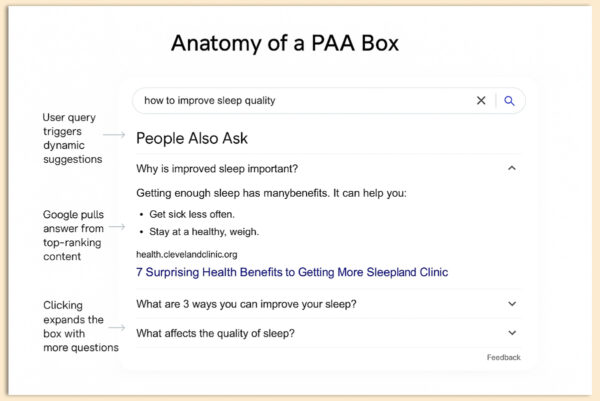
1. Google studies what people search
Google looks at millions of searches to see what questions people commonly ask after typing a keyword. If many users ask similar follow-up questions, Google adds them to the PAA box.
2. Detects user intent
Google tries to understand what the searcher is actually looking for – definitions, steps, comparisons, etc. Based on that intent, it picks the most helpful related questions.
3. Pulls answers from websites it trusts
Google scans millions of web pages to find short, clear explanations that answer these common questions. It then takes a small snippet from those pages and shows it inside the PAA box.
4. PAA expansion
When you click one question, Google predicts what else you might want to know next. It automatically loads more similar questions.
5. Give users quick answers
Goal is to save time so users don’t need to run multiple searches. You get instant answers directly on the results page.
How to Optimize Content for PAA Box?
1. Answer users’ Questions Directly:
You must give short, clear answers to possible common questions around search query. Write a 1–2 sentence answer first, then add extra details if needed.
Example:
Q: How to find People Also Ask questions?
A: Search your keyword on Google and look at the PAA box. You can also use tools like AlsoAsked or Semrush to find more related questions.
2. Provide a Concise Answer:
Google prefers answers that are 40-60 words long, highly relevant, and placed right below the question. Write a short paragraph (1-3 lines) directly answering the question. Follow it with more explanation, examples, or context.
3. Use Snippet-Friendly Formats:
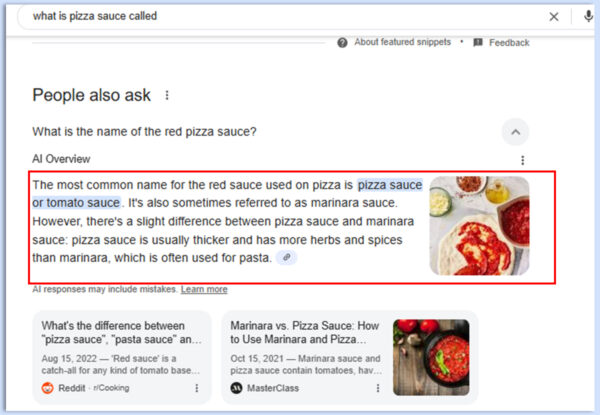
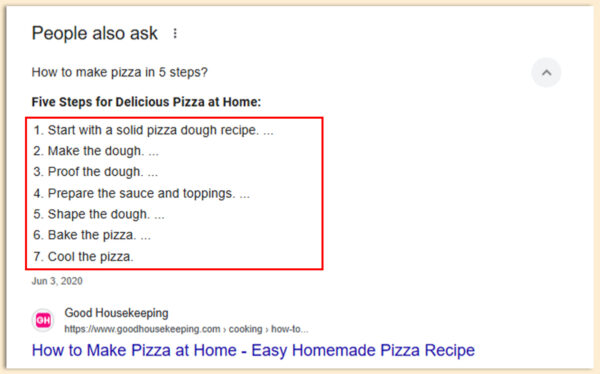
The PAA box often features structured responses with a single paragraph, bulleted or numbered lists, tables etc. These formats help Google extract your content as a snippet. They make the content easier to read.
4. Incorporate Schema Markup where Applicable:
Schema markup helps Google understand the context and structure of your content. You can use schemas like FAQPage, HowTo, Article schema and other for different types content.
5. Match the User’s Search Intent:
Give users quick, direct answers for their searches – a clear definition, a short step-by-step guide, or a simple explanation they can understand immediately. You can also include examples, small checklists, do’s and don’ts, short comparisons etc. Research & understand long-tail LSI queries.
6. Keep a Track of Your Content:
Google regularly updates SERPs, and what ranks today may not rank tomorrow. Regularly use Google Search Console to identify question-based queries, review your content with tools like Semrush or Ahrefs, refresh outdated sections and re-optimize headers based on new PAA trends.
7. Add FAQ Section Using PAA Data:
An FAQ section built from real PAA questions is a smart way to increase keyword coverage, earn multiple PAA placements from a simple page, and help users find direct answers within your article. You can write 2-3 line responses to make it useful.
How Can You Find “People Also Ask” Questions?
1. Use Google Search Box:
Just type your main keyword into Google and watch the PAA box populate with related queries. Clicking one question reveals more, helps you discover follow-up intent, great for building FAQ sections or subheadings.
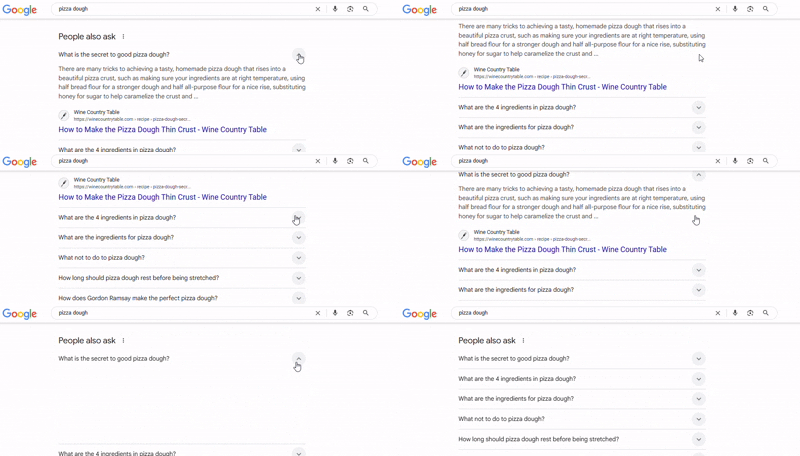
2. Use Google’s ‘People Also Ask’ Questions:
Each question in a PAA box is a doorway into a deeper subtopic. Use them to Structure your content hierarchy, write in a Google way – question + concise answer + elaboration, and increase chances of ranking for multiple long-tail keywords. Use targeted PAA queries as your H2 or H3 headers.
3. Use Tools Such As Ahrefs, Semrush, GSC:
These tools help you find the exact questions people ask on Google. Ahrefs and Semrush show you popular question keywords, while GSC reveals the questions your site already appears for. Using these tools makes it easier to discover real PAA opportunities and create content that matches what users are searching for. Some of the best tools in the market are:
▶️ Answer The Public
▶️ Ahrefs
▶️ Semrush
▶️ Also Asked
▶️ Keywordly.ai
▶️ Allintitle
▶️ Backlinko
▶️ Usetopic
▶️ SEO Pilot
4. Competitor PAA Analysis:
Find your competitors’ ranking pages for your target keyword and check the PAA questions that appear when you search those same keywords. List the questions your competitors already answer. Find the PAA questions they don’t answer or answer poorly – these are your content opportunities.
Common PAA Optimization Mistakes to Avoid
1. Targeting Every PAA Question
Do not chase every PAA box question. Some are too broad or dominated by authority sites. Pick long-tail, low-competition, high-intent questions.
2. Stuffing FAQs
Simply adding FAQs doesn’t guarantee visibility. Choose questions that align with your keyword & user intent.
3. Long Answers
Keep it 40–60 word short & direct answers for PAA.
4. Ignoring Schema Markup
Schema helps Google understand answers better. Add proper structured data.
5. Duplicate Content
Google will not allow repetitive content. Write unique & original answers.
6. Not Refreshing PAA
PAA boxes update frequently. Update answers every 3–6 months.
7. Forgetting Internal Linking
Internal link your PAA-optimized sections from strong contextual pages.
Finally
Ranking in Google’s PAA boxes is an SEO strategy you can’t ignore. Appearance in PAA box drive more qualified traffic, enhance topical authority, and you successfully position your content where it matters most.
FAQs
Q1. How long does it take to show up in a PAA box?
A1. There is no set time, content may appear within days, or it may take forever.
Q2. Should I optimize every blog for PAA?
A2. Not necessarily. Prioritize pages that target question-based queries.
Q3. Do videos or images help with PAA rankings?
A3. PAA mostly features text, sometimes images and even YouTube videos are shown.
Q4. Is it okay to answer multiple PAA questions on the same page?
A4. Yes, it helps Google see your page as a strong source on that topic.
Q5. Should I check PAA boxes on mobile separately?
A5. Yes, mobile PAA questions sometimes differ from desktop results.