Updated: March 06, 2026
In this blog, we will primarily learn:
- What is Reverse Video Search?
- Why do you need it?
- 6 Proven Methods to Trace Any Clip
What is Reverse Video Search?
Reverse video search is a method of finding information using a video instead of keywords. Instead of typing text, you upload a video clip, paste its URL, or use a frame from the video. The search engine then analyzes visual elements and metadata to find similar or related videos online. It helps users identify the original source, detect duplicates, verify authenticity, or discover where a video appears across the web.
Video continues to play a significant role in the marketing mix. In fact, video marketing is one of the fastest-growing marketing strategies today. It complements your marketing efforts, web content creation, social media marketing, and more. You need to use reverse video search to find, source, and attribute videos faster than ever before.
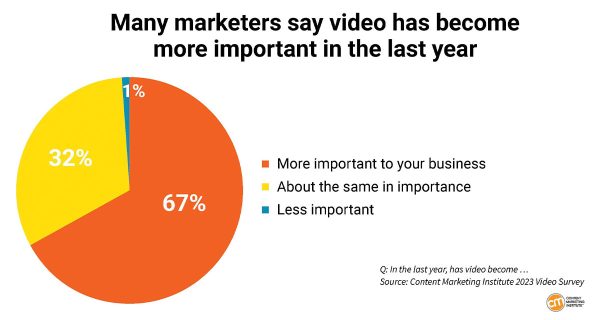
According to the Content Marketing Institute’s latest research, 67% of marketers say video has become more important to their business. Therefore, searching for videos is a standard part of the research when considering new video content ideas.
Combined with video search engines, a reverse search video method will help you find just about any video you need.
Why Reverse Video Search Matters?
Here are a few reasons why you might want to use reverse video search:
- To track down the source of a video that has been shared or reposted on social media or other websites.
- To find the full video from a single clip.
- To find similar videos or content that is related to a particular video.
- To verify the authenticity of a video or determine if it has been doctored or edited.
- To find illegitimate video content uses if you’re a video creator.
- To identify objects or people in a video that may be of interest or significance.
- To generate more online video marketing ideas for content marketing strategies.
Why “Keywords” are Dying and “Visuals” are King
For decades, the internet was a library of text. If you wanted to find something, you typed a string of keywords into a search bar and hoped for a match. But in 2026, the “Text-First” era is officially over. We now live in a Visual-First digital landscape where over 80% of all internet traffic is video.
The problem? Keywords are easily manipulated. A uploader can title a video “Authentic News Clip,” but the pixels might tell a completely different story. This is why Reverse Video Search has evolved from a niche trick for photographers into a critical survival skill for anyone navigating the web.
The Shift to AI-Driven Pixel Matching
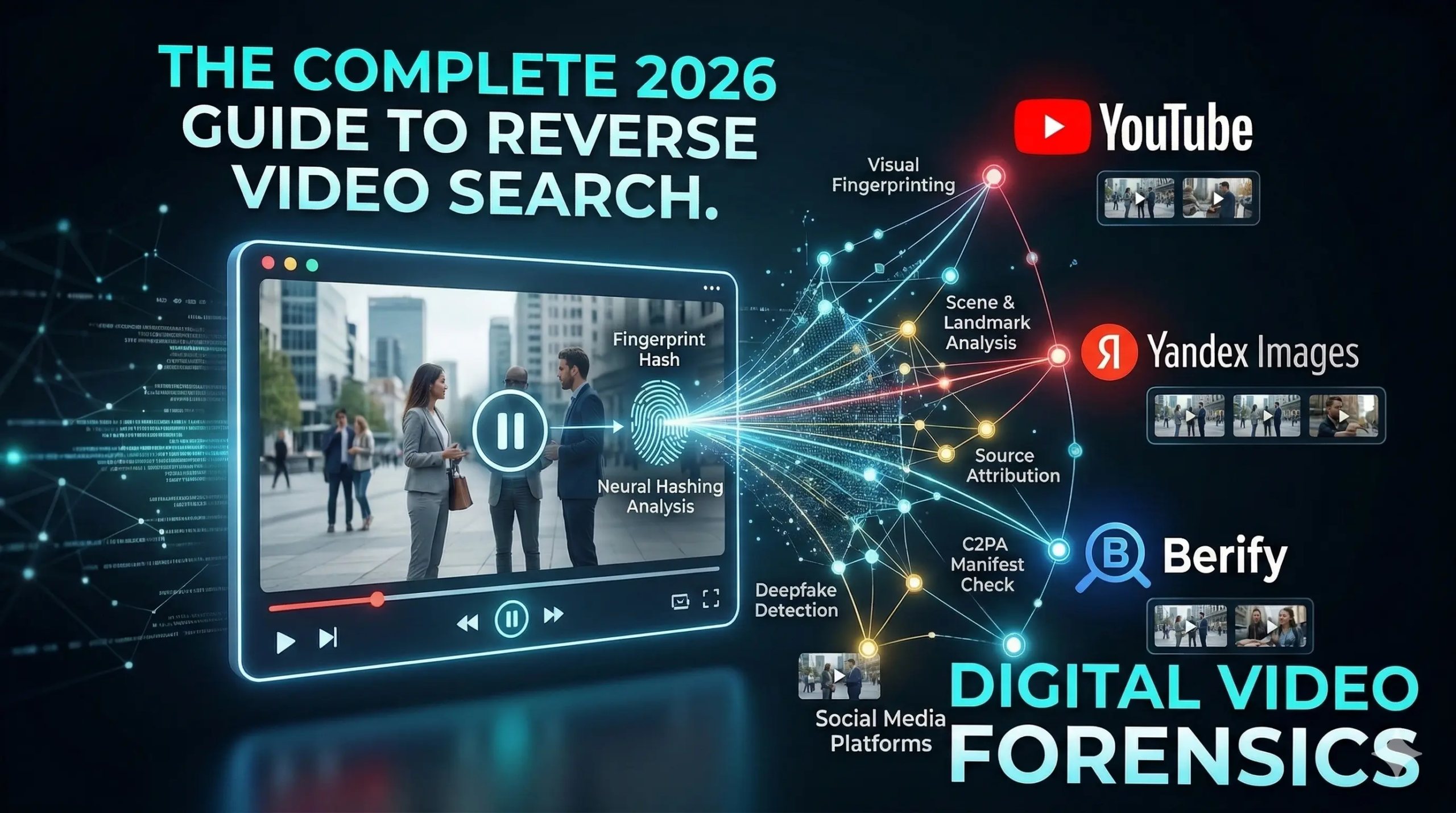
In the past, search engines looked for filenames or “tags” to identify a video. Today, search engines like Google and Yandex use Neural Hash Mapping. Instead of reading a title, AI “watches” the video, breaking it down into millions of data points called “Visual Fingerprints.”
- Scene Recognition: AI identifies the specific geographic location, even without GPS tags.
- Object Identification: It recognizes the specific model of a car or the brand of a watch in a single frame.
- Temporal Analysis: It tracks how pixels move over time, allowing it to find a 5-second clip even if it has been cropped or filtered from a 20-minute original.
Verification, Attribution, and Sourcing
In an era where AI-generated “Synthetic Media” is indistinguishable from reality, reverse searching serves three vital pillars:
- Verification: Is this viral clip from a real protest yesterday, or is it recycled footage from a movie set five years ago?
- Attribution: Who is the actual creator? Reverse searching allows you to bypass “freebooters” (people who steal and repost content) to find the original artist.
- Sourcing: See a product or a location you love? Visual search bridges the gap between a “cool video” and a direct purchase or travel booking.
How Reverse Video Search Works?
Reverse video search is an advanced technology that relies on the power of artificial intelligence (AI) & machine learning. This method utilizes object recognition algorithms to compare the content of a user’s input to existing sources, resulting in more precise searches than previously possible. Search engines, like Google and Bing, can interpret the color & pixels in a video and then find similar or the same videos on the web. This will often show the original source of the video.
However, sometimes, if a single pixel in the video changes, it might not appear accurately in the search engine results. Search engines must efficiently index all videos uploaded daily to surface them in the search results. Keep reading to learn different methods for reverse searching a video.
🛠 Method 1: The “Native” Way (Desktop & Mobile)
- Google Lens & Chrome Integration: Right-click a video frame and search instantly without leaving the tab.
- Apple Visual Look Up: Use the “Lift Subject” or “Search” feature directly from a paused video in Safari/Photos.
- For iOS Users: Pause any video in your Photos app or Safari. If you see a sparkling “i” icon or a “Visual Look Up” prompt, tap it. Apple’s on-device AI can identify plants, landmarks, and even specific pets directly from the frame without an external app.
🕵️ Method 2: The “Deep-Dive” Tools (Professional Attribution)
For when Google fails, or you need to find the original creator.
- TinEye: Explain its “Match Engine”—it doesn’t just look for similar images; it finds the exact original.
- Yandex Images: Highlight its superior facial and location recognition (often better than Google for specific scenes).
- Berify: The “set it and forget it” tool for copyright monitoring.
⚡ Method 3: The “Quick-Frame” Workflow
Since you can’t upload a whole .mp4 file to most engines, this is the most efficient manual process:
- Select a “Keyframe”: Avoid transitions/blur.
- The “Snapshot” Shortcut: (Shift + Win + S or Cmd + Shift + 4).
- The “Paste” Method: Most engines now allow Ctrl+V directly into the search bar—no more saving files to the desktop!
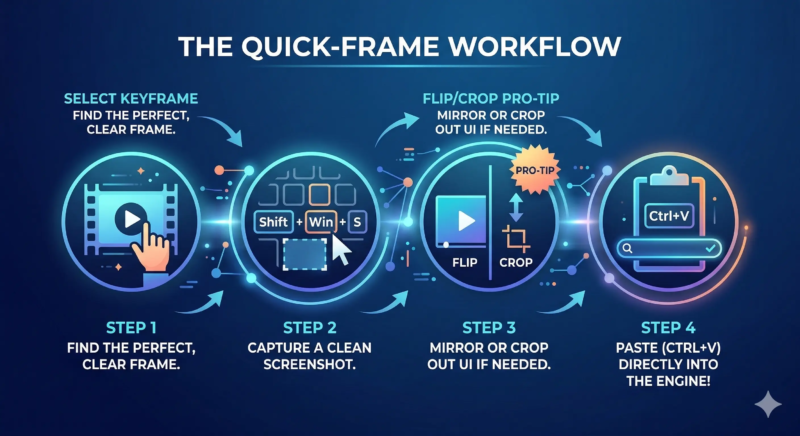
Pro Tip: In 2026, you can’t just upload a .mp4. Follow this 4-step process to manually prep your screenshot. This optimization ensures that AI engines analyze the core content, ignoring artifacts, blur, and interface overlays.
🤖 Method 4: AI & Deepfake Verification (The 2026 Edge)
- InVID / WeVerify: Tools used by journalists to debunk viral “fake” videos.
- Metadata Analysis: Why checking the “hidden” data in a video file is just as important as the pixels.
6 Proven Methods to Reverse Search or Trace Any Clip
The 2026 Toolkit: From Instant Search to Forensic Analysis
Before you dive into the tools, remember the Golden Rule of 2026 Search: The quality of your screenshot determines the quality of your result. Pause your video on a frame with high contrast, clear faces, or unique landmarks.
1. Google Lens & Chrome Integration (The “Instant” Method)
In 2026, you don’t even need to leave your tab.
- The Desktop Shortcut: Right-click any video playing in Chrome and select “Search Image with Google Lens.”
- The Result: Google’s AI analyzes objects, faces, and text overlays simultaneously, often finding the original YouTube or TikTok link in seconds.
- Best For: Fast, everyday identification.
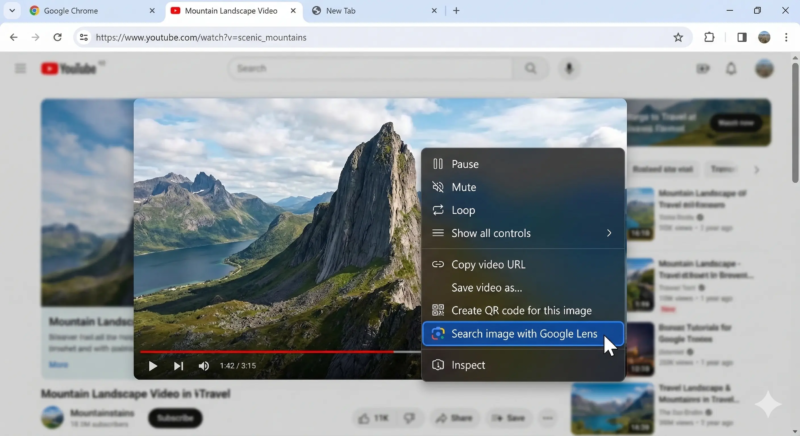
Pause the video on a distinctive frame and access Google Lens instantly with a right-click.
2. Yandex: The King of Visual Forensics
Yandex remains the “gold standard” for finding the actual source of a viral clip rather than just reposts.
- The Edge: Its facial recognition and landmark detection are often superior to Google’s, especially for content originating outside of North America.
- How to Use: Upload your screenshot to yandex.com/images. It is particularly good at matching different angles of the same scene.
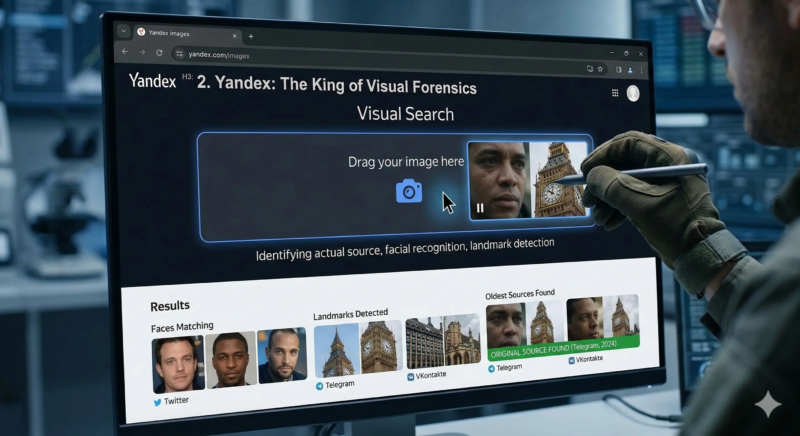
Pro Tip: Use Yandex when Google fails to find a person or a specific location. Its forensic AI is often better at tracing viral clips back to their original upload on platforms like Telegram or VK.
3. TinEye: Finding the “First” Upload
TinEye doesn’t just look for similar images; it looks for the exact visual match.
- The Feature: Use the “Sort by Oldest” filter. This is the fastest way to find the very first time a video frame appeared on the internet, effectively bypassing years of social media “freebooting.”
- Best For: Tracking down the original photographer or creator.
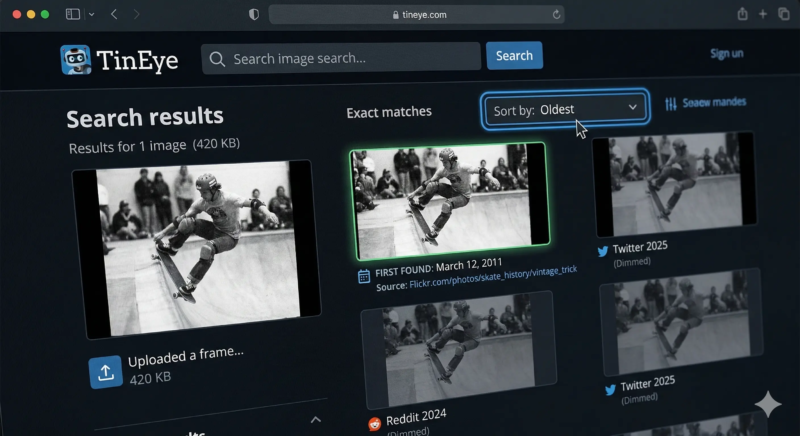
Pro Tip: Use TinEye when your priority is finding the first-ever appearance of a video clip. Its unique ‘Match Engine’ doesn’t just look for similar images; it finds the exact original. Use the ‘Sort by Oldest’ filter to bypass years of viral reposts and jump straight to the authentic creator or photographer.
4. Bing Visual Search: Best for Products
Bing’s visual engine excels at identifying specific products, apparel, and furniture within a video.
- The Edge: If you’re a marketer trying to find the source of a product video, Bing’s “Related Content” will often link directly to the original shopping or brand page.
- Best For: Sourcing products or identifying specific objects in a frame.
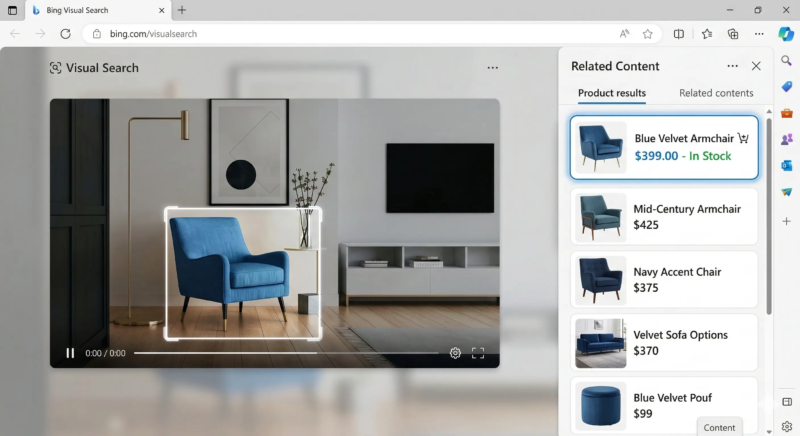
Pro Tip: Use Bing Visual Search when your primary goal is to identify a specific product, piece of furniture, or piece of apparel within a video frame. Bing’s advanced object recognition doesn’t just find similar images; its ‘Related Content’ feature often links you directly to the original brand’s shopping page, making it essential for sourcing or monetization.
5. Berify: The Professional Aggregator
Berify is a specialized tool that runs your screenshot through Google, Bing, Yandex, and its own proprietary database all at once.
- Automated Monitoring: For creators, Berify allows you to “set and forget” a search. It will notify you if your video frames appear on a new site later, making it essential for copyright enforcement.
- Best For: Professional photographers and brands protecting their IP.
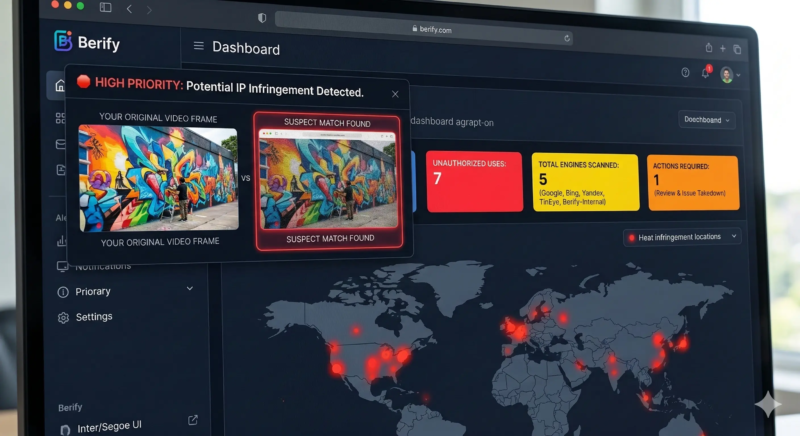
Pro Tip: Use Berify when you are a professional creator, journalist, or brand that needs to actively monitor and protect your video content. As an aggregator, it automatically runs your screenshot through five major engines at once and alerts you to unauthorized uses, making it essential for enforcing your digital rights and copyright.
6. AI Verification: SynthID & C2PA (The “DNA” Check)
As AI-generated media dominates 2026, traditional pixel-matching sometimes isn’t enough.
- SynthID (Google): Upload a clip to the Gemini App and ask: “Was this generated by AI?” It will scan for invisible watermarks woven into the pixels.
- C2PA (Content Credentials): Look for the “CR” icon on video players. This provides a “manifest” showing the video’s entire edit history from camera to screen.
- Best For: Verifying deepfakes or confirming if a video is “Real” or “Synthetic.”
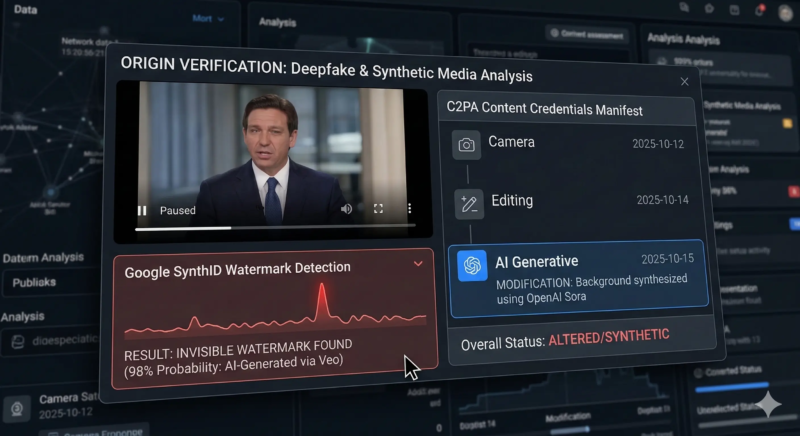
Pro Tip: In the era of deepfakes, true verification requires checking a video’s provenance data. Use tools that can detect Google’s SynthID (invisible pixel watermarks) and read the C2PA Content Credentials (tamper-proof metadata manifests). These hidden signals are nearly impossible to alter, providing definitive proof of whether a video is real, synthetic, or edited.
💡 3 Pro-Tips for Better Results:
- Flip the Frame: If a search fails, mirror your screenshot horizontally. Some “freebooters” flip videos to evade automated copyright bots.
- Crop Out the UI: If you take a screenshot of a TikTok, crop out the username overlay and the play buttons. This forces the AI to focus on the content, not the interface.
- Search the Audio: If the visuals are too edited, use a sound-matching tool. Often, the soundtrack will lead you to the original upload faster than the pixels will.
Quick Comparison Table
| Tool | Best For… | Notable 2026 Feature |
| Google Lens | Instant ID | Native Chrome & Android OS integration |
| Yandex | Faces & Places | Superior Non-Western & Facial Forensics |
| TinEye | Finding Originals | “Sort by Oldest” Exact Match Engine |
| Bing | Shopping/Objects | Direct E-commerce & MSRP Matching |
| Berify | IP Protection | Multi-Engine Automated Monitoring |
| Gemini/InVID | AI Verification | Detects SynthID & C2PA Credentials |
The Bottom Line: Visual Literacy is the New Standard
In 2026, you can no longer trust what you see at first glance. Whether you are a marketer protecting your brand or a user verifying the news, these 6 methods are your digital armor. As AI continues to evolve, so must our ability to trace, verify, and attribute the content we consume.
Want to stay ahead of the latest video marketing trends? Reach out to our SEO experts.
FAQs
Q1: How can I tell if a video is a Deepfake if no reverse search matches appear?
A1: If traditional pixel-matching fails, look for Provenance Data. In 2026, most ethical AI models embed SynthID (invisible watermarks) or C2PA (metadata manifests). Use a verification tool like ContentCredentials.org or the Gemini App to check if the video contains these “hidden” markers that prove it was generated by an AI model like Veo or Sora.
Q2: Does reverse video search work on mobile devices?
A2: Yes. You can upload a screenshot or video frame directly from your phone using visual search tools like Google Lens or similar AI-powered image search platforms.
Q3: Does YouTube have a reverse video search feature?
A3: No. YouTube does not offer a built-in reverse video search. You need to capture a frame and use an external visual search tool.
Q4: Is reverse video search useful for detecting AI-generated or deepfake videos?
A4: Yes. It can help trace earlier versions of a video, detect reused footage, and identify inconsistencies. However, advanced deepfakes may require specialized AI detection tools.
Q5: Can reverse video search help verify fake news?
A5: Yes. It allows you to find the original upload date, source website, or previous versions of a viral clip, making it a powerful fact-checking method.
Q6: Can I reverse search a video using only its URL?
A6: Sometimes. Some tools allow URL-based searches, but extracting and uploading a clear frame usually delivers better results.
Q7: Why are there no results for my video?
A7: The video may be new, private, region-restricted, AI-generated without prior uploads, or not yet indexed by search engines.
Q8: How does AI improve reverse video search in 2026?
A8: AI now analyzes objects, faces, scenes, text overlays, and contextual signals within video frames. This improves accuracy and helps detect edited, cropped, or slightly modified versions.
Q9: Can reverse video search track copyright misuse?
A9: Yes. Content creators and brands use it to monitor unauthorized uploads, repurposed clips, and intellectual property violations across platforms.